Zennaxx

Author: admin

  • UI/UX design in Mobile App Development: Role and Importance

    The days when the desktop computer was the most popular mode of communication are long gone; today, the same desktop devices have become a secondary mode of communication.

    We used to do most of our searches on our PCs and communicate with one another using various devices.Nowadays we are always active on our smartphones, whether at home, at work, or when travelling, and it has become an unmissable part of our lives.

    If it is the case, it will be wise for many organisations looking to build a name for themselves in their respective fields. You should begin developing mobile applications and websites, which will assist you in developing a strong market presence.

    We can easily see that the market is swamped with mobile applications relating to plenty of businesses, including education, hotels, restaurants, healthcare, travel, and retail. Every day, hundreds of mobile apps are submitted to the app store.

    The worldwide mobile application market size was assessed at USD 154.05 billion in 2019 and is predicted to grow by USD 653.91 billion during 2022-2025, with a CAGR of 21%.

    This demonstrates that developing an unrivalled mobile app has become a difficult task that can only be attained if mobile app developer are willing to go outside the box for each and every project they tackle.

    You should be aware that an app’s style and appearance should be appealing so that it can make a faster and lasting impression on clients’ brains while they are downloading an app from the app store. The success of every mobile application is determined by the UI/UX design services.

    Globally, there are more than 6.3 billion mobile phone users, according to Statista. According to some reports, the Google Play Store has 2.89 million apps available for download.
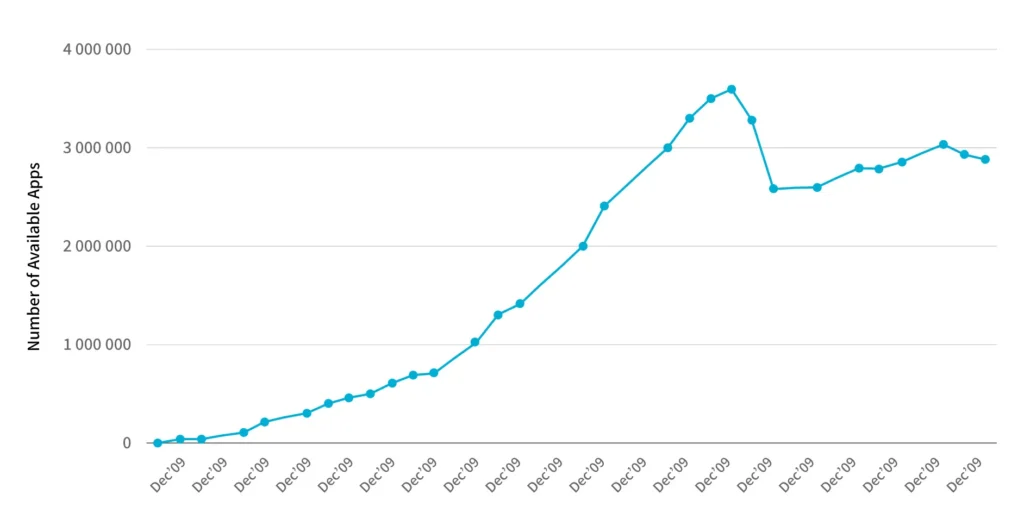
    Number of available Apps

    Defining UI design in mobile apps

    The abbreviation UI stands for User Interface. It is how users interact with mobile applications. User interface design for mobile apps is to make interactions between users and the programme as simple, enjoyable, and successful as possible.
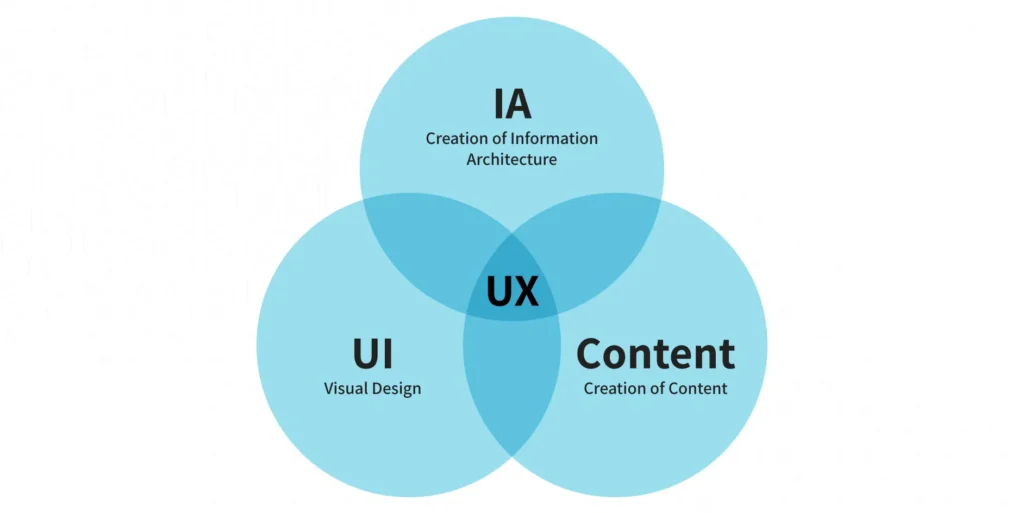
    UI in mobile app development A UI in mobile app development refers to any device that allows people to interact with displays, screens, or overlay buttons. The main purpose of mobile app user interface concepts is to deliver the best possible interaction.

    Defining UX design in mobile apps

    The term ‘UX’ refers to the user’s experience. User experience design aims to create a system that provides the best possible experience for users. 

    According to UX principles, customers become loyal customers when they have a positive experience with mobile apps. The user experience (UX) is in charge of a user’s journey via a mobile app or website, which defines the company’s success. UX Design in Mobile Apps

    App for mobile devices UI and UX design are always combined since they are mutually beneficial. To be successful, an app must be the greatest.

    Difference between UI and UX

    Let’s start with an understanding of what UI and UX mean. The result of a mobile application’s User Interface (UI) and User Experience (UX) is understood as Creative Design. Both of these concepts are sometimes used interchangeably, but it’s a mistake to think of UI and UX in the same way when it comes to design.

    The user interface (UI) determines the application’s appearance and interacts with the user’s requirements to determine their level of satisfaction.

    Difference between UI and UX

    In the UI/UX design services, the UX part works as a systematized approach for increasing consumer happiness by improving the app’s usability. In other terms, UX specifies how an app appears to a user. As a result, both UI/UX are critical for a mobile application to function properly and achieve its goals.

    Deliverables of the UI/UX app design development.

    Any UI/UX designer’s work is divided into several stages. Various deliverables are provided for clients during the UI and UX design process of android and iOS app development.

    These deliverables are developed for multiple purposes, including improved client communication, documentation, and effective presentation of ideas.

    Both UI and UX have their deliverables; let’s look at them to better grasp the significance of mobile app UI/UX design in the development process.

    What are the key UI/UX services?

    1. Mood boards

    Mood boards are used to showcase new ideas in an easy-to-understand format.

    Mood boards

    It aids clients in comprehending the app concept on which the designer would be working. You can save your own or anyone else’s schedule by making a mood board instead of giving long talks with a presentation.

    2. Dynamic prototyping

    Dynamic prototypes are another one of the UI deliverables—prototypes aid in refining the app’s overall functionality and making adjustments as needed.

    UI deliverables—prototype

    A mobile app development company can develop UI according to the clients’ wishes using dynamic prototypes.

    3. Visual designs

    Visual designs will aid in comprehending the effects of design aspects. With visual designs, the effects of elements such as photography, typography, space, colours, layouts, images, and so on may be better understood.

    4. UX deliverables

    User personalities

    Designers must ensure that their clients know what their customers require and anticipate from their products. Creating a buyer persona aids in understanding and explaining customer behaviour to clients. User research is used in the UX process to determine the behavioural pattern.

    Competitive analysis report

    The competitive analysis report is designed to assess your app’s level of competition. All of your efforts will be for nought if your app is in a highly competitive market or if you are not prepared to outperform your competition. A competitive analysis report can reveal the strengths and weaknesses of a competitor’s app.

    Journey of the user, maps, and user flows

    Users’ entire behaviour toward a product is depicted in experience maps. The experience maps show the expectations, time spent, feelings, ideas, and wants, among other things. 

    User journeys, also known as user flows, are the actions performed by a user to interact with a product at various phases. These could be actual or future interactions with a product.

    Interactive prototypes

    Another one of UX’s deliverables is interactive prototyping. In the initial prototyping phase, you will be able to save a lot of time and effort, and it does the job well enough.

    Interactive prototypes

    Prototypes aid in displaying how the final product will function with what clicks and taps leading to the next action. It also aids the designer in effectively communicating their ideas.

    Let’s move on to the relevance of UI/UX design in providing a custom product now that we’ve looked at what UI and UX stand for and what part mobile app UI/UX design plays in the development process.

    Significance of mobile app UI/UX design services

    It becomes critical to understand the importance of UI/UX design in app development. Most developers construct a high-performing app but neglect to focus on the design, which leads to the app’s demise. It isn’t easy to balance an app’s usefulness and relevance in UI/UX design, but it’s necessary.

    One of the most prominent characteristics that might define the success of a mobile application is its ease of use. In terms of appearance, feel, and navigation, providing an unrivalled user experience is simple.

    1. Catch users’ attention

    In the UI/UX design for mobile apps, the designs pique users’ interest and encourage them to interact with the app. Users should, however, be able to grasp the designs and navigation well enough to stay for the long haul.

    2. Form a good impression

    The value of a UI/UX design for a startup or any small business rests in forming the first impression. When consumers first visit your app, they should be immediately hooked and want to come back for more. 

    A good app will have a longer usage period, which may be achieved through the app’s UI/UX design.

    3. Feature in the app store

    The number of users who like a mobile app determines whether it is good. Satisfied consumers’ ratings and reviews will propel your mobile app to the top of search results. 

    Make sure your app’s UI/UX is good to have it highlighted in the Play Store or App Store. Having your app appear in the top rankings of any category will automatically increase its popularity.

    4. Loyal customers

    Appealing apps indeed have more users. Apps with amazing UI/UX, such as Instagram, Facebook, Candy Crush, and others, have attracted millions of users. Users become loyal because of their satisfaction from a positive user experience.

    5. User satisfaction

    Make sure you know your app’s users before you start building the user interface. This will aid you in making changes to your app to suit the demands of your users better. A successful user interface design includes insightful content and straightforward navigation, which leads to client satisfaction.

    Check to see if your app contains all of the necessary features. You should also have a clear structure and an appealing CTA button in the right place.

    6. Save cost and time

    When you start with a solid understanding of mobile app best UI/UX practices, you can rest assured that app maintenance and updates will be minimal.

    And, because those two issues will be addressed, the obstacles you may have following the app’s introduction will be minimal.

    7. Brand building

    Investing in a successful Ul/UX design increases customer happiness, resulting in happy consumers. Individuals like to work for companies that make them happy.

    They’ll be willing to accept features that can be enhanced and, as a result, invest resources in improving your app.

    As a result, your company’s credibility grows, and customers form positive ties with your company and brand. The value of your company and your brand name will increase due to this.

    8. Enhanced traffic

    Users are more prone to stick around if the UI/UX is nice. Nothing can stop them from researching the predetermined target and converting users into invaluable clients if your website or mobile app is well-built and has an outstanding client experience.

    As a result, it is your obligation and that of the UI/UX developers to ensure that your site/application has the best UI/UX possible.

    It’s a widespread misconception that you don’t require any additional guidance if you’ve mastered the UI/UX development process. However, considering how the impact of UI/UX design may be long-lasting, there’s little harm in going over some sure-fire tips.

    9. It makes your business unique

    Suppose you aspire to make your business unique and different from others. You will have to understand your customers and their needs. You may influence new users and increase sales conversions with an excellent UI/UX design.

    Planning mobile development?

    Ready to elevate your app development projects? Partner with us for seamless app development solutions.


    Book your free consultation

    Image CTA

    How mobile application design and development services can ensure successful UI/UX?

    You will find many companies that offer mobile application design & development services in your town. That’s why it becomes critical for you to choose the best one.

    1. Leveraging UI elements

    Ensure that all elements, such as buttons, icons, colours, contrast, and symbols, are consistent. The elements are the one that users frequently interact with.

    UI elements

    It will make it easier for users to become accustomed to the elements, and they won’t need any additional instructions to continue using the app. It will boost consumer’s confidence and provide security when using your mobile app, which they can also share with others.

    2. Try to keep it engaging

    Apart from the app’s look, you must concentrate on moving from one window to the next. Try to develop an app that is more engaging for the users.

    3. Set uniformity

    Try to keep your app’s layout consistent across all windows. 

    Set uniformity

    The skilled developers recommend that the consistent design makes it simple for the audience to carry out their actions.

    4. Faster and smoother

    When working on your app’s UI, make it a goal to ensure that it doesn’t take too long to load. It may result in users losing interest in your software right from the start. It is preferable to optimise your mobile application so that it loads in a fraction of a second so that users cannot switch to another app.

    If your application takes longer than expected to load for any reason, it’s a good idea to let users know. This will inform your users of the delay, and they will wait for the programme to load.

    5. The simpler, the better

    A user will only download a mobile app if it promises to give top-notch services with minimal effort. As a result, it becomes our primary priority to keep this in mind while creating a mobile app, which can be accomplished by decreasing the number of steps to be performed throughout the download process.

    6. Build user-friendly designs

    In the age of touch screens, it’s your responsibility to ensure that all icons and buttons are the right sizes. 

    7. Hire the right UI/UX designers

    Working with experts is highly suggested if you focus on the mobile app user interface design and experience. To ensure that your app’s UI/UX designs are on point, you can outsource app development to a professional app development business. All end-to-end user interactions should be understood by the UI/UX designers and incorporated into the app.

    8. Consider platform-based designs

    The UI design of iOS app development differs significantly from that of Android app development. Similarly, the iOS app UX design differs from the Android app UX design because both platforms are designed at the device level. 

    What matters is that you comprehend both Material Design and Human Interface Design and the aspects that distinguish them.

    The minimal approach in the beginning of UI/UX for mobile app development

    Creating UI/UX development processes frequently concentrates on too many components at once, resulting in a poor user experience. If there are many things ongoing on the screen, the user will be unable to focus on the app’s content.

    Another approach to quickly lose users is to overcrowd the screen with stuff. You must have a thorough and deep understanding of your target market.

    After all is said and done, the only thing that can prevent the bad effects of UI/UX design is a thorough understanding of your users.

    You can only give a memorable experience to your user base and the rest of the world if you know who you’re producing the product for. A well-planned product discovery workshop is one approach to accomplish this.

    The only thing that you are required to do now is work with a trustworthy and professional app design business. You can increase your mobile UI/UX design services with the support of a good app design and development business.

    How effective can UI/UX design make your mobile app successful?

    Mobile consumers prefer app designs that are both exciting and straightforward. You must create a user-friendly interface and easy navigation for them.  

    The development of a well-designed app determines the success of a company. Most users prefer visually appealing and user-friendly software with amazing features and functionality.

    user-friendly software

    As a result, creating a superb user interface will provide your users with a realistic experience while using your software. 

    Furthermore, it continuously offers updated information. More traffic will be generated if more individuals utilize your app daily. This will boost sales conversions and strengthen your brand’s identification.

    Conclusion

    UI and UX designs help establish a brand and improve its online visibility. All the netizens expect a high class user experience in today’s world when it comes to using the mobile app. As a result, they look for apps with a user-friendly and engaging layout.

    A flawless UI/UX design for mobile application will enhance your company’s visual identity. As a result, it will keep expanding. Use the best UI/UX design techniques and follow the current mobile app UI/UX design trends if you aspire to stand out in the digital world. 

    Find the best mobile app development company that can deliver the best mobile app for your business as per your requirements.

  • Enterprise Mobile App Development Process: Platforms, Frameworks, Languages, and Cost

    Enterprise mobile app development is the process of designing intricate, scalable, secure, and powerful software solutions to suit the precise requirements of large enterprises. Enterprise apps are intended to automate processes, facilitate workflow, promote communication, enhance efficiency, and increase productivity within different departments and business operations. Business apps have interactions with current business systems such as CRM, ERP, and HR systems. Enterprise apps are under rigorous security controls and even require special deployment and maintenance processes. Enterprise apps are geared towards functionality that hopefully equates to business functions and strategic plans.Key goals are to make workers more productive, make processes easier, improve communications, make data more available for making decisions, improve security, and possibly improve partner or customer experience. Enterprise apps have important contributions in agility, instant information availability, worker engagement, improved security, being competitive, and saving the cost of doing business through effectiveness in this mobile age.Development is targeted towards platforms such as iOS and Android. The main frameworks used to develop enterprise applications are React Native, Flutter, Xamarin/MAUI, and Ionic. The main languages used to develop enterprise apps are JavaScript, Dart, and C#. The cost to develop enterprise application development ranges from $50,000 for simple apps to over $500,000 for highly complex solutions, depending on factors such as features, integrations, security, and testing.Listed below are the steps to develop enterprise applications.

    • Define Enterprise Business Goals: Defining enterprise business goals involves the definite identification of the clearly defined business objectives that the enterprise mobile application is designed to accomplish.
    • Assess Security Requirements: Assessing security requirements is a detailed review of the business and data that the enterprise app will handle, security threats, and compliance needs.
    • Choose suitable platforms: Choosing suitable platforms is the choice of which mobile platforms, such as iOS and Android, the app will be created for.
    • Estimate Budget & Resources: Estimating budget and resources is used to estimate the cost investment to be spent on the entire development process of an enterprise app, such as design, development, testing, deployment, and maintenance.
    • Select Development Team: Selecting a development team is the procedure used in the selection of the individual or third-party vendor who will be creating the enterprise mobile application.
    • UX/UI Design for Enterprise Needs: UI/UX design for enterprise needs workflows with clean common sense, unimpeded navigation, and an accessible interface suitable for the specific needs of the workers or other end-users.
    • Develop Core Features & Integrations: Developing core features and integrations is where the mobile app is coded, and functionality and features are written as necessary.
    • Conduct Security & Performance Testing: Conducting security and performance testing is when the application is seriously tested to know and fix any security risks, performance flaws, bugs, or usability bugs.
    • Deploy & Integrate with IT Infrastructure: Deploying and integrating with IT infrastructure means the software application that has been developed is deployed to the targeted market and integrated with the organization’s current IT infrastructure, such as servers, networks, and device management systems.
    • Ensure Updates & Compliance: Ensuring updates and compliance is a continuous process that ensures the app remains current with frequent updates to repair bugs, introduce new features, improve performance, and ensure continued compatibility with evolving operating systems and devices.

    1. Define Enterprise Business Goals

    Defining enterprise business goals in enterprise application development brings realistic advantages such as enhanced operational efficiency, internal or external communication, availability of information, and measurable goals. Defining business goals involves collaboration with a mix of executive management and end-users to discover their needs and expectations. Best practices for defining enterprise business goals include identifying goals that translate into specific, measurable, achievable, relevant, and time-bound (SMART) objectives to develop a clear outline for the entire development process. Without a clearly defined strategic vision, the company can waste precious resources on a mobile application that lacks a clearly defined purpose, doesn’t address significant business issues, and doesn’t offer the desired return on investment.

    2. Assess Security Requirements

    Assessing security requirements in an enterprise mobile application development requires careful deliberation over security requirements. It’s a thorough review of potential security threats and the complex matrix of relevant compliance laws, the intended use, and the confidential information. Assessing security needs includes a correct taxonomy of the various sets of sensitive data the app will read, process, and store, and a thorough threat modeling exercise to predict realistic attack surfaces and threats. Best practices to assess security requirements in enterprise apps include detailed knowledge of all applicable regulatory and industry-mandated compliance requirements, such as GDPR, HIPAA, or PCI DSS. Therefore, a proper set of security controls includes such aspects as secure authentication, authorization controls, and encryption controls in transit.

    3. Choose Suitable Platforms

    Choosing suitable platforms in the development of enterprise mobile applications is done for the app’s level of reach, cost, performance features, and viability in the long run. Selecting the right platform entails a strategic and informed decision-making process for selecting the mobile operating systems, such as iOS and Android. The platform selection is an optimal trade-off between achieving the largest user base and minimizing development time and cost. The best practices for choosing suitable platforms in enterprise apps include organizational technology strategy and the current skill sets of the internal development staff. It results in achieving the desired performance level and availability of device-specific features and aligning with the long-term maintenance and scalability requirements of the enterprise.

    4. Estimate Budget & Resources

    Estimating budget and resources for enterprise mobile application development entails careful and detailed estimation of the financial budget and deployment of required resources throughout the project life cycle. Estimating a budget requires careful identification and tactical assignment of all the required resources, including human resources in terms of qualified developers, competent designers, thorough testers, successful project managers, technology infrastructure, software licenses, and development tools. Best practices of estimating budget and resources in enterprise apps include a well-established budget that gives the company a clear picture of the cost of ownership and allows it to secure the necessary funds. Inefficient resource or budget distribution results in project schedule delays, reduced quality, and eventual failure of the project.

    5. Select Development Team

    Selecting a development team for enterprise mobile application development is a careful deliberation of selecting the individuals, internal personnel, or external partners to take charge of constructing the mobile application. The selection of the development team process considers a variety of key factors, such as detailed technical skills, a proven history of creating similar enterprise-level applications, and good communication and teamwork skills to ensure compatibility of working within teams. Best practices for selecting a development team for enterprise apps include not considering a team with poor experience or communication failure that can cause excessive delays, expensive mistakes, and an end product that fails to meet expectations.

    6. UX/UI Design for Enterprise Needs

    Designing UX/UI for enterprise application development focuses on the intentional creation of a user experience (UX) and user interface (UI) that is explicitly designed for the particular needs and context of enterprise users. The development process of enterprise apps is centered on functionality, quick access to key information, and overall ease of use to increase productivity and reduce training needs. Best practices for UX/UI design in enterprise apps include an appropriately designed UX/UI in an enterprise environment that directly converts into higher user adoption rates and more productive workers.

    7. Develop Core Features & Integrations

    Developing core features and integrations in enterprise application development involves the actual coding and deployment of the functionalities defined through the requirements gathering and designing stages. Developers implement the fine-grained technical specifications as functional software, developing each feature with performance, scalability, and maintainability considerations. Best practices to develop core features and integration in enterprise apps include the successful implementation of key features that accurately meet business needs and thoroughly tested integrations that support effective data exchange and business process automation.

    8. Conduct Security & Performance Testing

    Conducting security and performance testing in enterprise mobile applications is a phase of security and performance testing that is required. Conducting performance testing entails a systematic review of the application, addressing any possible security vulnerabilities. This step detects any performance problems, software defects, or usability problems that would harm the user interface. The best practices to conduct security for enterprise apps include the testing phase, utilizing a combination of techniques and tools such as full security scanning, simulated penetration testing, comprehensive performance, and rigorous user acceptance testing.

    9. Deploy & Integrate with IT Infrastructure

    Deploying and integrating with the IT infrastructure in enterprise mobile application development entails planning and carrying out the deployment of the application to employee mobile phones. Deployment requires accurate setting up of the required server environments, databases, and network settings to enable the runnability of the application. This includes the use of APIs, secure communication channels, and compliance with the IT policies and security guidelines of the organization. The best practices to deploy with IT infrastructures in enterprise apps include a properly planned and executed deployment plan that reduces user disruption and results in a successful roll-out of the new mobile application. Seamless integration enables the application to exchange information and interact seamlessly with other big-enterprise software systems, enabling smooth workflows.

    10. Maintain Updates & Compliance

    Maintaining updates and compliance in enterprise mobile application development includes ongoing investment in constant maintenance through periodic maintenance. The objectives include long-term compatibility with future releases of mobile platform operating systems (iOS and Android), and support for an enormous volume of hardware are long-term necessities. It helps scan the security horizon to find new weaknesses and threats, and implement the security patches and upgrades promptly to secure sensitive enterprise data. The best practices of maintaining updates in mobile apps include staying vigilant and in sync with the latest industry protocols and compliance mandates, and modifying the application accordingly.

    Is the enterprise mobile app development process the Same for all types of mobile apps?

    No, the enterprise mobile app development process varies for each category of mobile apps. Enterprise mobile app development processes vary due to the focus, work, and concerns in the planning, security, integration, user management, and deployment phases. For example, developing a simple calculator app is very different from the rigorous security and complicated integration of an ERP mobile app. A social media app is worried about UX and scalability differently than internal business apps. The development process is customized for each category of an app’s particular requirements.

    What is enterprise web app development?

    Enterprise web application development is a process of creating advanced, secure, and combined web applications for large organizations that are usually internal and made to automate business processes and facilitate collaboration. The life cycle involves requirements gathering, planning, front-end/back-end and database development using programming technologies such as Spring, .NET, and JavaScript (Angular, React), legacy system integration, strong security integration, adequate testing, deployment, and maintenance. The cost of developing enterprise web apps ranges from $50,000 to $500,000, depending on complexity and technologies used.

    What are Mobile Enterprise Application Platforms (MEAPs)?

    Mobile Enterprise Application Platforms (MEAPs) are sets of software that facilitate easier development, deployment, management, and security of mobile apps. MEAPs involve development tooling, backend enablement middleware, rich security components, deployment and management features, MDM support, application lifecycle management, and cross-platform. The focus of MEAPs is to simplify development, secure data, offer centralized management, and improve security, compliance, and workforce productivity. The set of tools being utilized in enterprise app development includes IDEs such as Android Studio and Xcode; frameworks such as React Native and Flutter; backend technology such as Node.js and Java Spring; database systems such as PostgreSQL and MongoDB; and API management tools such as Swagger and Postman.

    What are the frameworks used to develop enterprise-level applications?

    Listed below are the frameworks used to develop enterprise-level applications.

    • Spring Framework (Java): Spring Framework is an open-source Java framework used for enterprise application development as it provides Control (IoC) and Dependency Injection (DI) support, loose coupling between components, and greater testability and maintainability for complex enterprise systems. Security, high-level data access, integration with other enterprise services, and web application development support are included with Spring MVC and Spring Boot rapid development support.
    • .NET (C#): .NET is a Microsoft-developed framework used for enterprise application development as it provides a rich environment to develop any kind of application, like enterprise-class and scale-out web applications (ASP.NET Core), desktop applications, mobile applications (Xamarin/MAUI), and cloud applications. The programming language is C # .NET, which has a single platform with an excellent set of libraries and fair tools (Visual Studio). ASP.NET Core is deeply high-performance, cross-platform, and secure, and therefore deeply appropriate for building new enterprise websites. .NET has a gigantic, highly active community of developers, especially in those businesses dependent on Microsoft technology. In early 2025, GitHub survey reports that .NET has between 6 and 8 million active developers.
    • React (JavaScript): JavaScript is a user interface rendering library used for enterprise app development because it provides a view layer in MVC or similar architectures. React’s virtual DOM makes updating the user interface efficient and fast, with a highly responsive, silky smooth user experience demanded in complicated enterprise applications. Its component reuse, along with a huge quantity of state management libraries (like Redux or Zustand) and routing libraries, makes it highly flexible to construct complicated UIs. React is among the most commonly used front-end technologies worldwide, with around 4.8% to 6.2% of the top websites globally.
    • Angular (JavaScript/TypeScript): Angular is a front-end framework used to develop enterprise apps for building single-page applications (SPAs) because it provides solid architecture design patterns (component-based, module-based, and service-based) and feature richness. Angular raises code quality and scalability in high-end apps. Angular has a mature ecosystem and is widely used to create enterprise-grade front-end apps. Although its adoption curve has been driven aggressively by React, it still has 300,000 weekly downloads in the enterprise sector for firms wanting a more prescriptive, feature-oriented world.
    • Node.js: Node.js is a framework used to develop enterprise mobile applications because it offers highly scalable and performant enterprise back-end APIs and services. Node.js’s non-blocking approach to I/O makes it extremely lightweight when it comes to concurrency.
    • Django (Python): Django is used to develop enterprise mobile applications and provides several features, such as ORM, admin interface, and security-related features, as it gives the framework room to be an economic business web application development trendsetter. Database interaction is made simpler by its ORM, and the return on database administration is brought instantly by its admin interface. Django excels in business web development, particularly for businesses that utilize Python in backend infrastructure, machine learning, and data science. Django possesses a very large and active community and is utilized by different business organizations to host multiple web applications.

    What programming languages are used to develop enterprise-level applications?

    Listed below are the programming languages used to develop enterprise applications.

    • Java: Java is a cross-platform programming language used to develop enterprise mobile applications because it provides maturity level, a broad ecosystem, and performance. Java is associated with the Spring framework for creating well-designed and scalable enterprise apps. Statista suggests that there are over 9 million Java developers worldwide as of early 2025.
    • C#: C# is a cross-platform general-purpose language developed by Microsoft used to develop enterprise mobile applications because it provides native performance, scalability, and robust security features. C# is used extensively in web app development within the enterprise space (ASP.NET Core), services, and Windows desktop applications within the Microsoft realm. According to a GitHub survey, there are 6 to 8 million .NET developers worldwide as of early 2025.
    • JavaScript: JavaScript is a cross-platform front-end language used to develop enterprise mobile apps, as it creates enterprise apps’ user interfaces through frameworks such as React and Angular. According to a Statista report, JavaScript is one of the most popular programming languages, with 16 million developers worldwide as of early 2025.
    • Python: Python is a cross-platform back-end development language used to develop enterprise mobile apps with frameworks such as Django and Flask. Python’s readability, robust library support (especially data science and AI libraries), and quick development-favorable nature. According to the 2025 Statista report, more than 10 million developers worldwide are using Python.
    • TypeScript: TypeScript is a cross-platform language developed by Microsoft used to develop enterprise mobile apps. Angular is now being adopted by React and Node.js to ensure maintainable and scalable large business apps. In 2025, Statista indicates that 16 million developers are using TypeScript.

    What are the examples of enterprise-level app development?

    The examples of enterprise app development are as follows.

    • Human Resources Management Systems (HRMS)
    • Business Intelligence (BI) and Analytics Dashboards
    • Field Service Management Applications
    • Healthcare Electronic Health Record (EHR) Systems
    • Financial Accounting and Bookkeeping Systems
    • Project Management and Team Collaboration Tools
    • Internal Communication and Team Collaboration Platforms

    What is the cost to develop an enterprise-level application?

    The cost to develop an enterprise-level application ranges from $50,000 to $500,000. A normal enterprise app with a limited set of features, such as user authorization, a user-friendly interface, and basic data management, runs between $50,000 and $150,000. A medium-complexity enterprise application with additional features, multistage integrations, and custom UI/UX ranges from $150,000 to $500,000. A high-complexity enterprise application with complex features, multiple-system integration complexity, high-security needs, and high user experience, the price increases from $500,000 and even in the million-dollar-plus range. The main factors to develop an enterprise-level application include complexity, integration, platforms, security requirements, testing, and quality assurance.

    How much time does it take to develop an enterprise-level application?

    Developing an enterprise-level application ranges from a few months to more than one year. The enterprise mobile app development timeline depends on the scope and complexity of the application, team size and composition, technology stack, integration needs, data management requirements, UI/UX design, strict testing and quality checks, security standards, regulatory norms, project management effectiveness, stakeholder engagement, and external risks. The statistical evidence indicates that small applications take 3-6 months, medium-sized applications take 6-12 months, and large, complex systems take 12-24 months or more, with time spread across design (15-20%), coding (35-40%), testing (20-25%), and deployment (5-10%).

    Are enterprise-level applications hard to develop?

    Yes, enterprise apps are harder to develop than average consumer apps due to rich functionality, advanced legacy system integrations, strict security, compliance requirements, scaling, and high-level admin requirements. Developing enterprise apps takes longer with process frameworks such as Agile, using native or cross-platform approaches. Developers with the security, integration, and scaling skill sets required for such advanced projects.

    How can an enterprise application development company help with enterprise mobile solutions?

    An experienced company in enterprise mobile application development assists enterprises in creating customized mobile solutions through end-to-end solutions like ideation, design, native and cross-platform application development, integration with existing enterprise infrastructure, proper security implementation, stringent testing, secure deployment, and continuous maintenance and support. Zennax is an enterprise mobile app development company that enables enterprises to have specialized skill sets, improve time-to-market, and offer improved quality, reliability, and scalability. Our company reduces development costs, enables core business focus, offers the latest technology access, improves security and compliance, provides constant support, and offers excellent value by developing efficient and secure mobile solutions that automate and increase productivity.

  • Top WordPress Web Development Trends in 2024

    With 43% of websites on WordPress, 2023 saw a tech boom. Whether you’re a developer or user, gear up for 2024’s website trends, especially in the dynamic world of WordPress.Want to make a unique and updated website with a superior user experience? Want to develop websites with new upcoming technologies or implement new technology in websites? In short, you are in the right place if you want to learn about these all.Zennaxx is a professional development company. They provide cutting-edge website and software development solutions with WordPress trends in mind.

    Zennaxx stays up-to-date with the latest advancements in website development. They offer innovative solutions. This blog discusses the latest WordPress web development trends in 2024.

    WordPress Web Development Trends

    Seamless Transition and Customization

    Before we dive into the WordPress web development trends 2024, we will cover WordPress’s basic features. WordPress is gaining popularity for eCommerce businesses.

    This is due to its flexibility, scalability, and robust features from plugins like WooCommerce. These basic features also upgrade with time for a better WordPress experience.

    1. WooCommerce Integration

    WooCommerce is a free and powerful WordPress plugin. It significantly enhances a website’s functionality as an eCommerce store. It smoothly integrates with the WordPress platform. This allows businesses to add eCommerce capabilities without migrating to a different system.

    2. SmoothUser Experience

    The user experience is important for the success of any eCommerce platform. WordPress trends for eCommerce focus on providing a seamless transition for users. They navigate between regular content and eCommerce sections of a website.

    3. Mobile Optimization

    WordPress eCommerce trends emphasize mobile optimization as mobile users continue to rise. Seamless transition and customization include adaptable design practices. This way, eCommerce websites look and function well on various devices. This includes smartphones and tablets.

    4. Customization for Business Specifics

    One-size-fits-all solutions are no longer sufficient for businesses with unique needs. WordPress development companies are increasingly offering tailored eCommerce solutions. They are designed to meet specific business requirements.

    These tailored eCommerce solutions can be implemented on various devices. They include smartphones and tablets.

    5. Advanced Functionality and Integration

    ECommerce websites incorporate advanced functionality and integrations to stay competitive. WordPress has a vast ecosystem of plugins and extensions.

    Businesses can use these to enhance their eCommerce platforms. They can add features like advanced analytics, CRM integrations, and personalized user experiences.

    Headless WordPress Technology

    Headless WordPress websites use WordPress as a backend for content management and organization. However, they have separate frontend rendering and content creation.

    The front end is custom-built using technologies like React, Angular, or Vue.js. This allows developers to create bespoke, optimized user interfaces. This approach unlocks possibilities for designing modern, responsive, visually stunning websites in 2024.

    Headless WordPress offers a significant performance boost by distributing workloads, allowing each component to operate independently.

    The custom front, built with modern JavaScript frameworks, ensures a seamless user experience. It reduces server-side processing and page load times and improves overall performance. This positively impacts search engine website rankings.

    Flexibility is another hallmark of headless WordPress. In 2024, the separation of the backend and frontend gives developers freedom.

    They can choose the most suitable technologies for each aspect of website development. This flexibility extends to content presentation, allowing developers to integrate content seamlessly from various sources, such as external APIs or third-party services. 

    As a result, in 2024, Headless WordPress will facilitate the creation of dynamic and engaging web experiences. It goes beyond the capabilities of traditional WordPress setups.

    WordPress for SaaS: No-Code Convenience

    In early 2024, WordPress plugins allow developers to customize and enhance applications for specific SaaS requirements. This makes the development process more accessible and efficient.

    This traditional SaaS development landscape shift focuses on visual interfaces and drag-and-drop functionalities. It accelerates the development cycle and reduces costs.

    WordPress Web Development 2024 offers a popular no-code platform and extensive community support and resources for web development companies.

    Its popularity attracts many developers, making finding expertise and troubleshooting issues easier. This community-driven ecosystem is particularly beneficial for startups and SMEs.

    The adoption of WordPress plugins for SaaS development significantly reduces costs. Traditional coding and development processes can be time-consuming and expensive.

    With the no-code approach, companies can allocate resources more efficiently, speeding up the development timeline and ultimately lowering overall project costs.

    Ready to ride the wave of WordPress development trends?

    Let’s modernize your website and stand out online. Let’s start transforming your digital presence now!


    Book your free consultation

    Image CTA

    Augmented and Virtual Reality (AR/VR)

    Augmented and Virtual Reality (AR) and VR technologies are revolutionizing the online shopping experience. They allow customers to visualize products in 2024.

    This innovative approach addresses the limitations of traditional e-commerce, bridging the gap between physical interaction and purchase decisions.

    AR allows customers to visualize furniture and shoes. VR creates immersive environments, benefiting industries like real estate, travel, and fashion. WordPress integrates these features into websites, providing a user-friendly and customizable interface.

    These professionals can design and develop tailored solutions. The solutions align with a brand’s identity and the specific needs of its products or services.

    The development company creates 3D models. It also integrates AR/VR functionalities into the website interface. The company is pivotal in delivering a seamless and engaging customer experience. 

    Using AR and VR on WordPress websites can reduce product returns, boost customer confidence, and enhance the online shopping experience.

    It ultimately fosters brand reputation and loyalty. Adopting Augmented and Virtual Reality (AR) and VR technologies becomes a vital change in WordPress web development in 2024

    Progressive Web Apps (PWA): Bridging Websites and Apps

    Progressive Web Apps (PWAs) represent a transformative approach to web development trends in 2024. They seamlessly blend the strengths of traditional websites with the immersive capabilities of native mobile applications.

    Progressive Web Apps (PWAs) are web applications. They provide a user-like experience directly through web browsers without needing app store installation.

    WordPress plugins integrate PWA technology into its content management system. This enhances performance, accessibility, and user engagement.

    PWAs use innovative caching strategies, allowing websites to load quickly, even in low-network conditions or offline. They also offer “installable” web apps. This allows users to add the website to their device’s home screen, creating an icon similar to a native app.

    This simplifies integration with WordPress plugins. It makes it accessible to website owners without extensive technical expertise.

    PWA integration in WordPress enhances user engagement. It provides push notifications, allowing businesses to re-engage users with timely updates.

    This technology aligns with mobile user expectations, reducing bounce rates and increasing user retention through faster loading times and offline capabilities.

    Progressive web apps become more successful in the year 2024.

    Voice Search Optimization

    • Voice search optimization is a growing trend in WordPress development in 2024.
    • Plugins help integrate this feature, improving user experience and eliminating manual typing.
    • Rising use of voice-activated assistants increases the need for voice search functionality on websites.
    • WordPress plugins allow easy integration of voice search capabilities.
    • Voice search benefits include natural language queries, accessibility for those with disabilities, and improved user satisfaction.
    • Voice-optimized content is prioritized by search engines, improving website rankings.
    • Businesses can enhance online visibility and attract organic traffic through voice search optimization.

    Chatbot Integration

    AI-powered chatbots revolutionize customer service by providing quick responses and 24/7 resolutions. It also enhances user engagement. When integrated into WordPress websites, they enhance efficiency, accessibility, and the overall user experience.

    This immediacy improves customer satisfaction and efficiency. AI-driven chatbots handle customer interactions. 

    They manage basic queries and complex problem-solving. They enhance customer service and free human agents for more complex tasks.

    Chatbots on WordPress websites enhance user engagement. They do this by proactively initiating conversations, guiding visitors, and assisting.

    This data can be used for personalization, tailoring content to individual needs, and fostering deeper connections with the audience. Human agents are then freed from routine tasks. 

    This allows them to focus on more complex and strategic responsibilities. This maximizes the overall efficiency of the customer support team. Chatbots will also participate in WordPress web development trends in 2024.

    How do you find exceptional WordPress experts in 2024?

    With the increasing demand for WordPress CMS, the number of companies offering development services is rising in 2024. However, selecting the right WordPress development company can be a time-consuming process. 

    Here are some steps to follow when hiring proficient WordPress experts with new features and technology for your website development. They will help simplify your decision-making.

    1. Project Requirements

    Define what you need for your WordPress website. Be clear on features, budget, and deadlines.

    2. Know Your Audience

    Understand who will use your website and what you want to achieve. This helps in choosing a company that gets your vision.

    3. Find Potential Companies

    Search for WordPress development companies. Look for recommendations, reviews, and testimonials.

    4. Check Portfolios

    Review the work of shortlisted companies. See if they’ve done similar projects and if their work fits your needs.

    5. Check Tech Skills

    Make sure the company is up-to-date with the latest WordPress features and trends.

    6. Communication Evaluation

    Check how well the team communicates. Make sure there are no language barriers or other issues.

    7. Industry Experience

    See if the companies have worked in your industry before. It can be helpful if they understand your business.

    8. Ask for References

    Get references from the companies and contact them to learn about their experiences.

    9. Budget and Contract

    Discuss the budget and finalize the contract terms. Be clear on timelines and milestones.

    10. Finalize Partnership

    Once satisfied, seal the deal with the chosen company. Ensure everyone is on the same page and has a plan for clear communication throughout the project.

    Conclusion

    The WordPress web development trends 2024 blog covers the latest technology and trends. We’ll explore what’s developing in the upcoming year.

    Technology is always evolving. New features and developments keep emerging each year. Visit our technological blogs often. Stay updated with the technology and trends of 2024.

    Our team of experts has the skills to implement new technologies. They can assist you in creating a unique and modern website.

    It will align with the upcoming WordPress trends in 2024. Choose our professional services for your WordPress website. Take it to the next level and stay ahead of the competition. 

    Read Also: 

  • Software Quality Metrics Explained With Examples

    Metrics and measurements are essential for Quality assurance in software development. They provide valuable insights into project quality. Business owners prioritize success and customer loyalty.

    It underscores the importance of understanding key code quality metrics and Software reliability and maintainability metrics.

    These metrics allow teams to systematically monitor progress. They help pinpoint areas for improvement and align efforts with established standards.

    Entrepreneurs need a solid understanding of these metrics. It helps them make well-informed decisions.

    It also helps them communicate effectively between development teams and business stakeholders. Incorporating these metrics promotes transparency, accountability, and continuous improvement. It benefits both development processes and final products.

    Welcome to our blog post about software development quality metrics. Today, we’ll discuss the importance of these Metrics for software quality assessment.

    By the end of this post, you should better understand how to effectively use software quality metrics. This will improve your software development process.

    What are Software Development Quality Metrics?

    Software development quality metrics serve as a set of criteria for evaluating the quality of software products.

    They function as a reliable guide during the software development process to assess aspects of software quality. These aspects might be challenging to gauge due to their abstract nature.

    Consider the evaluation of your team’s source code quality. Experienced senior developers or software architects who rely solely on their subjective opinions as code reviewers introduce an element of subjectivity into the assessment.

    Quality metrics offer objectivity. They eliminate biased conclusions and uncertainties from evaluating software quality.

    There are various quality metrics in software development, each addressing specific dimensions of software quality.

    Some metrics allow conclusions about the source code’s quality and the user interface’s design. Others measure the effectiveness of the software testing process.

    The software development life cycle encompasses different stages, roles, and activities, each with concerns. The combination of these elements and quality metrics collectively contributes to the creation of high-quality software.

    Importance of Software Development Quality Metrics

    Before delving into IT and its code quality metrics, understanding the importance of software metrics is needed. Exploring the main advantages of these metrics reveals their significance:

    1. Productivity

    Fast data processing is an essential aspect of application development. Specific metrics for increasing and monitoring a project’s productivity. They also address urgent issues and promote efficient task execution.

    2. Decision Making

    Software metrics can help analyze the impact of decisions made. Project managers (PMs) and CEOs can use metrics to organize objectives.

    They can prioritize tasks and avoid impulsive resolutions. This approach helps make informed compromises. It also optimizes projects and Measurement of software development quality.

    3. Data Sorting

    Metrics serve as tools to reduce misunderstandings and ambiguities in complex projects. Organizing software helps obtain objective information. It facilitates clarity in decision-making processes.

    4. Priorities

    Metrics assist managers in tracking, identifying, and prioritizing project issues. They provide a communication tool across all organizational levels. This ensures a unified understanding of project priorities.

    Monitoring the consistency of a project’s timeline and ensuring it develops as planned is critical for overseeing progress.

    Software testing metrics provide valuable information on the project’s condition, quality, and any modifications, facilitating efficient progress management.

    Project management depends heavily on estimates, controlling, and prioritizing risks, constituting a crucial aspect of software development.

    Not only do they aid in instant problem-solving, but they also prevent the need for costly solutions in the future. Metrics provide a quantitative way to measure and track the progress of a project. They allow project managers to make data-driven decisions and adjustments as needed.

    Common Software Development Quality Metrics

    We can categorize software quality metrics into three main groups. There are Key performance indicators for software development quality.

    Software testing metrics have three main pillars: agile metrics, quality assurance (QA) metrics, and production metrics.

    When used individually, these metrics focus on specific aspects of productivity and code quality. When combined, they contribute to enhancing team effectiveness and ensuring product reliability.

    1. Agile Metrics

    Agile metrics for software quality assessment emphasize quick production in iterative cycles, and specific metrics help assess the development process and drive improvements.

    These metrics evaluate developers’ time to complete tasks and their working velocity. Notable agile metrics include Lead Time, Cycle Time, and Velocity.

    1.1 Lead Time and Cycle Time

    • Lead time measures the duration from the task or project request to completion.
    • Like lead time, cycle time excludes wait time before developers address the task. It focuses only on task initiation to completion.
    • These metrics provide insights into task processing, queue management, distribution, and completion.

    Example: Analyzing lead and cycle time during issue resolution post-project release helps identify delays in the task queue, prompting management efforts to reduce wait times for quicker problem resolution.

    1.2 Velocity

    • Measures how rapidly individual developers complete assigned tasks.
    • Indicates developer efficiency in specific areas, aiding in better task distribution.

    Example: Identifying lower velocity in specific individuals can prompt adjustments in task distribution, aligning developers with areas that suit their skill sets, with subsequent increases indicating successful efforts.

    2. QA Software Quality Metrics

    QA metrics primarily focus on code quality and its potential impact on defects and maintenance challenges. They aid project managers in predicting, preventing, and resolving issues. Two key QA metrics are Test Coverage and Code Coverage.

    2.1 Test Coverage

    • Measures the thoroughness of testing throughout a project.
    • High test coverage, which involves robust unit and user tests, helps identify program functionality and detect defects before users do.

    Example: Regularly calculating test coverage during development and ensuring consistency indicates thorough testing, while low coverage prompts developers to strengthen tests.

    2.2 Code Coverage

    • Similar to test coverage, it measures the proportion of the codebase tested by unit tests.
    • Ensures unit tests cover every aspect of the code to enhance reliability.

    Example: Code coverage metrics, used by tech giants like Google, contribute to bug identification and code quality assessment, driving continuous improvement.

    2.3 Code Complexity Metrics

    • Metrics like Cyclomatic Complexity gauge how complex code is to understand, test, repair, and maintain.

    Example: Observing decreased productivity and increased code complexity during development signals overly complex code, prompting simplification efforts for more accessible modifications.

    3. Mean Time to Detect and Mean Time to Repair

    [MTTD]Mean Time to Detect:

    • Measures the average time to detect an issue, indicating a company’s ability to discover problems.
    • A lower MTTD signifies early problem discovery.

    [MTTRMean Time to Repair :

    • Similar to MTTD, it quantifies a team’s ability to repair defects.

    Example: Monitoring low MTTD and MTTR post-product release indicates prompt issue resolution and software improvement, while higher values signal a need for enhanced defect discovery methods.

    4. Production Metrics

    Production metrics offer insights into developers’ efficiency, work patterns, and code revision frequency, aiding in skill assessment and task allocation. Examples include Active Days, Productivity, and Code Churn.

    4.1 Active Days

    • Measures the number of days developers spend actively coding, excluding planning time.

    Example: Analyzing active days helps optimize time allocation, ensuring developers focus on coding tasks rather than non-essential activities.

    4.2 Productivity

    • Based on a developer’s code volume.

    Example: Past productivity metrics guide decisions on team organization, task distribution, and determining the number of developers needed for a project.

    4.3 Code Churn

    • Reflects the number of code changes in the software.

    Example: Low code churn post-publication suggests well-produced code, while high churn may indicate a defect-prone structure, necessitating design changes.

    M-commerce Development

    Reach more customers and grow your revenue with user-friendly ecommerce mobile apps and mobile-responsive websites that facilitate seamless and secure transactions.


    Book your free consultation

    Implementing Quality Metrics in the Development Process

    Implementing quality metrics in the development process involves several key steps.

    • Choosing the Metrics Formula: Selecting the appropriate metrics formula is crucial. Options include off-the-shelf formulas like Halstead’s Metrics, McCabe’s Cyclomatic Complexity, and Albrecht’s Function Point Analysis. Custom formulas may also be created, particularly for complex attributes.
    • Identifying Input Data: Determining the data required for Measurement and ensuring its availability for tracking.
    • Deciding Data Sources: Deciding where to obtain input data. This can involve specific data owners, project management tools, source control management systems, CI/CD tools, application performance management tools, BI tools, and direct feedback from end users through various channels.
    • Appointing a Responsible Person: Designating a responsible individual for tracking the chosen metrics.
    • Determining Stakeholders: Deciding who should receive the metric results and benefit from the gathered data.
    • Frequency of Reporting: Determining the reporting frequency specifying how often the metrics should be shared.
    • Mitigation Plan: Establishing a mitigation plan for cases where metrics indicate unsatisfactory results.
    • Regular Adjustments:Regularly adjusting metrics that prove ineffective. Recognizing that the ideal set of metrics may evolve over time through trial and error.

    When interpreting software development metrics, avoiding considering metrics in isolation is essential. Relying solely on the Lines of Code (LOCs) metric for productivity measurement may be misleading.

    LOCs may not accurately represent code complexity or functionality. It is crucial to consider the context, understanding that code lines can vary in complexity, and the number of comments may differ.

    Challenges and Considerations for Quality Metrics

    Implementing and using quality metrics in software development has various challenges and considerations. It’s essential to navigate these obstacles. This makes sure that the metrics effectively contribute to enhancing software quality. 

    1. Lack of Clear Objectives

    One common challenge is a lack of clearly defined objectives for implementing quality metrics. The metrics may lose relevance and efficacy without a clear understanding of what the organization aims to achieve.

    Consideration: Set specific, measurable, achievable, relevant, and time-bound (SMART) objectives for implementing quality metrics. Make sure it is in alignment with overall business goals and development objectives.

    2. Inappropriate Metric Selection

    Selecting metrics not aligning with the organization’s goals or correctly reflecting software quality can lead to faulty efforts and ineffective outcomes.

    Consideration: Carefully choose metrics that directly contribute to the organization’s objectives, considering the nature of the software being developed and the desired outcomes.

    3. Lack of Leadership Support

    Without strong support from leadership, efforts to implement quality metrics may lack the necessary resources and authority.

    Consideration: Secure leadership buy-in, communicate the strategic importance of quality metrics, and ensure leaders actively champion and support the initiative.

    4. Misalignment with Culture

    Quality metrics may be perceived as intrusive or disruptive if they do not align with the organization’s culture.

    Consideration: Integrate quality metrics into the existing culture by emphasizing their role in fostering improvement rather than punitive measures. Align metrics with the organization’s values.

    5. Inconsistent Implementation

    Inconsistency in implementing metrics across teams or projects can hinder meaningful comparisons and improvements.

    Consideration: Establish standardized processes for metric implementation and ensure that teams are trained consistently. Regularly monitor and enforce adherence to these processes.

    6. Lack of Training and Education

    Inadequate training on using and interpreting metrics can limit their effectiveness and lead to misinformed decisions.

    Consideration: Provide comprehensive training to teams on the purpose, use, and interpretation of selected metrics. Foster a culture of continuous learning and improvement.

    7. Short-Term Focus

    Prioritizing short-term gains over long-term benefits may lead to the neglect of essential metrics for sustained improvement.

    Consideration: Balance short-term goals with a strategic focus on metrics contributing to sustained quality improvements and aligning with the organization’s long-term objectives.

    8. Bench-marking Without Context

    Bench-marking against industry standards without considering the organization’s unique context may result in unrealistic expectations.

    Consideration: Customize benchmarks to the organization’s specific context, considering its size, industry, and development practices. Use benchmarks as reference points rather than strict targets.

    Organizations can use quality metrics in software development processes more meaningfully and effectively by solving these issues and challenges. Regular reflection, communication, and adaptation are key performance indicators for software development quality.

    Measuring the Impact of Quality Metrics

    Here are examples of test metrics and methods for measuring software development quality. In today’s fast-paced development environments, efficient measuring and testing are essential for maximizing the chances of releasing high-quality software.

    • Reliability: Measure reliability by counting high-priority bugs found in production. Use load testing to assess software performance under ordinary conditions, varying between low and high loads.
    • Performance Efficiency: Employ load testing for measuring performance efficiency. Conduct stress testing to determine the maximum operating capacity of an application by inundating it with requests exceeding standard patterns.
    • Security: Assess security by measuring the time it takes to patch vulnerabilities. Examine previous security incidents, addressing all issues in future releases to enhance software security.
    • Maintainability: Measure maintainability by counting lines of code; more lines often indicate increased complexity. Utilize detailed test metrics like cyclomatic complexity, with a value above 10 indicating potential risk according to NIST.
    • Rate of Delivery: Check the rate of delivery by counting software releases. Measure the number of shipped “stories” or user requirements to assess the pace of delivery.
    • GUI Testing: Test the GUI to ensure simplicity and user-friendliness. Implement automated testing tools like Abbot, eggPlant, and Selenium to streamline complex GUI testing, allowing faster software release cycles.

    These metrics and methods provide valuable insights into the reliability, performance efficiency, security, maintainability, rate of delivery, and user-friendliness of software. Adopting automated testing tools can enhance efficiency and help balance the complexity of GUI testing with the need for rapid software releases.

    How do you manage future software quality in development?

    Best practices for measuring software quality for the future. These include coding standards, code auditing, and refactoring. These activities contribute to reviewing and maintaining the code base. They ensure its long-term viability. Neglecting regular code reviews can increase difficulty in maintaining the code, finding bugs, and scaling the development team.

    Best practices for measuring software quality

    1. Coding Standards, Code Auditing, and Refactoring

    Maintaining coding standards makes the codebase consistent and readable. Code auditing entails methodical examinations to spot possible problems. It also ensures compliance with standards. Refactoring improves the design of existing code without altering its functionality. It promotes long-term quality control in software development.

    2. Metrics and Measurement

    Utilizing various metrics to assess and maintain software quality. Key metrics include best practices for measuring software quality and code review. Also, automated code testing, refactoring, and code cleanup. In addition, code complexity, cyclomatic complexity, and feature coverage.

    3. Quality Assurance Practices

    Implementing best practices and executing code reviews to maintain code quality. Regularly refactor and clean up code to enhance design and readability. Monitoring code complexity and cyclomatic complexity to manage software complexity effectively.

    4. Customer-Centric Approach

    Knowing that quality software meets user needs, operates within constraints, and adheres to expected timelines. Meeting expectations for reliability, Identifying and addressing common issues through metric analysis. And implementing efficient bug-tracking and resolution processes.

    5. Technology Expertise

    Employing comprehensive expertise in the latest technologies, including cloud, web, and mobile applications. Web services and database development services are also available.

    6. Business Focus

    Providing quality software solutions that align with business goals and contribute to customer satisfaction, retention, and increased sales.

    Conclusion: Emphasizing the Value of Quality Metrics

    Managing future software quality requires adherence to coding standards, code auditing, and refactoring.

    Metrics and measurement, quality assurance practices, a customer-centric approach, a strategic relationship with customers, technology expertise, and a business focus contribute to effective quality management.

    The approach taken by CSW Solutions highlights the significance of quality in software development and emphasizes a strategic relationship with customers to deliver scalable and cost-effective solutions.

    Zennaxx software development industry with prior experience in quality metrics. Our expert team gives you a competitive advantage in delivering high-quality software solutions.

    Don’t wait to contact us for all your software development needs. We understand the importance of customer satisfaction and prioritize it in our practices.

  • What is the Role of DevOps in Mobile App Development?

    A tech project manager of the next big tech startup looked blankly at his monitor. His heart was sinking. The last release was a train wreck of bugs, missed deadlines, and overworked teams. The first word that came to his mind was“ DevOps!” “What would have happened if I used it?” he thought.

    This is the story of several project managers and software development teams, even in 2024!

    With the focus on mobile in modern software development, the role of DevOps in app development has become crucial. It enables faster releases and fewer defects, allowing businesses to scale operations quickly.

    Such benefits have led to a DevOps market reaching revenues worth $10.4 billion, indicating how more organizations are embracing this methodology.

    You’re missing out on an excellent opportunity to release your app faster and smoother if you are still not using DevOps.

    This article will discuss DevOps in app development and provide you with the six Cs of successful implementation.

    role of devops in app development

    What is DevOps?

    DevOps is an amalgamation of “Development” and “Operations.” This name perfectly captures the essence of its end goal: connecting the Dev and Ops teams.

    So, let’s demystify it before we understand what role DevOps plays in mobile apps.

    DevOps allows organizations to improve collaboration between development and operations teams. These teams share tools, techniques, and objectives to develop mobile apps faster and more efficiently.

    What makes DevOps an essential practice for most businesses is the agility to respond to changing customer needs while maintaining quality and user experience.

    But is DevOps, to some extent, similar to Agile?

    No, it isn’t.

    How is DevOps Different From Agile App Development?

    DevOps aims to improve software delivery by breaking the silos between ops and dev teams following the conventional approach of app development.

    Agile targets an iterative development approach that creates dynamic responses to change and customer feedback. Both methodologies aim to provide rapid response and efficiency in app development.

    While Agile may have specific limitations, DevOps extends beyond the dev and ops team. You can implement DevOps culture across the organization so that cross-functional teams can collaborate and enhance software delivery.

    The Roles of DevOps in App Development

    DevOps changes how we build and support mobile applications, creating streamlines and effective processes. It fills the gap between cross-functional teams and manages the entire development lifecycle.

    Below are the critical roles of DevOps in app development.

    #1. Enhance Collaboration and Communication

    DevOps makes teams unify IT ops and developers to work as one entity. Think of a team composing code for a new app feature while setting up the release environment.

    DevOps plays a significant role in app development by ensuring seamless team collaborations. This includes,


    • Encourages different teams to share knowledge and work together towards common goals.

    • The open communication approach from DevOps improves constant connection

    • Faster task completion and asynchronous collaborations improve agility

    • A high level of trust infused by DevOps culture improves decision-making among teams

    #2. Improve app Quality and Reliability

    DevOps is not only about speed; it offers higher app quality and reliability. DevOps teams conduct continuous testing to identify bugs and resolve them on time. For example, a banking application that updates without interruptions or data loss.

    The role of DevOps in such apps is significant, with every release improving on the last after its implementation.

    But how does DevOps ensure better quality?

    It helps you by,


    • This includes continuous testing and integration, where every change to the codebase is automatically tested.

    • Automated testing, deployment, and monitoring ensure consistent quality at every stage.

    • Employing a shared responsibility among teams for quality results with better communication, faster feedback loops, and a collective focus.

    • Allowing teams to identify and fix issues sooner, preventing them from reaching production.

    #3. Enhancing app system’s scalability and stability

    DevOps is crucial in making app systems more scalable and stable. Automating deployments, DevOps allows apps to effortlessly handle peak loads without compromising performance.

    This adaptability ensures an e-commerce app remains responsive even during massive sales events.

    DevOps ensures scalability by implementing CI/CD pipelines and automating deployments across systems. With the dev and ops team continuously testing the system and working on errors, system stability can be ensured.

    #4. Acceleration of app Delivery

    DevOps streamlines every development phase, from coding to deployment. This means updates and features reach users faster than ever.

    For instance, a social media platform can rapidly roll out new filters or features, ensuring higher engagement and a competitive advantage.

    Accelerated feature delivery emphasizes the role of DevOps in app development. If you are a business looking to enter a market and timing the product right, DevOps implementation is what you need!

    #5. Cost Reduction

    DevOps is not only about velocity but also about an approach that keeps your development budget optimized. Consider how a company can save money by avoiding a massive software glitch!

    Source

    It can save the cost of recalling a product or recovering crucial data. Catching a bug early and automating processes by implementing DevOps can result in significant cost savings.

    #6. Encourage Continuous Learning and Improvement

    DevOps fosters an environment where continuous learning and improvement are part of the daily routine. This culture encourages teams to experiment, fail, and learn faster. It turns mistakes into lessons, driving innovation and efficiency forward.

    Understanding DevOps’s role in modern app projects is essential. It ensures faster delivery, better quality, and higher customer satisfaction. Now that you know DevOps’s role in your app development project, here are some key benefits.

    Benefits of Adopting DevOps

    DevOps feels like unlocking a secret level in app development. It’s all about teamwork, speed, and getting things right.

    So, here are the standout perks of using DevOps.

    #1. Better Time-to-market

    DevOps drastically reduces the time needed to release new iterations by automating the deployment process.

    Imagine pushing out app updates in days instead of weeks. It’s like having a fast-forward button for your app development process.

    #2. Efficient Resource Management

    DevOps maximizes resource efficiency, eliminating waste through automation and collaboration.

    For example, automated testing frees up developers for more critical tasks, optimizing team productivity. It’s intelligent resource management in action, ensuring nothing is squandered.

    #3. Eliminate Bottlenecks

    DevOps streamlines workflows, removing bottlenecks that delay app releases. Continuous integration, for example, allows instant feedback on code changes, preventing logjams. 

    This method keeps development moving smoothly, enhancing project timelines.

    #4. Better Feedback

    DevOps encourages continuous feedback, which is crucial for refining apps. This loop allows for immediate improvements, enhancing user satisfaction. For instance, any user-reported issue can be addressed in the next update cycle, keeping the app in line with user expectations.

    Applying DevOps is like supercharging your app development process. It’s not just about making things faster; it’s about being smarter and more in tune with users’ needs.

    Challenges with Mobile DevOps

    The DevOps journey brings its own set of obstacles. It’s a field where precision and adaptability collide. Here are the hurdles that teams often face.

    #1. Different OS version

    Every mobile app platform is different. Take Android and iOS. Both have different native requirements crucial for mobile app development projects.

    So, if you are applying for DevOps, you must be mindful of the difference between native environments and platform-specific requirements.

    #2. Hardware

    From high-end smartphones to more modest devices, your app needs to work seamlessly across the board. Picture a gaming app that must deliver the same latency and immersive experience on every device.

    So, you need a well-planned DevOps strategy to overcome the challenges of hardware-based issues across platforms and devices.

    #3. Keeping a balance between App Quality and Consumer Demands

    Balancing app quality with consumer demands has always been challenging for businesses. Users want cool new features, but not at the expense of performance or reliability.

    The changing market dynamics and consumer demands keep changing, which means your DevOps implementation needs more adaptability.

    Further, DevOps plays a crucial role by providing quick and responsive updates.

    These challenges test the resilience and innovation of DevOps teams.

    Overcoming them is critical to delivering stellar mobile experiences.

    The 6 Cs of DevOps Adoption

    DevOps is a framework built on key principles for successful adoption. Here are the 6 Cs that will help you adopt DevOps successfully.

    #1. Continuous Planning

    Continuous planning is about keeping your strategy agile and your goals aligned.

    Imagine plotting your app’s journey on a constantly evolving map. It’s a way to stay ahead of changes and ensure your team knows where they’re headed next.

    This stage is about creating a roadmap of DevOps implementation across the organization. You need to define roles, teams, and tasks for strategic implementation.

    #2. Continuous Integration

    Continuous integration involves combining code written by different team members frequently.

    This approach catches conflicts and errors early. For instance, when a developer adds a new feature, it’s integrated and tested immediately, ensuring it meshes well with the existing app.

    #3. Continuous Testing

    With constant testing, your application will always be ready for the spotlight. Every change triggers automated tests to find bugs early.

    It is like having a safety net, guaranteeing new errors do not disrupt app operations.

    #4. Continuous Monitoring

    Continuous monitoring is a process of analyzing the app’s performance and user interactions to identify app problems.

    It allows you to find critical issues of applications like scalability problems, security threats and others to fine-tune system performance.

    #5. Continuous Delivery

    Continuous delivery is having your codebase in a state where it can be released anytime. It is a software development practice where code changes are automatically prepared for a production release.

    Continuous delivery helps software development teams get their code changes from development to testing and get them into the hands of users more quickly.

    #6. Continuous Deployment

    Continuous deployment is when code changes are automatically deployed to production after passing automated tests.

    It is an advanced DevOps practice that extends continuous delivery by automatically releasing changes validated through the CI/CD pipeline directly to customers.

    The role of DevOps in developing mobile applications is to simplify the process from idea to customer. With these 6 Cs, the team can maximize the advantages of mobile app development through DevOps.

    How to Implement Mobile DevOps?

    Starting DevOps in your project can seem daunting but is ultimately rewarding. Here are the essential steps for implementation.

    #1. Continuous Integration and Delivery

    Merge your development work often, automating the build and deployment processes.

    This ensures new changes integrate without disruption. For instance, automatically deploy a feature as soon as it’s ready, reducing manual effort and errors.

    #2.Testing and Monitoring

    Implement automated testing and continuous monitoring to catch bugs early and often.

    Automated tests run with each update, ensuring nothing breaks. Monitoring app performance in real-time helps identify and fix issues before they impact users.

    #3. Quality Control

    DevOps plays a significant role in maintaining high standards through rigorous quality control measures.

    It’s not just about finding bugs but ensuring the app meets all user expectations for functionality and usability. Users’ feedback can guide developers on what needs improvement.

    These steps will effectively integrate DevOps into your development cycle, streamlining processes and enhancing outcomes.

    Don’t Be Left Behind- Implement DevOps

    Team up with us to unlock streamlined DevOps solutions for your business.


    Book your free consultation

    The ROI of Mobile DevOps

    Exploring the ROI of Mobile DevOps reveals its substantial impact on app development. Here are the key benefits and outcomes.

    #1. Enhanced customer experience

    DevOps ensures your app always performs at its best, directly boosting user satisfaction. Fast updates and seamless functionality make a big difference.

    It allows users to interact with your apps dynamically by continuously introducing new features and functionalities.

    #2. Increased innovation

    DevOps reduces the time teams spend fixing bugs and allows them to focus more on the innovation of new features.

    This change promotes an innovative environment where new ideas are developed quickly.

    #3. Better app quality

    DevOps practices like continuous integration and testing make your application highly available, efficient, and fault-tolerant.

    They help achieve better quality through constant monitoring, ensuring no performance gap.

    #4. Reduced risk

    DevOps reduces the possibility of significant failures by identifying and dealing with issues early.

    Less downtime and bugs ensure a safer app. It also improves security by ensuring no vulnerabilities in your applications that cyber attackers can expose.

    The ROI of Mobile DevOps is very high. Here are some tools to maximize that ROI.

    Tools and Technologies Used in DevOps

    advanced tools

    Jenkins

    Jenkins automates building, testing, and deploying software, streamlining DevOps processes. It enhances efficiency, allowing teams to focus on development rather than manual tasks. Jenkins is adaptable, supporting various programming languages and platforms.


    • Enables robust build pipeline support

    • Integrates a comprehensive workflow plugin

    • Incorporates a test harness for JUnit

    • Facilitates a rapid release cycle

    • Simplifies the configuration setup

    • Supports continuous integration and delivery

    Docker

    Docker streamlines deploying and running applications in isolated containers, enhancing security and portability. It’s integral for DevOps, improving efficiency across development workflows.


    • Simplifies configurations with Dockerfiles

    • Isolates applications for security

    • Boosts productivity by easing development

    • Manages clusters with Docker Swarm

    • Manages multi-container apps via Services

    • Facilitates connectivity with Routing Mesh

    • Enhances security with robust tools

    • Enables quick, easy system scaling

    • Streamlines software delivery

    • Supports software-defined networking

    • Reduces container size, saving resources

    Ansible

    Ansible automates software provisioning, configuration management, and application deployment. It simplifies complex workflows, making DevOps more efficient and reliable.


    • Provides easy-to-use automation for complex deployments

    • Facilitates consistent environment setup across development, testing, and production

    • Enhances security with automated compliance policies and configuration enforcement

    • Supports scalable infrastructure management without additional agents

    • Enables centralized management for multi-tier deployments

    • Accelerates operational workflows with reusable playbooks

    • Integrates seamlessly with existing DevOps tools and environments

    Kubernetes or K8s

    Kubernetes, or K8s, is pivotal for managing and orchestrating containerized applications across various environments. It ensures efficient deployment, scaling, and operation of applications.


    • Enables infrastructure and configuration as code for seamless automation

    • Automates deployment, scaling, and management of containerized applications

    • Supports containerization at scale, enhancing application consistency and portability

    • Offers observability for in-depth system analysis and troubleshooting

    • Facilitates on-demand infrastructure, adapting to workload changes

    • Ensures zero-downtime deployments for continuous availability

    • Provides flexibility through pods, allowing grouped container management

    • Guarantees reliability with robust failover and backup mechanisms

    • Simplifies updates and rollbacks for application version control

    Git

    Git, a cornerstone of DevOps, enables distributed version control for seamless collaboration among developers. Its flexibility in handling code versions streamlines the development process.


    • Tracks changes and history, ensuring work is never lost

    • Free and open-source, accessible for all types of projects

    • Facilitates non-linear development, allowing for multiple parallel workflows

    • Creates backups, providing a safety net for developers

    • Scalable to accommodate projects of any size

    • Enhances collaboration, allowing teams to work concurrently

    • It simplifies branching, making the feature and fix integration smoother

    • Supports distributed development, enabling remote work

    Prometheus

    Prometheus, a vital tool in cloud-native monitoring, supports infrastructure and application tracking. Its capabilities enhance operational insights and performance analysis.


    • Uses a multi-dimensional data model for complex metrics

    • Features PromQL for advanced data queries

    • Operates with a pull model over HTTP

    • Facilitates dynamic target discovery

    • Offers extensive graphing and dashboarding tools

    • Supports scalable and reliable deployments

    These tools and technologies form the center of successful DevOps implementation.

    Conclusion

    The role of DevOps in application development is significant as it acts as a link between development, operations, and quality assurance. What makes it a valuable practice for organizations is the amalgamation of several key benefits, such as faster releases, high performance, and agility.

    DevOps helps teams develop high-quality applications that meet market demands and user expectations. It is the driving force of modern mobile app development, resulting in successful deployment for several businesses.

    So, if you are looking to embrace the DevOps practices for your app development, Zennaxx can offer,


    • Strategic DevOps services

    • Automated CI/CD pipelines

    • End-to-end app development

    • Comprehensive tech support

    Get an estimate of your project now for more details on how we use DevOps to help optimize costs and performance.

    Read Also: 

  • 11 Cross-Platform Mobile App Development Frameworks

    A cross-platform mobile app development framework is a development platform that allows developers to build applications for multiple operating systems, such as iOS, Android, and Windows, using a single codebase. Cross-platform mobile app development frameworks simplify app development by offering pre-built components, UI toolkits, rendering engines, and APIs that reduce time-to-market and minimize maintenance efforts.Multi-platform frameworks have become essential for reducing development costs, increasing code reuse, and ensuring a uniform user experience across devices. 46% of developers globally prefer using Flutter for cross-platform development, according to Statista. The global cross-platform app development framework market is projected to grow from USD 15.67 billion in 2025 to USD 42.60 billion by 2034, exhibiting a compound annual growth rate (CAGR) of 11.75% during the forecast period. Businesses are increasingly adopting cross-platform frameworks due to their reduction in development costs by up to 30%. Advancements in cross-platform frameworks have significantly improved app performance and user experience, with Flutter’s custom rendering engine allowing for smooth animations that lead to a 95% satisfaction rate among developers.

    Listed below are the 11 best cross-platform mobile app development frameworks.

    • Flutter: Flutter is a cross-platform app development platform developed by Google for building high-performance applications from a single codebase. Flutter is known for its hot-reload feature, rich widget library, and expressive UI.
    • React Native: React Native is a cross-platform app development platform created by Meta (formerly Facebook) that enables developers to write apps using JavaScript and React.
    • Ionic: Ionic is a cross-platform framework that combines the flexibility of web technologies (HTML, CSS, JavaScript) with mobile-optimized UI components.
    • Kotlin Multiplatform: Kotlin Multiplatform is a cross-platform framework from JetBrains that allows code sharing between Android, iOS, backend, and web.
    • NativeScript: NativeScript is a cross-platform app development framework that enables developers to build native Android and iOS apps using JavaScript or TypeScript with frameworks like Angular or Vue.
    • Unity: Unity is a cross-platform framework primarily used for building mobile games and simulations, supporting over 25 platforms.
    • .NET MAUI (Multi-platform App UI): .NET MAUI is the evolution of Xamarin.Forms that allow developers to build cross-platform apps for Android, iOS, macOS, and Windows from a single .NET codebase.
    • PhoneGap: PhoneGap, formerly maintained by Adobe, was one of the earliest cross-platform app frameworks based on Apache Cordova. PhoneGap allows apps to be built using HTML, CSS, and JavaScript.
    • Appcelerator Titanium: Appcelerator Titanium provides a JavaScript-based platform for developing cross-platform mobile apps across different platforms.
    • Ext JS: Ext JS JavaScript framework for building data-intensive, cross-platform web and mobile applications.
    • Framework7: Framework7 is an open-source cross-platform framework for developing mobile, desktop, and web apps with a native look and feel.

    1. Flutter

    Flutter is an open-source cross-platform UI toolkit developed by Google that allows developers to build natively compiled mobile, web, and desktop applications from a single codebase using the Dart programming language.​ Flutter is known for its ability to deliver high-performance cross-platform apps with a consistent look and feel across platforms. Flutter’s hot-reload feature accelerates development by allowing real-time code changes.Flutter’s architecture includes a high-performance rendering engine that ensures smooth animations and a responsive interface. Flutter offers extensive support for Material Design and Cupertino widgets, aligning with Android and iOS design standards.​ Flutter is not the optimal choice for applications that require extensive platform-specific functionalities or those that need to maintain a minimal application size because Flutter apps are larger due to the inclusion of the Dart runtime.​ Flutter is particularly well-suited for developing Minimum Viable Products (MVPs), e-commerce applications, and apps with rich graphical interfaces. Flutter’s ability to provide a uniform experience across platforms makes it ideal for brands that aim for consistent cross-platform user engagement.​

    2. React Native

    React Native is an open-source cross-platform framework that enables the creation of mobile applications using JavaScript and React. React Native allows developers to build apps that function smoothly on iOS and Android platforms.​ React Native is favored for its code reusability, which allows a significant portion of code to be shared between cross-platform environments.The React Native framework provides access to native components to ensure that applications look and feel consistent with native apps. React Native supports third-party plugins to enhance its extensibility across multiple apps. React Native is not suitable for applications that require intensive computational tasks because performance is impacted compared to fully native solutions.​React Native is commonly used for developing social media applications, e-commerce platforms, and simple to moderately complex mobile apps where rapid development and cross-platform compatibility are priorities.​

    3. Ionic

    Ionic is an open-source framework for building cross-platform mobile applications using web technologies such as HTML, CSS, and JavaScript. Ionic is utilized for its ability to create hybrid mobile apps that can run on multiple platforms from a single codebase. Ionic offers a library of pre-designed UI components, facilitating rapid development and a consistent user interface.​Ionic’s integration with Cordova or Capacitor allows access to native device features through JavaScript, bridging the gap between web and native functionalities.​ ​Ionic applications experience reduced performance in graphics-intensive tasks or complex animations. ​Ionic’s reliance on web technologies can lead to challenges in achieving responsiveness comparable to native applications.Ionic is ideal for developing Progressive Web Apps (PWAs), simple mobile applications, and prototypes where development speed and cross-platform deployment are more critical than achieving native performance.​

    4. Kotlin Multiplatform

    Kotlin Multiplatform is an extension of the Kotlin programming language that allows developers to share code across multiple cross-platform environments that include Android, iOS, and web.​ Kotlin Multiplatform reduces duplication of business logic across platforms while allowing for platform-specific implementations where necessary.​Kotlin Multi Platform enables developers to designate specific sections of the codebase for sharing across platforms to facilitate a customized approach to cross-platform development.​ Kotlin Multiplatform’s tooling support is less mature than other cross-platform frameworks, requiring proficiency in both Kotlin and native platforms.Kotlin Multi Platform is suitable for projects where sharing business logic is beneficial, but platform-specific UIs are desired, such as applications with complex user interfaces that need to adhere to platform conventions.​

    5. NativeScript

    NativeScript is an open-source cross-platform framework that enables the development of native mobile applications using JavaScript, TypeScript, or Angular. NativeScript allows developers to build apps for iOS and Android platforms from a single codebase.​ NativeScript is employed for cross-platform app development to create truly native experiences on iOS and Android. NativeScript provides direct access to native APIs to allow developers to get platform-specific features without relying on third-party plugins. NativeScript offers a rich set of plugins and a vibrant community, facilitating the integration of various functionalities. NativeScript’s ability to use existing web skills for mobile development accelerates the development process. 28% of developers have been dedicated to using NativeScript for more than a year for various cross-platform application development projects. ​NativeScript offers extensive capabilities for cross-platform development, but it is not the ideal choice for applications requiring complex animations or those demanding the highest performance levels. NativeScript is ideal for developing business applications, e-commerce platforms, and applications that require access to native device features while maintaining a shared codebase across platforms. NativeScript integration with Angular and Vue.js makes it a favorable choice for developers familiar with these frameworks.​

    6. Unity

    Unity is a cross-platform game engine developed by Unity Technologies by utilizing the languages C++ and C#, that enables the creation of both 2D and 3D games and simulations across various platforms. Unity is used to develop interactive cross-platform games and simulations requiring complex graphics and physics calculations. Unity’s robust asset store and comprehensive development environment make it popular among game developers.​ The number of games available on multiple platforms has increased by 40% since 2021. Smaller studios using Unity, which previously focused on single-platform releases, have expanded their cross-platform game development by 71% in the past 2 years.Unity offers a comprehensive set of tools for game development that include a high-performance rendering engine, physics engine, and support for both 2D and 3D graphics. Unity’s AR and VR development support has made it a go-to choice for immersive cross-platform application development.​ Unity is not the most efficient option for non-gaming applications because its game-focused structure can add unnecessary complexity.

    Unity is used to develop interactive games, virtual reality experiences, and simulations requiring complex graphics and physics calculations. Unity’s versatility allows applications in industries such as architecture, automotive, and education to create immersive cross-platform experiences.​

    7. .NET MAUI (Multi-platform App UI)

    .NET MAUI is an open-source cross-platform framework developed by Microsoft, allowing developers to create native mobile and desktop applications using C# and XAML. .NET MAUI is the evolution of Xamarin.Forms that aim to provide a unified cross-platform framework for building applications across multiple platforms.​ .NET MAUI is designed to enable developers to build applications for Android, iOS, macOS, and Windows with a single codebase. .NET simplifies the cross-platform development process by providing a unified project structure and access to native APIs. The structural approach reduces development time and effort, as developers can share a significant portion of code across platforms..NET MAUI offers a rich set of UI controls and layouts, supports hot reload for rapid development, and integrates seamlessly with the .NET ecosystem, allowing for code sharing across cross-platform environments. .NET MAUI has been rapidly gaining popularity, ranking high in active users on GitHub within the .NET community and being among the top active repositories. .NET MAUI’s ecosystem and community support are still growing, which leads to limited resources and third-party libraries compared to more established cross-platform frameworks. Developers have reported issues with tooling and performance in .NET MAUI, which indicates the framework is still maturing..NET MAUI is suitable for enterprise applications, internal business tools, and applications that benefit from integration with other Microsoft services and products. The ability of .NET MAUI to target multiple platforms with a single codebase makes it an attractive cross-platform choice for businesses aiming to reach a broad audience.

    8. PhoneGap

    PhoneGap is an open-source cross-platform mobile development framework that enables developers to create mobile applications using standard web technologies such as HTML5, CSS3, and JavaScript.​ PhoneGap is designed to build cross-platform hybrid mobile applications that operate across multiple platforms using a single codebase. PhoneGap allows developers to utilize their web development skills to create mobile apps and makes it accessible to many developers.​PhoneGap provides a set of JavaScript APIs that grant access to native device functionalities, such as the camera, accelerometer, and contacts. These APIs bridge the gap between web applications and native mobile features to allow developers to build feature-rich cross-platform applications without writing extensive native code. Applications developed with PhoneGap experience performance limitations, particularly for graphics-intensive tasks or complex animations. PhoneGap relies on WebView components to render the user interface, and this reliance leads to less responsive interfaces compared to fully native applications.​PhoneGap is ideal for content-driven cross-platform applications, simple utilities, and prototypes where rapid development and cross-platform compatibility are prioritized over achieving native performance. PhoneGap examples include news apps, information portals, and basic productivity tools.​

    9. Appcelerator Titanium

    Appcelerator Titanium is an open-source cross-platform framework that enables the development of native mobile applications using JavaScript. Appcelerator Titanium allows developers to build cross-platform applications for iOS and Android platforms from a single JavaScript codebase.​ Titanium is utilized to create native applications while using web development skills. Titanium provides access to native APIs and UI components to facilitate the development of feature-rich applications with a native look and feel.Titanium’s SDK offers a cross-platform API for accessing native UI components and device functionalities. The Titanium framework includes Alloy, a model-view-controller (MVC) architecture that simplifies cross-platform development and encourages clean code practices. Titanium supports direct access to native APIs through Hyperloop, which enables integration of third-party native libraries for advanced functionality. Developers encounter challenges with complex UI designs and platform-specific nuances, which demand extra customization and unique code for each platform. Titanium enables the development of native applications, but achieving the same level of performance as fully native apps requires further optimization.Titanium is suitable for developing cross-platform data-driven applications, enterprise solutions, and applications that require integration with existing web services and APIs. Direct access to native functionalities in Titanium makes the framework appropriate for applications that rely on device-specific features.

    10. Ext JS

    Ext JS is a comprehensive JavaScript cross-platform framework used for building data-intensive, cross-platform web and mobile applications. Ext JS offers a range of pre-built components and development tools designed to create interactive and responsive user interfaces. Ext JS is used to build complex cross-platform web applications that require a fast and responsive user interface. Ext JS provides more than 140 high-performance UI components such as grids, charts, and forms, which support creating feature-rich cross-platform applications. Built-in responsive design features in Ext JS ensure compatibility across multiple devices and screen sizes.Ext JS includes an efficient layout manager, two-way data binding, and a powerful package for seamless data management and integration. Theming and styling capabilities in Ext JS allow developers to build visually consistent and appealing interfaces. Built-in testing and debugging tools further streamline the cross-platform development process. Ext JS has a steep learning curve because of its extensive features and complex structure. Ext JS is a proprietary cross-platform framework that includes licensing costs, which increases the total project budget. JavaScript-heavy UI definitions in Ext JS lead to larger application sizes, and larger applications directly affect load times and performance.Ext JS is commonly used for cross-platform enterprise-grade applications, advanced dashboards, and platforms that manage large datasets with complex user interactions. The component library in Ext JS supports the development of high-performance cross-platform applications for sectors such as finance, healthcare, and education.

    11. Framework7

    Framework7 is an open-source cross-platform framework for building mobile, desktop, and web applications replicating a native look and feel. Framework7 uses HTML, CSS, and JavaScript to support cross-platform application development. Framework7 simplifies hybrid mobile app development by offering a rich set of UI components that replicate native behavior on both iOS and Android devices. Rapid prototyping in Framework7 allows developers to build visually polished interfaces using familiar web technologies.Framework7 provides a range of pre-styled widgets and components that follow native iOS and Android design standards to deliver a consistent cross-platform user experience. Framework7 includes support for Electron and NW.js, which enables the development of native desktop applications using web technologies. Framework7 integrates with other libraries and frameworks, such as React and Vue.js, offering greater flexibility during cross-platform application development. Performance limitations appear in Framework7 when building complex or resource-heavy applications, as the framework does not match the speed of fully native solutions. Platform-specific functionalities in Framework7 require manual customization and direct integration with native code.

    Framework7 is ideal for developing cross-platform progressive web apps (PWAs), simple mobile applications, and prototypes where a native look and feel is desired without extensive development time. It is particularly useful for applications prioritizing a consistent user interface across platforms.​

    How to choose the best cross-platform mobile app development framework?

    You can choose the best cross-platform mobile app development framework by focusing on measurable project needs, technical priorities, and performance demands.

    Framework7 is ideal for developing cross-platform progressive web apps (PWAs), simple mobile applications, and prototypes where a native look and feel is desired without extensive development time. It is particularly useful for applications prioritizing a consistent user interface across platforms.​

    Listed below are the 7 key factors for selecting the right cross-platform framework.

    • Repeat Project Requirements and Complexity: Project requirements and complexity define the depth of features, third-party integrations, and user interactions in cross-platform development. 42% of developers note that Flutter and React Native handle complex UI better than hybrid cross-platform solutions such as Ionic.
    • Repeat Performance and User Experience: Performance and user experience are critical in cross-platform frameworks, and 67% of developers confirm native-like responsiveness in Flutter and React Native.
    • Repeat Development Team’s Expertise: The development team’s expertise with a cross-platform framework’s core language matters because 58% of developers select React Native since they already work with JavaScript in web development.
    • Repeat Community Support and Ecosystem: Community support and plugin ecosystem help developers fix issues faster and find ready-made solutions during cross-platform development. Flutter has over 152,000 GitHub stars and thousands of plugins, which reduces development time and avoids building everything from scratch.
    • Repeat Budget and Time Constraints: Budget and time constraints impact cross-platform framework selection by forcing teams to build faster without increasing costs. A shared cross-platform codebase reduces both development cost and duration by up to 40%, as reported in Stack Overflow’s 2025 developer survey.
    • Repeat Platform Compatibility: Platform compatibility in cross-platform development allows developers to build once and deploy on multiple systems without rewriting code. 70% of developers select React Native or Xamarin to publish iOS, Android, and Windows apps from a single cross-platform project.
    • Repeat Security Considerations: Security considerations in cross-platform development protect sensitive user data and maintain compliance with industry rules. Xamarin and .NET MAUI are often used in enterprise cross-platform apps because they support encrypted data transfer, biometric authentication, and secure storage.

    What is Cross-Platform mobile app development?

    Cross-platform mobile app development enables developers to build single applications that run across multiple platforms including iOS, Android, and Windows using unified codebases that save development time, reduce costs, and ensure consistent user experiences. The process begins with planning and requirements analysis to define app goals and features, preventing the 35% failure rate associated with unclear specifications, followed by framework selection where Flutter leads with 58% developer adoption and React Native serves as the second choice. UI/UX design creates intuitive interfaces addressing the 80% app uninstall rate caused by poor usability, while the fundamentals of cross-platform mobile app development rely on shared languages like Dart, JavaScript, and C# to reduce total development time by up to 50% compared to native builds.


    Native modules integration provides hardware access through platform bridges used by 60% of developers, while testing and debugging ensure functionality across devices using built-in tools utilized by 75% of developers to identify platform-specific issues early. Deployment and maintenance encompass store submissions and performance monitoring, with single cross-platform codebases enabling updates to be deployed 60% faster than native applications, significantly improving development agility and product cycle efficiency across all target platforms.

    What is the popular framework used to develop cross-platform mobile apps?

    Flutter is the most popular framework used to develop cross-platform mobile apps because it allows developers to build Android and iOS applications using a single codebase. 58% of global developers actively use Flutter, which places it ahead of React Native in adoption rate. Flutter offers faster development through hot reload and a wide range of customizable UI widgets that support platform-specific designs.

    Can you develop cross-platform mobile applications using other mobile app development frameworks?

    Yes, you can develop cross-platform mobile applications using other mobile app development frameworks that support multi-platform deployment from a single codebase. A mobile app development framework is a set of tools, libraries, and components that help developers build apps efficiently for different operating systems. Frameworks such as React Native, Flutter, Xamarin (.NET MAUI), and Ionic reduce development time, ensure UI consistency, and support access to device-specific features without duplicating code for each platform.

  • Automation in Software Development- A New Stream of Revolution

    The competitive market and the need to release software soon are two significant drivers for choosing automation. Though automation in software development has newfound enthusiasm with the introduction of AI-based assistants, it is still an afterthought for many organizations.

    A report states that 84.7% of software development projects focus on enterprise applications, 53.6% on automation, and 38.5% on ECommerce.

    So, there is no denying that software development automation is not at the top of organizations’ priorities.

    Several reasons contribute to organizations shying away from automation, such as lack of control, security risks, and resistance to change.

    But what if you can overcome these challenges and ace software automation? Isn’t that worth it?

    In this article, you will find top ways to overcome such blockers and enhance your software development projects with automation.

    Automation in Software Development

    7 Ways to Automate Your Software Development

    Software development automation offers the benefits of increased efficiency and reduced costs.

    However, if you don’t execute the automation correctly, it can disrupt your operations. So, here are the top ways to automate software development for maximum efficiency.

    1. Testing Automation

    Testing automation reduces manual tasks like writing tests, executing them, and analyzing results.

    It also reduces the cost of the testing phase by minimizing test creation; you can automate test creation for different scenarios, help auto-schedule, and offer data-driven analysis.

    While doing all of the above manually requires a team with several testers and QA, software automation tools reduce the team size significantly.

    This means businesses can have massive gains in costs needed to hire testers and QAs.

    However, you will need access to experts who can automate tests, improve test cases’ reusability, and enhance results.

    Here are some of the tests you can automate

    • Unit tests check a software system’s functions and methods. They’re easy to automate and dash, making them cost-effective.
    • End-to-end (E2E) tests simulate real-world user interactions with the entire system, covering all the functions of an application.
    • Integration tests verify that different software components work properly in response to user requests.
    • Functional tests check that the software meets its intended business requirements.

    While testing automation does cover critical aspects of automating test activities, ensuring QA for each test needs strategic automation.

    2. Enable Quality Assurance

    Practically, enabling quality assurance for improved results takes work. You may plan your testing automation and QA for early detection of errors, but some always slip away.

    So, a practical approach is testing for failure early and later in production.

    Testing in production can be complex, and that is why you can leverage automation to reduce manual efforts.

    This will help you give developers more time, allowing them to focus on creating robust testing in production environments.

    3. Promote Code Reuse

    Automating code development fosters code reusability, boosting software development efficiency and sustainability.

    Scripting and code generation tools enable developers to create flexible code segments that can be reused in multiple projects.

    Code reusability offers specific benefits for software automation, such as applying similar business logic.

    Reusable code reduces manual efforts and improves development speeds for iterations that apply specific logic to every new version.

    Reusable code speeds up development and reduces errors, ensuring seamless operations. You can also use Infrastructure as Code (IaC) practices with reusable codes to automate infrastructure deployment.

    4. Cost Management Automation

    Cost management automation in software development is a strategic approach, including planning, estimating, budgeting, and controlling costs throughout the Software Development Life Cycle (SDLC).

    Here are some key aspects of cost management automation:

    • Automated tools empower project managers to estimate costs precisely, analyze historical data, and forecast future trends.
    • Enables real-time budget tracking and alerts, ensuring projects stay within financial constraints.
    • Monitors and compares costs against the budget, identifying variances and triggering corrective actions.
    • Helps optimize resource use, reducing waste and unnecessary expenses.

    5. Increase Developer Happiness

    Automation in software development enhances developers’ productivity, which means they have more time to dedicate to learning.

    Automation in software development eradicates repetitive tasks, enabling developers to get creative.

    Further, by embracing the DevOps culture, you can build cross-functional teams, allowing development and operations teams to collaborate seamlessly.

    6. Provide Consistent Testing Across Environments

    Using automated testing tools across different development environments guarantees software functions, regardless of the underlying infrastructure.

    This consistency allows for early detection and resolution of errors, reducing costly post-deployment fixes.

    To make it more efficient, you can deploy automated CI/CD pipelines to ensure consistency across the environments and maximize gains.

    Planning software development?

    Ready to elevate your software projects? Partner with us for seamless software solutions.


    Book your free consultation

    Image CTA

    7. Employ Automation & Software Development Tools

    You can use automation in software development to enable efficient and scalable processes. For example, automated testing tools ensure better code and deployment automation systems.

    It makes the migration of iterations from development to production stages streamlined.

    Implementing CI/CD pipelines, version control systems, and continuous integration tools makes software development faster, more flexible, and more collaborative.

    The above approaches require a strategic implementation plan. Here is a strategic step-by-step plan to implement software development automation.

    What Software Development Steps Can We Automate?

    Embedding automation across various stages of SDLC allows you to streamline operations, ensure consistency, and reduce the risk of human error.

    What Software Development Steps

    1. Requirement Gathering

    You can automate the collection and documentation of project requirements for better efficiency.

    Leveraging workflow automation and scripting languages can automate requirements tracking and align with organizational goals.

    2. Coding

    Coding automation involves auto code generation and scripting. You can use scripting languages to expedite the development process, automatically producing standard code snippets.

    One way is to automate code generation through AI, and another is to leverage a no-code/low-code platform with minimal coding.

    3. Unit Testing

    You can leverage automated testing tools to automate individual code unit deployment.

    These tools can run a suite of tests automatically, identifying defects early and streamlining the continuous integration process.

    4. Functional Testing

    The deployment of automated testing tools extends to functional testing. It allows you to evaluate the software’s overall functionality.

    Automation ensures that all functional requirements are met, seamlessly integrating new features within the agile methodology framework.

    5. Deployment

    Deployment automation ensures that software delivery to production environments is reliable and consistent.

    This automated deployment minimizes downtime and enables continuous delivery within the DevOps practices.

    6. Performance Testing

    Performance testing automation allows you to rapidly test apps’ scalability, speed, and stability under varying conditions.

    You can leverage automated builds and testing tools to simulate user interactions, ensuring optimal performance before release.

    7. Maintenance

    Automation in the maintenance phase can be achieved by employing version control systems and continuous integration practices.

    This allows seamless management of changes, ensuring the software remains relevant and functional.

    8. Testing

    You can leverage automated testing tools to execute a comprehensive testing strategy.

    It includes unit, functional, and performance testing, ensuring a robust software product. This automation process ensures that your digital deliverable syncs with the expected output.

    Now that you know how to automate software development, here is why you need to consider it.

    Why Automate Software Development at All?

    Automation has become a critical factor driving significant investments by enterprises to improve cost benefits.

    Beyond the cost optimization, automation in software development redefines how teams conceive, develop, and deploy software.

    1. Increased Productivity

    Implementing automation tools can accelerate software development through the elimination of repetitive tasks.

    This allows teams to focus on building features that act as a key differentiator for your business in the market.

    2. Improved Quality

    Automation in software development enhanced the efficiency of tasks like testing and code reviews.

    Automated testing tools scrutinize every line of code, minimizing the risks and elevating product quality.

    3. Reduced Cost

    Automation directly reduces costs by streamlining development processes and reducing the need for extensive manual labor.

    The ability to detect and rectify errors early in the development cycle further diminishes potential financial impacts associated with post-deployment fixes.

    4. Improved Flexibility

    Automation enhances the adaptability of software development processes, enabling teams to quickly adjust to changes in project scope or technology trends without significant disruptions.

    This flexibility is pivotal in maintaining competitiveness in the fast-paced technology sector.

    5. Improved Collaboration

    Automated workflows and tools foster better collaboration among development, operations, and quality assurance teams by providing a unified framework for sharing information and tracking progress.

    This improved collaboration is essential for successfully implementing DevOps and Agile methodologies.

    6. Reduced Stress

    Automating mundane and repetitive tasks alleviates the workload on software developers, reducing burnout and stress.

    This creates a more balanced and satisfying work environment, increasing employee retention rates.

    7. Improved Innovation

    Freed from routine tasks, developers can dedicate more time to exploring innovative solutions and emerging technologies.

    Automation, therefore, acts as a catalyst for innovation, empowering teams to push the boundaries of what is possible in software development.

    8. Increased Efficiency

    Automation streamlines various stages of the software development lifecycle, from code integration to deployment, enhancing overall efficiency.

    Adopting CI/CD pipelines and automated builds ensures that software can be delivered faster and more consistently.

    9. Easier to Scale

    As businesses grow, the scalability of their software development processes becomes crucial.

    Automation simplifies scaling operations, managing increased workloads, and maintaining high-quality standards without proportional increases in resources or costs.

    10. Increased Accuracy

    Automation significantly reduces the likelihood of human error in software development.

    Automated testing tools, for example, can execute thousands of tests with unerring accuracy, ensuring that the final product meets all specifications and requirements.

    Challenges of Automation in Software Development

    Here are some of the top challenges of automation in software development as identified in 2024:

    • Communication Gap: Misalignment between technical and non-technical stakeholders can hinder communication, resulting in ineffective solutions.
    • Integration Issues: Rapid technology adoption has created challenges in integrating different systems seamlessly.
    • Scaling Limitations: Organizations often need help expanding automation across multiple departments or applications.
    • Financial Barriers: Setting up automation systems can be costly, particularly for smaller businesses needing access to specialized tools and knowledge.
    • Infrastructure Constraints: Some organizations need more infrastructure for extensive automated testing, slowing down automation adoption.
    • Data Challenges: Automation requires vast amounts of data, but issues with data quality, availability, and privacy can hinder implementation.
    • Skilled Workforce Shortage: There is a high demand for automation professionals, but not all companies have the resources or expertise to hire or develop them.
    • Unrealistic Expectations: Stakeholders often have unrealistic expectations about what automation can achieve, leading to disappointment and resistance to its implementation.

    Automation Tools Used in Software Development

    enterprise software

    Integrating automation tools into your software development pipeline dramatically boosts your team’s efficiency and the caliber of the software you produce.

    Each tool provides a unique set of capabilities tailored to specific development and testing requirements, giving programmers the tools they need to successfully meet the challenges of contemporary software development.

    1. Terraform

    Terraform stands out for its robust cloud infrastructure deployment, provisioning, and modification capabilities, making it an essential tool for DevOps practices.

    Key Features:

    • Infrastructure as Code (IaC) enables developers to automate the setup and maintenance of hardware components.
    • Supports multiple cloud providers, allowing for versatile cloud infrastructure management.
    • Efficient change management and versioning capabilities ensure seamless updates and rollbacks.

    2. Jenkins

    Jenkins, known for its excellence in continuous integration/continuous deployment (CI/CD), automates integrating changes from multiple contributors into a single software project.

    Key Features:

    • Hundreds of plugins to support building, deploying, and automating across various platforms.
    • Highly customizable with support for pipeline-as-code.
    • Integrates with virtually every tool in the CI/CD toolchain.

    3. Ansible

    Ansible is favored for its simplicity and ability to automate software provisioning, configuration management, and application deployment without extensive coding experience.

    Key Features:

    • Agentless architecture requires no software or firewall ports on the client systems.
    • It uses YAML for its playbook scripts, making it easy to understand and use.
    • Capable of complex multi-tier deployment yet simple to manage.

    4. LambdaTest

    LambdaTest is a test automation platform for desktop and web applications. It offers live and interactive testing environments across browsers and operating systems.

    Key Features:

    • Supports Selenium test scripts for comprehensive testing scenarios on its Browser Testing Grid
    • Offers real-time browser testing along with a slew of integrations
    • Facilitates both automated and manual testing, enhancing test coverage and quality

    5. Katalon Studio

    Katalon Studio has carved a niche by providing a versatile testing platform that supports web, mobile, API, and desktop application testing in a single package.

    Key Features:

    • Simplifies the testing process with features like test recording, execution, and script generation.
    • Integrates seamlessly with other tools and frameworks in the software development lifecycle.
    • Supports Groovy and Java for scripting, catering to novice and experienced testers.

    What is the Future of Software Development Automation?

    build mvp

    The future of software development automation is poised for transformative growth, driven by several pivotal advancements.

    These developments promise to democratize programming, streamline processes, and ensure that software development becomes more inclusive, secure, and aligned with ethical standards.

    1. Low-Code/No-Code Platforms

    Low-code/no-code platforms are making software development accessible to non-technical users.

    This democratization means that individuals without extensive coding knowledge can build applications.

    As these platforms become more sophisticated, an increase in their adoption across businesses of all sizes will be more rampant.

    2.Machine Learning Operations (MLOps)

    MLOps focuses on streamlining and automating the machine learning lifecycle, seamlessly integrating ML systems into mainstream production environments.

    It represents a holistic approach, combining machine learning, DevOps, and data engineering to expedite the delivery of ML-driven applications.

    As MLOps mature, they will play a critical role in making AI and ML applications more scalable, efficient, and manageable, accelerating their adoption in solving real-world problems.

    3. Generative AI

    Generative AI is set to revolutionize software development by automating the creation of code, content, and design elements.

    It can generate new data samples from existing information, making it a powerful tool for software developers.

    Generative AI models like GPT4 have already revolutionized how software development automation is implemented through automatic code generation.

    4. AI-Powered Development Tools

    AI-powered development tools go beyond generative AI capabilities by providing the ability to automate code generation, debugging, and deployments.

    These tools improve developer productivity and code quality, reducing time-to-market for software products.

    5. Cybersecurity

    Cybersecurity remains a top priority for enterprises. Especially when global spending on risks and security management will reach $215 billion, it becomes a key component of your software development automation plan.

    You can integrate security measures into automated development processes, known as DevSecOps, ensuring that applications are secure by design.

    As cyber threats evolve, automated security testing and vulnerability detection will become increasingly crucial in identifying and mitigating risks early in the development cycle, thus ensuring data protection and privacy.

    6. Ethical Automation and ESG (Environmental, Social, Governance) Compliance

    The importance of ethical automation and adherence to ESG standards is growing in software development.

    This involves the responsible use of automation technologies, ensuring they are designed and deployed relatively and transparently and do not perpetuate bias.

    Software development processes will increasingly be evaluated based on environmental impact, social contribution, and governance practices.

    Conclusion

    Software automation has benefits and challenges; overcoming these roadblocks requires strategic planning.

    You can implement software automation on different levels, whether it is cost management, testing, QA, or even productivity.

    Implementation includes requirement gathering, coding, testing, and maintenance. The entire process of automating software development involves an iterative approach, enabling streamlined SDLC.

    Using software automation, you can improve productivity, cost optimization, quality of delivery, and flexibility.

    Automation tools can leverage the benefits of automating software development, with new innovations like generative AI and MLOps enhancing the ROI.

    Here, you need a reliable software development solution that offers automation, leveraging tools like Selenium, Terraform, and Ansible.

    Zennaxx can offer you enhanced software automation solutions for your projects. Get an estimate of your project now.

    Frequently Asked Questions (FAQs)


    • WHAT IS SOFTWARE AUTOMATION?

    • Software automation uses technology, tools, and processes to automate repetitive, rule-based tasks in the software development lifecycle. This includes automating testing, deployment, and other manual processes to improve efficiency, consistency, and productivity.

    • WHAT ARE THE BENEFITS OF AUTOMATION IN SOFTWARE DEVELOPMENT?

    • The key benefits of automation in software development include increased productivity, improved quality, reduced costs, enhanced flexibility, better collaboration, reduced developer stress, improved innovation, increased efficiency, more effortless scalability, and higher accuracy.

    • WHAT ARE SOME STANDARD TOOLS AND TECHNOLOGIES FOR SOFTWARE AUTOMATION?

    • Standard tools and technologies for software automation include robotic process automation (RPA), workflow automation software, continuous integration/continuous deployment (CI/CD) tools, automated testing frameworks, infrastructure as code (IaC) solutions, and various scripting languages.

    • CAN I USE SOFTWARE AUTOMATION FOR MANUAL TASKS?

    • Yes, software automation can be applied to automate a wide range of manual, repetitive tasks, such as data entry, form filling, information extraction, and other rule-based processes that humans traditionally perform.

    • CAN I USE SOFTWARE AUTOMATION FOR TASKS UNRELATED TO THE SOFTWARE IN THE DEVELOPMENT PROCESS?

    • Absolutely. While software automation is primarily used within the software development lifecycle, the principles and technologies can be applied to automate various business processes and tasks outside software development, such as HR onboarding, financial reporting, and customer service workflows.

    • WHAT ARE SOME OF THE CHALLENGES IN SOFTWARE DEVELOPMENT AUTOMATION?

    • Potential challenges in implementing software development automation include the required initial investment, the need for technical expertise, potential integration issues with existing systems, the complexity of automating specific tasks, and an organization’s resistance to change.

    Read Also: 

  • 20 Best Web Development Tools to Improve Your Workflow

    When you join the field or choose any software development stream, one slogan everyone repaints in the development sector is “work smart, not hard.” 

    As a beginner, whenever you struggle, you get an intelligent solution from your senior and some beneficial web development tools suggestions for solving your developing problem.

    So this is brilliant work and good knowledge of website development tools every developer must have known about earlier to make the career and company successful.

    Several open-source website development tools are available on the internet. It is always hard to find the best website development tool on the internet that solves your problems in minutes.

    So, in this guide, we suggest the best website development tools for beginners and list some advanced development tools.

    • The global web development market is expected to reach a staggering $1,000 billion by 2027, reflecting a significant growth trajectory – Grand View Research.
    • Businesses recognize the power of web applications for wider reach, improved operations, and sales growth. This trend is expected to continue, boosting demand for developers and advanced tools.
    • Statista’s developer survey in 2022 shows that source code management tools like Git (GitHub, GitLab, Bitbucket) are the most commonly used, with over 84% of developers utilizing them

    Software Testing Challenges

    What to Look for When Choosing a Web Development Tool?

    Remember these things to find the best development tool. From our expert developer perspective, here are some simple points you must follow when choosing your development tool.

    Tool’s Scalability

    Scalability is top priority while choosing a tool. It would help if you constantly juggled small, midsized, or large projects as a software developer or freelancer. So be aware that your tool adapts to every project.

    Value for money

    Choose an option that does not sacrifice quality to best fit your budget. Consider the long-term value and conceivable return on investment when deciding.

    Supported platforms

    Supporting multiple platforms also increases your development time and quality. It saves you from technical problems and gives you a smoother experience.

    Security Features

    Choose technologies combined with Web Application Firewalls (WAF) and regular security audits to protect your apps against online attacks.

    Language Compatibility

    Check the compatibility between the development tool and your technical environment. Always choose a tool that easily integrates with your preferred programming language.

    Finding every factor in one platform may help you in your development journey. It helps make your work easy and gives success to your project.

    Pro Tip for Best Development Tool

    Choose tools that easily integrate with your present workflow and technologies. The proper compatibility improves your working process and saves time and handling difficulties.

    Requirement Gathering and Analysis

    Top 10 Web Development Tools for Beginners

    If you are just a beginner in software development and don’t need more knowledge about tools, do not worry. We provide simple, easy-to-learn, straightforward development that works smoothly in your system.

    GitHub

    GitHub is an open-source developer software that provides a cloud-based Git repository hosting service with an easy-to-use graphical interface. It is a networking hub for web developers looking to build a personal brand. 

    GitHub is a flexible project management tool designed to accommodate different team dynamics. Access to extra features like GitHub Copilot and Codespaces is only possible with paid plans, although the free plan allows for infinite repositories and collaborators.

    Chrome Developer Tools

    Chrome Developer Tools is integrated into Google Chrome. It helps developers update web page styles and debug JavaScript code. With features like local overrides and lighthouse audits, you can optimize site performance and design directly.

    Mastering its functionalities may require some learning time, but this tool can easily optimize your code without any hassle.

    Sublime Text

    Sublime Text is the best development tool for beginners who have just started learning to code. It is a text editor that is both lightweight and advanced, with robust features.

    Its flexible interface and range of editing features make it a top pick for coding, even though it doesn’t have indexing capabilities.

    Marvel

    Marvel is a unique tool for making blueprints for websites and mobile applications. It speeds up the development process by creating raw projects and helping developers test them to see how well they work.

    Marvel is simple to handle and does not require extensive coding experience. It doesn’t have fancy moving effects. Still, if you want to create designs quickly and showcase them to others, Marvel is the right web development tool for you.

    Planning web development?

    Ready to elevate your web projects? Partner with us for seamless web app solutions.


    Book your free consultation

    Image CTA

    Visual Studio Code

    Visual Studio Code is a toolbox for writing computer code that anyone can use for free. It understands lots of different programming languages, and you can add more tools to it if you need them.

    Its features help you write code faster and keep track of changes if you need to correct something. The additional tools you add may cause it to become unstable and consume much of your computer’s power. 

    Node Package Manager (npm)

    Node Package Manager, or npm, is a giant online store for JavaScript tools that simplifies coding. It has many helpful tools you can use in your projects to check them for safety. Using too many tools from npm can create problems, and it might make your coding slower. So, npm is a convenient development tool, but you must be careful with how many tools you use.

    Sass

    Sass is a refined version of CSS that helps with website styling. It lets you do creative things like use variables and loops in your styles. It’s great for beginners and works with lots of different tools.

    But sometimes, having huge files makes your site run slower. Sass is an excellent tool for increasing the impact of your CSS styles.

    Bootstrap

    Bootstrap includes many customizable features and lets you check that your website looks perfect on all devices. One minus point is that your designs might look similar to others because of their pre-built components.

    It also takes time to load for some large projects. But as a beginning developer, you know it’s used and easy to use.

    Grunt

    Grunt is a helper who handles monotonous tasks when building a website or app. It does things like move files around and check that everything works smoothly without you having to do it manually.

    You can make it work just how you want because it’s flexible. But sometimes, the plugins it uses might get updated slower than you’d like. While Grunt is helpful, you might have to experiment to get it right for your project.

    Ruby on Rails

    Ruby on Rails is a complete toolbox for building entire websites and apps. It comes with tools that test your code automatically and libraries. Sometimes, it might take a bit longer for your website to load.

    And if you want to add unique features, Ruby on Rails might not be as flexible as other options. But even with these drawbacks, many people still love using it 

    because it’s excellent at ensuring your website works well and doesn’t break.

    So, this list is complete here, and we present the top 10 best website development tools for beginners. We hope you find the best bucket for choosing an excellent tool for your practice. Now, it’s time to showcase the best development tools for advanced developers.

    advanced tools

    Top 10 Web Development Tools for Advanced Developers

    The right website development tools are questions for beginners and expert developers, and some industries are considering changing the technologies for some reason. So this list has the solution to every question. Now, we are going to discuss about ten advanced website development tools.

    Postman

    Postman helps you build, test, and share APIs quickly. It makes the operation more effortless with features like monitoring the performance of your APIs and troubleshooting issues.

    The free version gives you the basics, but you might purchase the plans if you need more features, like working with others or ensuring your APIs follow specific rules.

    The tool is compatible with other coding and documenting tools, making coding easy and increasing productivity. Postman is a valuable tool for anyone working with APIs.

    Docker

    Docker is an open-source website development tool, and many people are constantly improving it and helping each other. Companies are purchasing additional features that optimize collaboration and expedite tasks.

    Docker makes it simple to build and run your apps. But it would help if you were still careful about keeping them safe and ensuring they run smoothly. Anyway, if you use Docker properly, it can significantly improve your working environment.

    Kubernetes

    Kubernetes functions like a conductor, protecting the smooth operation of all software components. It helps store your application easily from anywhere on your device and makes it flexible.

    Kubernetes allows apps to self-regulate and move between locations without causing issues. It has many features for managing how your apps work, like keeping track of settings and helping.

    The learning curve of Kubernetes is periodically tricky for developers. Kubernetes is a robust tool for software management, but it may take some time to get used in the development industry.

    Sketch

    Sketch is a drawing tool designed specially for web developers. You can create a perfect design with the help of this tool, with the tiniest detail, and it will help to make it perfect.

    It only works on Mac computers. While Sketch lacks some of the functionality of other tools and could be better for creating interactive prototypes and adding extra tools, you can try it out for a month before buying it. It provides different plans, making it easy to use as a freelancer.

    NGINX

    NGINX is an open-source website development tool that works as a load balancer, an HTTP cache, and a reserved proxy. It helps to run multiple connections at high speeds, making it suitable for building resource-intensive websites.

    With NGINX Plus and NGINX Open Source, more than 110 million websites use safe and efficient content distribution. LinkedIn, Netflix, and Pinterest are among the popular websites that use it.

    This website is highly recommended for high-traffic websites due to its extensive resources and secure measures.

    Want to Automate Your Business Process With a Software Solution?

    Zennaxx, a leading software development firm in Canada, has delivered 700+ bespoke solutions spanning various industries.


    Contact Us

    Flutter

    Flutter’s open-source UI toolkit and hot reload feature promote quick iterations and responsiveness and transform the development of cross-platform mobile apps.

    Flutter’s IDE support and considerable widget library speed up development despite worries about app size and the necessary Dart knowledge.

    Because of its cross-platform compatibility, it quickly gained much popularity in the development sector. Flutter is an excellent development tool for creating custom app designs.

    ReactJS

    ReactJS is a free and open-source JavaScript library. It is most prevalent in the software industry for creating modern and responsive web and mobile app user interfaces.

    One of the primary advantages of using ReactJS is the simplicity with which components can be written and pre-built.

    ReactJS optimizes your development process by reusing your design’s components and virtual DOM features. Its flexibility and community support make it a preferred choice for advanced web development.

    Vue.js

    Vue.js is the best front-end development tool for web and mobile application developers. It provides an HTML-based template system, making updating the Document Object Model (DOM) with Vue data accessible and streamlining user interface creation.

    Its basic design and GitHub-based support resources build a vibrant community, which motivates front-end developers to learn more from it. For beginners who want to learn front-end development, Vue.js is a great choice.

    Laravel

    Laravel’s built-in Object-Relational Mapping (ORM) system. Its robust security features make it a more secure and productive web development environment.

    As a PHP framework, it provides developers with an expressive syntax and diverse tools, making creating web applications easier. It works with other web app frameworks, such as React and Vue.js. You can also add packages using Yarn or Node Package Manager.

    Most of the websites you’re scrolling through are built using these tools. These tools are for building a website and help make changes and data modifications easily.

    If you want to improve your personal experience in the e-development field, these are the best web development tools to make your website development easy and helpful.

    Angular

    Angular is the best framework for building front-end web applications. It is beneficial in developing a wide range of apps, including single-page applications (SPAs), progressive web applications (PWAs), and extensive enterprise applications.

    It assists web developers in creating more unified and streamlined code because it is written in Typescript.

    Its combination with various code editors and dependency injection further simplifies development workflows. Also, web designers can easily create dynamic web applications with an extensive selection of UI components.

    Conclusion

    You can find web development tools from this website design tools list. Some are code editors, version control systems (VCS), web frameworks, debuggers, libraries, prototyping tools, and container software.

    But here, we’ve collected a list of the best 20 web development tools suitable for beginners and experienced software professionals.

    The mentioned tools are helpful for both front-end and back-end activities in web development services. Choose appropriate tools for your budget and project size to increase your work performance and productivity.

    We have 10 years of experience in software development and have completed over 700 projects with 50+ dedicated professionals. Feel free to ask our team any questions; we are always happy to help you in your web development journey.

    Web Development Tools FAQ


    • WHICH TOOL IS BEST FOR BEGINNER DEVELOPERS?

    • Beginner developers can start with simple code editors like Visual Studio Code or Sublime Text. You can also explore beginner-friendly web frameworks such as Bootstrap for building responsive websites and best practices.

    • WHAT ARE THE DIFFERENT TYPES OF WEB DEVELOPMENT?

    • Web development includes front-end, back-end, full-stack, mobile web development, and progressive web apps (PWAs). The front end focuses on what users see and interact with, while the back end manages the server side and databases. Full-stack covers both. Mobile app development optimizes for mobile devices, and PWAs offer app-like experiences on the web.

    Read Also: 

  • Software Outsourcing Models Demystified: Complete Guide

    Did you know the IT outsourcing industry is expected to make over US$460 billion by 2023? A large number of businesses have chosen to outsource for valid reasons.

    After the global pandemic outsourcing work, industries are taking a considerable curve to work from different locations and combine different sharp skills. Also, businesses can benefit hugely from this. In fact, 45% of companies plan to outsource more.

    But if you are thinking about outsourcing, you must know the different ways to work on it. Other options are divided by place and distance between working teams.

    You can understand what is best for you and what the limits of each one are by reading this blog. It helps you find a suitable outsourcing model for your business.

    As experts in software development outsourcing, we can guide you through the process and find the best fit for your business needs and budget.

    We’ll break down the different outsourcing models, explain their benefits, and help you understand how they can work for your business.

    Whether new to outsourcing or looking to improve your current strategy, we’ve covered you with clear, straightforward advice.

    Nowadays, three types of software development outsourcing models are used in industries:

    • 1. Location-based software development outsourcing models
    • 2. Relationship-Based Software Development Outsourcing Models
    • 3. Contract-Based Software Development Outsourcing Models

    Let’s understand the model one by one.


    • Projected growth rates for the next few years can indicate the increasing demand for outsourcing services.

    • According to a Grand View Research report (2023), the global IT Services Outsourcing Market was valued at USD 639.59 billion in 2022 and is expected to reach USD 1,149.24 billion by 2032, with a CAGR (Compound Annual Growth Rate) of 8.2%.

    • A report by Precedence Research (2023) might discuss staff augmentation as a significant part of IT strategies, with a projected market size of USD 147.2 billion by 2028.

    • A survey by an outsourcing company might reveal that 60% of clients prefer dedicated teams for complex projects, while 40% opt for staff augmentation for short-term needs.

    Software Development Outsourcing Models

    Location-based software development outsourcing models

    Software development outsourcing models work based on the geographical distance between the client and server. Industries choose this outsourcing model because of the cost difference and the developer’s expertise in development. 

    Outsourcing sometimes gives the best results and finds the best team with good expertise to manage the project rather than locally.

    1. Onsite Outsourcing

    Onsite outsourcing brings an outsourced team to your office. They work like in-house staff but are employed by a third-party company.

    It saves on-boarding costs and allows quick adaptation to your systems. However, it may need to be more cost-effective in high-labor-cost regions. Suitable for projects needing close collaboration and fast turnaround.

    Advantage


    • Provide direct and immediate communication between development teams.

    • Being physically present encourages strong collaboration and problem-solving.

    • You can directly supervise the project and keep it on track.

    When it is based

    It is based in different locations worldwide but works in any physical location.

    2. Onshore Outsourcing

    Onshore outsourcing means partnering with a team in your own country. It’s convenient with no language or time zone barriers. However, it may cost more due to limited talent options.

    This is the right option for companies looking for more flexible outsourcing. Onshore outsourcing is frequently preferred by businesses seeking to maintain greater control over their projects while benefiting from external expertise and cost savings.

    Advantage


    • Help to find skilled developers at a lower cost and reduce operational costs.

    • You can tap into diverse skills worldwide, fostering innovation and problem-solving.

    • Delegating non-core office tasks can boost productivity and competitiveness.

    When it is based

    It is based in your own country but in a different city.

    Planning software development?

    Ready to elevate your software projects? Partner with us for seamless software solutions.


    Book your free consultation

    3. Offshore Outsourcing

    Offshore development is a business strategy where a company contracts tasks or services to a third-party provider in a different country. This option is best for companies looking for lower labor costs.

    Businesses can use offshore development methods to leverage specialized skills and reduce operational costs while maintaining high-quality standards. Offshore development commonly involves services like software development, customer support, and manufacturing.

    Outsourcing may present challenges related to communication, time zone differences, and cultural nuances.

    Advantage


    • Lower labor costs without compromising quality.

    • Access specialized skills from all over the world to produce high-quality results.

    • Extend market reach while addressing communication challenges.

    When it is based

    It could be in another country or halfway across the world.

    4. Nearshore Outsourcing

    Nearshore outsourcing is a model in which a client hires a development team in a nearby country. The time zone difference between this country and your home country is less than three hours.

    Nearshore outsourcing saves developers money and provides a diverse talent pool while minimizing time zone differences.

    Choosing a country with a common language can help reduce language and communal barriers by combining the benefits of onshoring and offshoring.

    Advantage


    • Save money by tapping into nearby talent pools.

    • Reduce language barriers for more productive collaboration.

    • Minimize time zone differences for better coordination.

    When it is based

    This is based on the nearest country or location where you can meet them in less than 3 hours of traveling.

    advanced tools

    5. Multisource Outsourcing

    Multisource outsourcing provides the most excellent flexibility by allowing you to combine different outsourcing models for various phases of your project.

    For example, you could hire a financial consultant locally (onshoring), a UX design team from a nearby country (nearshoring), and a development team from a faraway country.

    This approach allows you to leverage specialized expertise where it is needed while also saving money. Outsourcing to multiple vendors will enable you to reduce project cost and put together the best teams for each task.

    Advantage


    • Combine outsourcing models to create unique solutions.

    • Reduce costs by assembling the best teams.

    • Spread the risk by diversifying outsourcing partners.

    When it is based

    In this condition, teams work with remote development teams based in different locations.

    Relationship-Based Software Development Outsourcing Models

    Relationship-based outsourcing models cater to your project’s changing requirements. Choosing how to outsource your work requires more than where to outsource it. It also includes selecting the appropriate outsourcing model.

    These models are staff augmentation, dedicated development teams, and project-based. These models provide control and engagement options tailored to your project’s scope and size.

    Each of these options represents a unique type of outsourcing relationship. Here are some relationship-based models for outsourcing software development. Let’s review each in detail.

    1. Staff augmentation model

    The staff augmentation model, or extended team or outstaffing, means hiring a third-party provider to supplement your existing team.

    You can employ onsite or remotely, as you want. In short, you are hiring employees for your business with the help of other third-party services. You do not have to worry about typical employee costs such as onboarding, training, or benefits.

    You can hire skilled and working staff with better experience to help with your company projects.

    Staff augmentation is when you ask an agency to provide a freelance UX designer because you don’t have one on staff. It is a low-cost way to fill skill gaps in your in-house team or help you complete an app on time.

    It is ideal for short-term collaboration or when you suddenly find yourself with a limited time-frame.

    Sometimes, the most severe challenge is integrating the extended team with your in-house team, especially if they arrive mid-project.

    Aside from that, staff augmentation allows you to recruit developers when and where you need them. And if the project is finished, you can quickly terminate the contract.

    build mvp

    2. Dedicated team model

    This is when a company puts together a group of people specifically for your project. They work on it from the beginning to the end, just like a team you would have if they were your employees.

    Zennaxx is a company that follows this dedicated team model. They assemble a team of experts to work on your project.

    When you hire Zennaxx, they gather a team from their pool of over 70 skilled professionals. These people have different specialties in handling any problems during the project.

    The dedicated team can adjust to any changes in the project. They’re versatile and can handle different tasks. You can tackle projects requiring more experience With a dedicated team.

    For example, if you’re making a health app but need to learn more about health, you can have experts on your team who do.

    Managing and communicating with a team in a different office can be tricky. You have to make sure everyone understands what needs to be done.

    Sometimes, people from various backgrounds need help understanding each other perfectly, leading to misunderstandings.

    You can hire a team that speaks your language to avoid these challenges. This helps with communication and understanding each other better.

    In simple terms, a dedicated team model means hiring a group of experts to work exclusively on your project.

    It provides flexibility, but communication must be managed effectively, especially if team members come from different cultures. Hiring a team who speaks your language can help solve this problem.

    3. Project-based model

    A project-based model transfers the entire project to an external agency or company. This means they take on all project-related responsibilities, from initial planning to final release or delivery.

    This model is similar to the dedicated team model we discussed earlier. There is one notable difference. The service provider is responsible for project management and completing project tasks.

    Once you’ve defined your requirements and objectives, you hand over the reins to the agency. They are responsible for carrying out the necessary tasks, such as designing and programming the app and overseeing the project management.

    So, what does this imply in practice? Consider the following scenario: you have a project to develop a new app. Instead of managing the project internally within your organization, you outsource it to a professional agency.

    This includes developing timelines, assigning tasks to team members, meeting deadlines, and coordinating communication among all parties involved.

    They serve as the hub for all project-related activities, ensuring everything runs smoothly from beginning to end.

    Contract-Based Software Development Outsourcing Models

    When you’re looking to outsource software development, you have different options for setting up your contract with the outsourcing company.

    When deciding which outsourcing model to use, you must consider the specifics of your project and what works best for you.

    Depending on the complexity and requirements of your project, combining multiple outsourcing models may be the most effective approach.

    But this option makes you tension-free for your management and developing processes and errors.

    With the signing of the contract, you have to wait to complete your project at the right time and within budget. Here are two options available in this outsourcing method.

    Fixed-price model

    In a fixed-price model, the client and service provider agree on a set amount of money at the start of the project.

    This figure is based on how much time and resources they believe will be required to complete the job project. It’s a simple way to handle payments that helps clients avoid paying more than expected.

    Fixed-price models are unable to handle project changes effectively. And almost every project changes in some way.

    For example, suppose people are testing an app and discovering a disliked feature. It will require additional changes; we need more time and money to fix them. But if the price is fixed, the client either has to stick with the problem or pay more to get it fixed.

    So, you can be involved in a difficult situation if you choose this option for your project. Fixed-price models are better suited for more straightforward projects with well-defined requirements.

    Time and materials model

    In a time-and-materials model, the service provider charges the client for the time spent on the project. As a result, the time and materials model benefits both parties.

    Developers are fairly compensated for their work, and the client receives a high-quality product in proportion to the money spent.

    It also reduces stress and friction, allowing everyone to focus on the outcome. The time and materials model is the best approach for most app projects.

    It would help to have a flexible payment plan because changing requirements and scope are standard.

    Of course, when using the time and materials approach, you must remember that you may exceed your budget. An inexperienced development team will also spend more time on the project, resulting in unnecessary costs.

    Our opinion on the best outsourcing model

    The best outsourcing model for your project depends on your situation, budget, and what you need for your project. However, a committed team employing the time and materials model is the best approach for most app projects.

    This means you get a high-quality app and a smooth development process without worrying too much about costs.

    So, if you want these benefits for your project.

    Contact us right now to get started on your business project!

    We provide every single solution for your project.

    FAQs about software development outsourcing models


    • HOW DO YOU DEVELOP YOUR OUTSOURCING STRATEGY?

    • To create a successful outsourcing strategy, define business goals, identify suitable tasks, research various destinations, maintain clear communication, and monitor performance closely. Adjust the plan as needed to make it a success.

    • WHAT CRUCIAL PARAMETERS ARE USED TO CREATE THE LIST OF BEST SOFTWARE OUTSOURCING COMPANIES?

    • To select the best software outsourcing companies, consider their reputation, technical expertise, communication skills, cost-effectiveness, value proposition, cultural compatibility, and ability to work within budget and timezone.

    • WHAT ARE THE SUCCESSFUL OUTSOURCING MODELS?

    • Outsourcing models vary based on project requirements and organizational needs. Depending on project scope and organizational needs, project-based, dedicated teams, managed services, and hybrid models offer flexibility, continuity, expertise, and efficiency.

    • WHAT ARE THE DIFFERENT SOFTWARE DEVELOPMENT SERVICES THAT CAN BE OUTSOURCED?

    • Outsourcing models vary based on project requirements and organizational needs. Depending on project scope and organizational needs, project-based, dedicated teams, managed services, and hybrid models offer flexibility, continuity, expertise, and efficiency. You can contact Zennaxx Software Development Services for more queries.

    Read Also: 

  • Top 7 Augmented Reality Frameworks for AR App development

    Best Augmented Reality Frameworks for AR App development An AR framework is a development platform that provides essential tools, libraries, and APIs for creating Augmented Reality applications. AR frameworks simplify the integration of 3D models, object tracking, scene recognition, and real-time rendering into mobile applications. The difference between AR frameworks and SDKs depends on their scope and functionalities. AR frameworks provide a complete development environment with built-in libraries, rendering engines, and object tracking, making them ideal for full-scale AR app development. AR SDKs (Software Development Kits) offer specific tools and APIs that enhance AR capabilities within an existing application but do not function as standalone development platforms.

    Listed below are the top 7 AR frameworks used for building high-performance AR applications.

    best augmented reality development frameworks

    • ARKit: ARKit is a frontend AR framework for iOS that enables developers to create high-quality AR experiences using Apple’s advanced tracking and rendering technologies.
    • Unity MARS: Unity MARS is a backend AR app development framework that extends Unity’s capabilities for AR content creation.
    • RealityKit: RealityKit is a frontend AR framework for iOS designed by Apple to work seamlessly with ARKit for real-time rendering and physics-based animations.
    • ARToolKit: ARToolKit is an open-source AR framework for Android and iOS that enables marker-based tracking and augmented reality rendering.
    • MRTK (Mixed Reality Toolkit): MRTK is a backend AR app development framework developed by Microsoft, designed for mixed reality applications on HoloLens, Windows Mixed Reality, and cross-platform AR devices.
    • Unity AR Foundation: Unity AR Foundation is a backend AR app development framework that unifies ARKit (iOS) and ARCore (Android) under a single development environment.
    • Unreal Engine AR Framework: Unreal Engine AR Framework is a backend AR development framework designed for photo-realistic AR experiences.

    1. ARKit

    ARKit is Apple’s augmented reality (AR) development framework designed specifically for iOS and iPadOS devices to enable developers to build interactive and immersive AR applications. ARKit was first introduced in September 2017 as part of iOS 11 to significantly enhance the capability of Apple devices to process AR experiences. Unique features of ARKit include accurate motion tracking, scene understanding, image recognition, and LiDAR-powered depth sensing. Major pros of ARKit are its ease of integration, high accuracy in real-time AR experiences, and strong performance optimized for Apple’s ecosystem. ARKit is best suited for scenarios such as gaming, interactive product demonstrations, navigation apps, educational experiences, and retail applications.

    2. Unity MARS

    Unity MARS (Mixed and Augmented Reality Studio) is an advanced AR development framework built on top of the Unity game engine. Unity MARS aimed was simplify the creation of AR applications across multiple platforms including iOS, Android, and mixed-reality devices. Unity MARS was launched by Unity Technologies in June 2020 to streamline complex AR development through intuitive workflows and enhanced environmental understanding. Unique features of Unity MARS include real-world object anchoring, intelligent scene recognition using AI, and adaptive AR content placement. Unity MARS features include efficient cross-platform compatibility, powerful simulation capabilities, and simplified workflows. Unity MARS is ideal for enterprise AR solutions, industrial training, interactive product visualizations, and complex simulations requiring adaptive and realistic AR interactions.

    3. RealityKit

    RealityKit is Apple’s high-performance AR framework specifically designed for developing realistic and interactive AR experiences on iOS and iPadOS. RealityKit is integrated seamlessly with ARKit and provides developers with advanced tools for building detailed 3D animations, realistic physics interactions, and spatial audio. RealityKit was first released on June 3, 2019, alongside iOS 13, complementing ARKit by enhancing the visual realism and interactivity of AR content. Unique features of RealityKit include realistic rendering, physics-based animations, spatial audio integration, and real-time reflections. RealityKit framework features include ease of use, native integration with Apple’s ecosystem, and optimized rendering performance. RealityKit is best for developers and scenarios focused on creating immersive and lifelike AR experiences such as gaming, product showcases, virtual try-ons, and educational simulations.

    4. ARToolKit

    ARToolKit is an open-source AR framework designed for building marker-based augmented reality experiences on multiple platforms including iOS, Android, Windows, and Linux. ARToolKit was released in 1999 and ARToolKit became one of the first frameworks enabling developers to easily track and display virtual objects over physical markers. Unique features of ARToolKit include real-time marker tracking, natural feature detection, camera calibration, and strong cross-platform support. The key pros of ARToolKit include its open-source flexibility, straightforward implementation, and effective performance on a wide range of devices. ARToolKit is best suited for academic research, experimental AR applications, educational purposes, and simpler AR projects where marker-based tracking is preferred.

    5. MRTK

    MRTK (Mixed Reality Toolkit) is a backend AR development framework developed by Microsoft and designed for mixed reality applications on platforms. MRTK was launched in December 2017 and provides advanced tools for developers creating complex AR and MR experiences. Unique features of MRTK include spatial awareness, intuitive hand-tracking, gesture interactions, and pre-built UI components tailored for mixed reality. MRTK framework benefits include robust interaction models, powerful integration with Microsoft services, and comprehensive documentation. MRTK is best for enterprise-level mixed-reality applications, interactive training scenarios, remote assistance solutions, and complex simulations.

    6. Unity AR Foundation

    Unity AR Foundation is a cross-platform AR development framework by Unity Technologies and helps to build applications that smoothly operate on Android and iOS devices. Unity AR was launched in 2019 and provides a unified abstraction layer to simplify AR development across multiple platforms. Unique features of Unity AR Foundation include plane detection, image and object tracking, face tracking, environment probes, and robust integration with Unity’s real-time 3D engine. Unity AR Foundation has cross-platform compatibility, streamlined workflow, and an efficient development pipeline. Unity AR Foundation is best suited for developers needing consistent AR experiences across Android and iOS, especially in gaming, education, social AR apps, and large-scale commercial projects.

    7. Unreal Engine AR Framework

    Unreal Engine AR Framework is a high-performance augmented reality solution provided by Epic Games and built on the powerful Unreal Engine for creating visually realistic AR applications. Unreal Engine AR was introduced by Epic Games in 2017 and empowers developers to build AR apps capable of photorealistic graphics and seamless AR-VR transitions. Unique features of Unreal Engine AR Framework include advanced rendering capabilities, real-time lighting, visual scripting via Blueprints, and realistic physics interactions. The key advantages of the Unreal Engine AR Framework include exceptional graphics quality, versatility in content creation, and strong integration with VR platforms. Unreal Engine AR is best suited for high-end gaming applications, cinematic AR experiences, architecture visualization, and scenarios requiring AAA-quality graphics and immersive visual experiences.

    What Are the Best AR Frameworks for Android?

    The best AR frameworks for Android are ARCore, Unity AR Foundation, and Vuforia, as they provide advanced AR capabilities, cross-platform support, and strong development tools. ARCore is Google’s native AR framework and offers motion tracking, environmental understanding, and light estimation. Unity AR Foundation enables developers to create AR experiences that run on both Android and iOS without separate implementations. Vuforia is used for marker-based AR experiences and features advanced object recognition and cloud-based AR tracking.

    What Are the Best AR Frameworks for iOS?

    The best AR frameworks for iOS are ARKit, RealityKit, and Unity AR Foundation, as they provide high-performance AR capabilities optimized for Apple’s hardware and ecosystem. ARKit is Apple’s proprietary AR framework and offers high-precision tracking, LiDAR support, and seamless integration with iOS devices. RealityKit enhances ARKit’s functionality by providing realistic rendering, spatial audio, and physics-based interactions. Unity AR Foundation allows developers to build AR applications for both iOS and Android while maintaining native performance and compatibility with ARKit.

    What are the best Augmented Reality application SDKs?

    best augmented reality sdks The best Augmented Reality application SDKs provide developers with essential tools, libraries, and APIs to create immersive AR experiences. These SDKs facilitate object tracking, scene mapping, motion detection, and 3D rendering.

    Listed below are the best Augmented Reality application SDKs.

    • Unity 3D (with AR Foundation): Unity 3D (with AR Foundation) is a cross-platform AR development framework that integrates ARKit (iOS) and ARCore (Android) under a single environment. Unity 3D provides developers with a powerful real-time 3D engine, physics-based interactions, and cross-platform AR support. Unique features of Unity 3D include plane detection, object tracking, light estimation, and seamless AR/VR compatibility.
    • Unreal Engine 4 (with AR Framework): Unreal Engine 4 (with AR Framework) is a high-performance AR development engine designed for creating photo-realistic AR experiences with advanced rendering capabilities. Unreal Engine 4 provides developers with real-time lighting, physics-based simulations, and cinematic-quality visuals. Unique features of Unreal Engine 4 include Blueprint visual scripting, high-fidelity graphics, and AR/VR cross-integration.
    • AppGameKit: AppGameKit is a beginner-friendly AR development platform that enables developers to create AR applications with simplified coding and cross-platform support. AppGameKit provides built-in 2D/3D rendering, physics engines, and easy integration with mobile devices. Unique features of AppGameKit include its BASIC-like scripting language, rapid prototyping tools, and multi-platform deployment.
    • AR.js Integration for Web AR: AR.js is an open-source WebAR framework that allows developers to create browser-based AR experiences without requiring a separate app installation. AR.js provides efficient marker-based tracking, lightweight JavaScript implementation, and seamless integration with HTML and WebGL. Unique features of AR.js include fast performance, cross-browser compatibility, and mobile-first optimization.

    How AR Frameworks and SDKs Are Used in AR App Development?

    AR frameworks and SDKs are essential in Augmented reality app development as they provide the necessary tools, libraries, and APIs to create immersive and interactive experiences. AR frameworks enable structured augmented reality application development by handling 3D rendering, object tracking, motion detection, and real-world interaction mapping. AR SDKs enhance these capabilities by offering marker tracking, SLAM (Simultaneous Localization and Mapping), and AR cloud integration. The importance of AR frameworks and SDKs in augmented reality application development depends on their ability to streamline development, ensure cross-platform compatibility, and optimize performance.

  • 40+ Best Web App Ideas for entrepreneur in 2024

    How can you make money online or start any business online in 2024? The best ideas for making money online and starting your business are web applications. The best way to start generating good revenue and expanding all types of business can be done by building a web app and IoT things.

    In the future, web applications will be necessary for any big or small business. The only way to make your name in the market is to build a robust web application to battle with your marketing competitor.

    Now you are thinking about firing the market, how to get out of this race of online business, and which field gives you more revenue from the market? Worry not. Here, we provide you with 40+ of the best web app ideas to expand your business in 2024.

    web development tools

    What are Web Apps?

    Web app is an online program that can be run on any internet device without software installation. So it is easy for your user to access anytime without any other software. It is easy to access and use the functionality on every device without any problem.

    Nowadays, unlike traditional market apps, web apps are in the most demand because of their flexibility. Web apps are safer and more secure because all users operate on the same version, which reduces the chances of compatibility problems.

    Some examples of web applications include emails, online retail sales, spreadsheets, instant messaging, and photo and video editing apps. Many new no-code platforms have made web app development more accessible. Using this whole book of full-stack web application ideas, you can quickly get innovative ideas that raise your business online.

    Best Web App Ideas for Projects

    After so much industrial and marketing demand study and research, we selected 40+ web app ideas to quickly grow your business in the market without so much effort. We choose every marketing demand across industries to help you make the right decision.

    This comprehensive guide provides many web development ideas for starting your online business quickly.

    1. Wellness and Fitness Apps

    Wellness and fitness app development is a great way to enter this growing market. After the COVID-19 pandemic, the wellness and fitness areas are expanding rapidly. People highly care about their health and body fitness with online information and tutorials.

    Create a web-based app where people can get full health-related support.

    2. Travel Accommodation Selection Service Provider Apps

    The travel sector is growing through internet booking and sightseeing, which are necessary for travelers before reaching their destination. Create a web-based app that gives customers flexible options for managing travel. This web app creation business gives you more opportunities to stabilize your business in a hot field. 

    3. Online Classroom Web App Idea

    Online learning classes and tuition are some of the excellent web app ideas. Students and teachers both get total flexibility and peace from outside. Developing a web app for an online classroom is also more demanding in this digital world. Several education systems are also creating web applications for online classes.

    4. Online Pharmacy Web Application Idea

    It was no surprise that online pharmacies would be on trend in 2020. Still and all, these web apps will continue to thrive in the post-pandemic age as well. You can order medications from the comfort of your home and have them delivered, bypassing the long lines and busy markets.

    5. Dating Web App Project Idea

    Create a dating app and target Gen Z since it is easy to expand a business. A dating web app is the most trending business idea in the market right now. People love exploring online with Strangers on online platforms. It is the correct full stack web application idea for covering your lots of customers with this web application.

    6. Automated Chat-bots Web App Ideas

    Develop AI and ML-powered chatbots to respond to your customer queries and don’t make them feel bored. Live chats change perspectives on customer service by providing continuous support, with businesses incorporating automated chat boxes on their websites to give 24/7 accessibility.

    7. Payments Apps Idea to Make Money

    If you want a higher chance in the web application market, develop a UPI payment app and launch it with attractive offers and a user-friendly design. Because digital transactions are the most popular option for people worldwide, creating a secure UPI payment app can help you tap into a growing market.

    8. Workflow Management Apps

    Developing a web app for managing the workflow of the daily regular tasks of office workers’ attendance and chats. Because of the remote working culture, the demand for management apps is increasing, and everyone is finding flexible web applications to manage and save tasks.

    9. On-demand Grocery App for Beginners

    Many grocery web apps are available online, but more popularity is needed because of user-friendly interfaces and features. Develop a web application for grocery delivery with a smooth and flexible interface to get more users.

    10. AI-Powered Personal Assistant

    Consider developing AI-powered assistants to manage your daily tasks and schedule based on your routine work. Easily schedule and remind your day-to-day tasks and make reminders before you forget to attend. This web application makes more business revenue nowadays.

    11. Eco-Friendly Product Marketplace

    Finding eco-friendly and sustainable products on a web app with a curated selection of eco-conscious goods. From organic skincare to recycled fashion, an eco-friendly web application promoting eco-friendly products dramatically impacts your business idea.

    12. Language Learning Platform

    Create a new language learning platform where users can access interactive language lessons, live tutoring sessions, and educational resources on a web app catering to diverse learning needs and skill levels. From vocabulary drills to immersive conversations, everything is provided on one Platform.

    13. Simple Web Application Ideas for Beginners

    If you are new in the web application business, here are some full-stack ideas

    That can quickly enter the market without facing high requirements and demands. 

    Such a web app now has many business and customer options in the market. Create unique services that fulfill the basic needs of industries at a low cost and provide top-notch solutions to the users.

    Planning web development?

    Ready to elevate your web projects? Partner with us for seamless web app solutions.


    Book your free consultation

    Image CTA

    14. Website Building Apps

    Simple web development apps like customers can develop online websites using templates. Creating and reducing some challenges is easy, like designing a name, hosting, and running a website. This innovative web application idea is easy to buy and use for small businesses by direct purchasing. 

    15. CRM Tools Web Application Project idea

    CRM software is now the most demanding tool for handling the whole business, but small startups need help to afford the high cost of CRM software. You can create such tools as CRM web applications for small investors, which is the best idea for web development in 2024.

    16. Youtube Radio App

    YouTube is a vast content source; finding the gems in it takes work for some. So many masterpiece audios are still hidden behind this Platform. Consider developing a radio application that includes the top content and sells it to the audience.

    17. Crypto Exchange Platforms

    Cryptocurrency is a hot trend in the mind of every business person. Building a simple cryptocurrency exchange app can give you a lot of revenue from the market quickly. It is not only for demand, but this web application can brighten your business features, too.

    18. Platforms for Hobbyist

    Using multimedia and the internet, people most love to share different arts and hobbies and create interest in various hobbies. Develop a web app platform where people can engage, connect, share ideas, and build a community. Start making a web-based app that covers every social media user and provides an upgraded interface to attract their mind.

    19. Child Tube Web App Idea

    Many parents are always searching for accessible platforms for children to access and get colorful and funny content to make their children calm and engaged. The Child Tube web application idea is one of the best ideas for starting a business on a low budget. 

    20. Home Renovation designer

    From design inspiration to project management, the Platform streamlines the renovation process by creating a web application that helps engineers draw a proper visual design of the new structure and share it with the customers. New technological and estate innovative web application ideas help to create your business online.

    21. Stock Trading Web Apps

    Traders and new beginners always look for new apps to help them invest in stocks and track their portfolios. Create a web-based app for stock investment that is quick, simple to use, has a smooth interface, and provides trading updates to help you grow in industries.

    22. Gift Delivery App

    Sending a personal gift from far away is not accessible to some online stores, but develop a perfect innovative web application app that gives various gifts and toys and shows pic with gift wrapping options. 

    People can directly donate the gift using your application, a creative web application idea for new business startups.

    23. Web App For Auction

    Create a trustable and secure auction web app with accessible functions. Being able to connect people globally and help in business is one of the right ideas for creating customers. Develop a functional web auction app that gives more flexibility in auction options and a smooth user experience.

    24. Web App for Pet Care

    Many people start adopting pets in their homes, but caring for them requires many rules and guidelines in their schedule, as well as food care and treatment at home. Developing a web app for pet care parents that helps pet parents guide them in parenting and care.

    25. Online Gaming Apps

    Online server gaming is not a hot trending topic to jump on. Take expert support and develop a customized video gaming web app with the right technology. Online games easily reach the right players and are played by several users worldwide simultaneously.

    26. Memes and GIFs Making Apps

    Memes dominate these days, as do social media and social groups. People like to share memes and love to create personal memes for fun. Also, it is an excellent platform for earning money. Building memes and GIFs and developing an app is also a good idea.


    27. Docket Management Web App

    Organizations prefer secure, interactive, and user-friendly applications because the documents are private and require advanced security. Many organizations are responsible for managing a large number of sensitive documents. Gdrive, Dropbox, and similar services must help them develop a customized docket management web app that solves their issues.

    28. Web Application Project Ideas

    Know more business project-related innovative web application ideas when you can start a business and quickly build your business web application online. Here are some advisable full-stack web application ideas that give you new startup-related ideas when you think about establishing your business. If you have any queries or new ideas, share them with us and contact us for development-related queries.

    29. Music streaming Web Apps

    People crave to listen to music online whenever they can do their daily tasks or travel somewhere. Develop a music library app full of popular charts and different playlists, including some trending shows.

    30. Online Personal Styling and Fashion Advice Service

    Receive personalized fashion recommendations, style tips, and outfit suggestions from professional stylists via a web app. Whatever fashion-related new tricks and how to prepare for the latest fashion, expert advice and curated looks tailored to their taste, body type, and lifestyle elevate their fashion sense and confidence.

    31. Motor Services and Wash App

    In many countries, providing door-to-door services is the priority option for people. For the same, these days, cars are used or serviced in their place, and people want to use services like that. Develop web-based applications like a car wash or bike service, create a chain between vehicle owners and garages, and build your business worldwide.

    32. Medical Consultation Web App

    Medical consulting apps are also the most increasing opportunity, reducing the mundane tasks that reach more people with the help of the internet. You can create a web-based app that connects patients and doctors, offers 24-hour consultations, and delivers medications online, among other features. For more information, visit our blog on.

    33. Ride-sharing Web Apps

    Increasing the traffic in megacities and burning uncalculated fuels are unsuitable for the global market. Think in a new way when people can switch to on-demand cab and carpooling services. This brand new idea of designing full-stack web application ideas to provide cab service facilities and ride-sharing facilities to people in a city or country can quickly boost your business.

    34. Collaborative Study Space

    Build a student community web application where students share study-related information and guide other students. Where students can collaborate on group projects, share study materials, and organize study sessions, fostering a supportive and productive learning environment. 

    35. E-commerce Applications

    Online e-commerce application building with the right ideas and public demanding needs. Try to provide a feature-rich e-commerce application for things that are needed daily. Developing a web app for Ecommerce idea with flexible designs and more discountable dealing options has become more popular.

    36. Student Entrepreneurship Hub

    Design is a platform where aspiring student entrepreneurs can access resources, mentorship, and networking opportunities to launch and grow their startups, fostering innovation and entrepreneurship on campus. These Innovative web application ideas help to push new businesses fast, and new ideas come into the market marketplace.

    37. Online Therapy and Mental Health Support

    Create an application where people can connect and talk with licensed therapists for emotional support and mental health resources via a web app. Develop a personal space for customers who struggle with any mental illness and can quickly heal themselves through your web application.

    38. Legal Document Preparation Service

    Simplify the process of drafting legal documents such as contracts, agreements, and wills with a web-based app that provides templates, guidance, and document review services. From business contracts to personal legal matters, the Platform offers accuracy and compliance, saving time and resources for individuals and businesses navigating legal issues.

    39. Astrology Apps for New Projects

    Business and new project dealers believe in astrology and time-related future prediction talks. Many people use mobile phones and Google to predict the time to invest or develop. Create a web-based app that allows people to search for question-related success, relation, education, and investment.

    40. Crime Alert Web Application Ideas

    Crimes and fraud rates are increasing, and people don’t know what is happening around them. So, developing a web app where people update and know the details about any crimes happening around them and make strong communication is an essential idea for new businesses.

    41. Professional Services Web App

    Many people need professional support but can’t fit in because riPlatformsform is available. Suppose you have a good community of services like cleaning, helping, or house-related professional services. In that case, you can build a web app and connect many businesses and services with one Platform.

    42. E-commerce Stores

    Build an e-commerce store with the right niche and unique product that people find only in your store. Make your brand and product and create an online e-commerce store that attracts multiple people and grows your business revenue in a short time.

    43. Unique Web App Project Ideas for Students

    Student project ideas for the college and its students are easy to develop, code, and manage. College students can create projects like this in college submission and final year project ideas. We have many web development ideas to work on to make your submission project demanding future marketing applications.

    44. Food Delivery Apps for New Business

    Online food delivery apps are the right topic for students to improve and provide to people. Do some research on how to make it more flexible, make some needed improvements, and develop a food delivery web app that showcases hotels, restaurants, and cloud kitchens; everything merged into one Platform and provides flexible delivery.

    45. Job Portal Web App Ideas

    Job portal web apps still need to be more precise and more time-consuming online applications. Build a job portal web app that can easily direct seekers to the right place and directly connect them with job providers. It saves people from providing money to job-searching agencies every time.

    46. Fitness Challenge App

    Develop a fitness app that encourages people to participate in wellness challenges. People can use this web application to set fitness goals and track their progress, promoting physical activity and healthy habits in the community. Because of challenges and new people connections, this helps encourage people to use this web application.

    47. Career Guide Web App

    Guide the students to suitable careers and introduce them to every future career option in one application. It is a good idea to create a new web application. You can guide several students who need clarification about the career-choice phase. You can also introduce the importance of AI and ML in future careers.

    48. Flower and Gift Delivery App

    Any memorable moments are incomplete without cake, flowers, and gifts. Finding everything on one Platform is one cup of tea. Make a flexible platform to celebrate a special day in one order. Customers can discover every need on one Platform, which makes your business more popular. Like this new innovative web application idea, create a full stack web application to start new services.

    49. Table Booking App Idea for New Project

    Who likes to wait out of restaurants and cafes with family and full hunger? A perfect table booking app provides every restaurant and cafe table data and allows booking from anywhere at the right time. People use it to schedule meetings, occasional dinners, and hangout parties by giving a vast crowd of customers details and revenue.

    50. Personal Finance Management Tool

    Develop a web application to track customer financial data, such as spending and earnings. With this data, it can manage how to track expenses, set budgets, and monitor investments for better savings. People use your web application to make secure savings and create future goals.

    51. Book Review Web Application

    Authors and book readers also read everyone’s opinion before reading any book. Develop a book review web application when they find a massive database of every book review and comment. Also, they can share reviews on it and guide new readers and writers in a right-leaning way.

    52. Car Rental Platform

    From compact cars to luxury SUVs, the flexibility and affordability of the offer for travelers and commuters alike are available only on one Platform. Customers can book transparent pricing and find the perfect vehicle through your web application. A car rental web app lets Customers conveniently explore vehicles and book peer-to-peer car rentals.

    53. Photo and Video Editing App

    People give more importance to posting videos and photos on social media. This is not only the internment but is also a good source of generating income from it. Developing a web application that can easily edit and download photos and videos in high-quality resolution. This will provide video features and editing tools to make it more user-popular.

    54. Second-hand goods Buying and Selling Platform

    Selling and buying second-hand goods, furniture, and electronic tools is now the most helpful tool for working couples and busy customers in the office. People look for easy, reliable options without fraud and hassle-free payment. Developing web-based applications where customers can easily buy and find things of good quality and with money options.

    55. Language Translation Web Apps

    Create a smooth and flexible language translation web application that can easily be used by travelers, reporters, and elders to translate anything with a click. Try to make the experience smooth with this AI and machine learning technology. Build an all-in-one language translator web application to help people immediately, anywhere. 

    56. Interior Designing Apps

    Designing applications that help to boost artists’ creativity to another level, artists use your application to make their minds sharp and taste their ideas. Interior designing web apps allow people to make raw designs of homes and cut the extra cost of designing.

    57. Travel Experience Platform

    Build a travel community app where people share every travel experience on your web application, from iconic landmarks to hidden gems. This Platform offers immersive storytelling, interactive maps, and virtual tours that transport users to distant lands and inspire wanderlust, fostering a deeper connection to the world and its diverse cultures.

    58. Volunteer Matching Service

    Create a platform where people can find volunteer opportunities and connect with local organizations needing volunteers based on their required skills. It helps travelers find accommodation by providing them with skills and services. This is also one of our innovative web application ideas that is currently in demand.

    59. Task Management Apps

    Businesses now use digital assistant apps that handle all tasks. Create a web-based app that performs various functions, including calendar management, daily reminders, note-taking, etc. This is one of the most popular innovative web application ideas, and it can boost your business growth.

    Conclusion: Ideas for Web Application Projects

    Every web application idea is unique, as per marketing demands. I hope some of these innovative web application ideas help you start your business and ignite your sharp mind.

    Using Internet services, many companies make more than seven figures in revenue by using ideas like this and establishing their businesses worldwide. Stay focused on providing value to your users and adapting to their changing needs to ensure long-term success for your web application project.

    Getting the right idea and working with the proper planning gives you more opportunities to create a successful business. Start working on starting your business online by quickly creating your personal business idea.

    Zennaxx is a software development consultancy that helps companies with cutting-edge technology and solutions achieve their goals and grow their online presence. Our team of experts is dedicated to supporting your business as it reaches its full potential in the digital world. Contact us for your estimate and any web application development-related queries.

    Frequently Asked Questions (FAQs)


    • WHAT ARE SOME GOOD IDEAS FOR WEB APP PROJECTS?

    • For a college student or a Technological field student who can build a project app, We suggest projects like Build a Task Management App, Creating a platform where users can access interactive language lessons and educational resources to enhance their language skills.

    • WHICH WEB APP IS BEST?

    • The best web app depends on various factors, such as target audience, market demand, and personal interests. Some of the best web app examples are Online Classroom Web Apps, Education and Learning Apps, Productivity and Task Management Apps, and Financial Management Apps.

    • WHAT ARE SOME COOL APP IDEAS?

    • As per marketing demand, some excellent web applications are created where people can build a community and share their personal experiences and three skills; in short, people can earn by using their skills. Examples are Astrology Apps for New Projects, Eco-Friendly Product Marketplace, and Travel Experience Platforms.

    • WHAT KIND OF WEB APPS ARE IN DEMAND?

    • New marketing demands for web applications, such as crypto, share market-related, and traveling marketing applications, are rising. You can also build applications based on photo and video editing apps.

    Read Also: 

  • 6 Best Software Development Methodologies with Pros & Cons

    Over the decades, software developers have developed numerous methodologies. They all aim to improve the quality of software development projects.

    However, finding the perfect fit for every development team remains a challenge. There is no one-size-fits-all approach.

    We have over 10 years of experience in the software development industry. We have witnessed the benefits and challenges of various methodologies.

    This gave us valuable insights into project management.

    Over the decades, software developers have developed numerous methodologies. They all aim to improve the quality of software development projects.

    We discuss the six primary successful software development methodologies. We also show how they can be tailored to meet the specific needs of different development teams.

    By the end of this article, you will have a deeper understanding of the available software development methodologies.

    You will also gain the knowledge to make informed decisions. This will help you select the best software development methodology that aligns with your team and project.

    Whether you are a first-time founder or looking to expand your knowledge, grasping these methodologies will undoubtedly contribute to the success of your business.

    Continue reading to discover which software development methodology suits your needs best.

    What Is Software Development Methodology?

    Software development methodologies refers to structured processes applied in project work. It combines design principles and pragmatic reality rooted in the early days of computing.

    The objective is to create a systematic approach to software development.

    Over the years, various Software development methodologies have been established. They aim to leverage evolving technologies and resources. These methodologies provide a foundation for developers.

    They can collaborate more efficiently as a team. They formalize communication and define how information is shared within the team.

    Many IT companies recognize the importance of adopting a software development methodology.

    However, the debate persists about which method is superior. The development is that there is no one-size-fits-all solution.

    Each methodology comes with its own advantages and disadvantages. Success depends on team structure, project requirements, and goals. It’s not uncommon to use different methods for various projects.

    Why follow the software development methodologies?

    It’s essential to understand the need for choosing and following a software development methodology throughout a project.

    Taking this process for granted introduces numerous risks. It exposes developers to ever-changing customer requests and potential miscommunications.

    Without structured guidance, revisions to the software may become frequent. Often, they don’t consider the overall project implications.

    This can waste time, money, and effort. It can produce a subpar application that falls short of expectations.

    Development teams and customers both benefit from the design of software development methodologies.

    Ensuring that discussions are conducted through proper channels involves choosing the correct method. It also provides that we make decisions after thoroughly evaluating all relevant factors.

    Using a software development methodologies helps teams minimize inefficiencies. It also helps them provide more accurate delivery timelines.

    Let’s discuss software development methodology one by one in detail.

    Waterfall Model

    The Waterfall Model is a popular method of developing software. It can be compared to building a structure with Lego bricks. It involves progressing through distinct steps or phases. It’s similar to assembling one piece of the Lego set before moving on to the next.

    This process unfolds linearly and sequentially. It’s much like a waterfall cascading down levels. Each phase in the Waterfall Model is like a building block. It must be completed thoroughly before advancing to the next one.

    This approach ensures a systematic and disciplined way of handling software development. It helps to provide a clear road map for the project. Developers follow a rigid structure. They emphasize the importance of completing each phase before proceeding further.

    This simplicity and orderliness contribute to the reliability and predictability of the Waterfall Model. This makes it a foundational methodology in software development.

    Sequential Phases

    The Evolution of PHP and Why it is Still Relevant?

    1. Requirements: The project begins with a thorough understanding of customer requirements, aiming to document all specifications comprehensively.

    2. Design: The design phase involves creating detailed plans, architecture, and system specifications based on the gathered requirements.

    3. Implementation: Developers execute the design plans, translate them into actual code, and build the software system.

    4. Testing: The software undergoes rigorous testing to identify and rectify defects, ensuring it meets the specified requirements.

    5. Deployment: Once successfully tested, the software is deployed and delivered to the end-users.

    Advantage and disadvantage

    Use Cases

    1. Small to Medium-sized Projects: Waterfall is suitable for projects with well-understood requirements and limited complexities.

    2. Stable Environments: When the project environment is stable, and changes are unlikely, the Waterfall Model can be effective.

    3. Regulated Industries: Industries with strict regulatory compliance may benefit from the Waterfall Model’s systematic documentation and clear phases.

    Agile Methodology

    Agile is a dynamic software development method. It emphasizes flexibility and collaboration to enhance adaptability and customer satisfaction.

    It prioritizes individual contributions, effective communication, and practical solutions. It values customer involvement and responsiveness to change over strict processes and tools.

    You will also gain the knowledge to make informed decisions. This will help you select the best software development methodology that aligns with your team and project.

    In Agile, we divide projects into small, manageable parts called iterations. These iterations follow an iterative and incremental development approach.

    People do work in repeated cycles. Each cycle builds on the previous one. At the end of each iteration, we deliver a potentially usable part of the product.

    This enables continuous feedback and refinement. This iterative process allows ongoing improvements and adjustments based on real-time insights. It ensures that the final product aligns closely with customer needs and expectations.

    Scrum, Kanban, and Extreme Programming (XP) within Agile:

    1. Scrum: A popular Agile framework emphasizing teamwork, accountability, and iterative progress through time-boxed intervals called sprints.

    2. Kanban: A visual system that manages workflow, emphasizing continuous delivery and efficiency by limiting work in progress.

    3. Extreme Programming (XP): Emphasizes customer satisfaction and flexibility through practices like pair programming, continuous integration, and frequent releases.

    Advantage and disadvantage

    Success Stories (Check Board for Additions)

    1. Spotify: Embraced Agile and Scrum, allowing for rapid innovation and adaptation to changing market demands.

    2. Amazon: Utilizes Agile practices to enhance development speed and customer responsiveness.

    3. Microsoft: Adopted Agile methodologies, particularly Scrum, leading to more efficient development processes.

    DevOps


    DevOps is a fusion of Development and Operations. It represents a collaborative strategy. It unifies development and IT operations teams across the entire software development lifecycle.

    The primary goal is to enhance communication, collaboration, and efficiency between these traditionally separate functions.

    DevOps ensures a seamless and integrated workflow by breaking down the project between development and operations.

    This collaborative approach emphasizes continuous communication and cooperation.

    It fosters a shared responsibility for the success of the software delivery process. With DevOps, teams can streamline processes.

    They can automate repetitive tasks and deliver software more rapidly and reliably. This ultimately improves the overall quality and performance of the final product.

    Continuous Integration and Continuous Deployment (CI/CD)

    1. Continuous Integration (CI): involves regularly merging code changes into a shared repository to detect and address integration issues early in the development process.

    2. Continuous Deployment (CD): The automated process of deploying code changes to production environments after passing through the CI pipeline.

    We have over 10 years of experience in the software development industry. We have witnessed the benefits and challenges of various methodologies.

    Collaboration and Communication: DevOps emphasizes strong collaboration and communication among development, operations, and other stakeholders to streamline processes and improve the overall efficiency of software development.

    Automation in DevOps: Automation performs a major role in DevOps, featuring the automation of repetitive tasks, testing, and deployment processes. This automation contributes to faster development cycles and reduced human error.

    Advantage and disadvantage

    Real-world Examples

    1. Amazon Web Services (AWS): Utilizes DevOps practices to enhance scalability, reliability, and agility in their cloud services.

    2. Netflix: Implements DevOps to achieve rapid innovation, continuous delivery, and efficient incident response in their streaming platform.

    Lean Development

    Lean Development in software engineering adopts principles from Lean Manufacturing to streamline processes and maximize efficiency. It focuses on eliminating waste, optimizing workflows, and delivering customer value effectively. 

    Key principles include:

    Reducing Waste, Amplifying Learning, and Creating Teams:

    Reducing Waste: Lean Development targets the elimination of unnecessary processes, steps, or resources that do not contribute directly to delivering value to the customer. 

    This includes minimizing delays, unnecessary documentation, and inefficient practices.

    Amplifying Learning: Continuous learning is pivotal in Lean Development. Teams are encouraged to gather feedback, learn from experiences, and adapt quickly to changes.

    This iterative learning process contributes to ongoing improvement and ensures the software meets evolving customer needs.

    This empowerment enables faster decision-making and problem-solving, leading to more responsive and efficient development processes.

    Continuous Improvement: Lean Development strongly emphasizes continuous improvement, encouraging teams to regularly evaluate and refine their processes to enhance efficiency and eliminate inefficiencies.

    Creating Powerful Teams: Lean Development emphasizes empowering cross-functional teams. Giving teams autonomy and encouraging collaboration fosters a sense of ownership and accountability.

    Application in Software Development

    1. Value Stream Mapping: Identifying and optimizing the entire development process to enhance value delivery.

    2. Kanban: Visualizing work and limiting work in progress to maintain a smooth and efficient workflow.

    3. Just-In-Time (JIT): Delivering work just in time to meet demand, minimizing unnecessary waiting times and resources.

    Advantage and disadvantage

    Spiral Model

    The Spiral Model is a software development approach that blends features from both the waterfall and prototyping methodologies.

    It emphasizes iteration and risk analysis. This model guides the development process through a series of iterative cycles. Each cycle represents a phase in the project’s evolution.

    The primary key feature of the Spiral Model is its focus on risk management. It encourages developers to assess and address potential risks at every stage.

    This ensures that issues are identified and mitigated early in the development process. This iterative approach allows for flexibility and adaptation as the project progresses.

    The model involves four main phases: determination of objectives, risk assessment, and mitigation. It also includes development and testing, and an evaluation of the current iteration.

    This continuous spiral-like cycle repeats until the final product is ready. The Spiral Model is especially good for large, complex projects. When managing uncertainty and risks throughout the project’s development, we use it.

    Iterative Development with Risk Analysis

    1. Iterative Development: The Spiral Model follows a cyclical approach where the project evolves through repeated iterations, allowing for the incorporation of new features and improvements.

    2. Risk Analysis: Each spiral iteration includes a risk analysis phase, where potential risks are identified, assessed, and strategies are developed to manage or mitigate these risks.

    Phases in Spiral Model

    1. Planning: Define the project objectives, risks, and constraints.

    2. Risk Analysis: Evaluate potential risks and develop strategies to address them.

    3. Engineering: Develop, test, and integrate the product based on the planning and risk analysis.

    4. Evaluation: Review the results of each iteration to decide whether to proceed to the next spiral.

    Advantage and disadvantage

    Applicability and Comparison with Other Models

    1. Applicability: Suitable for large, complex projects with changing requirements and a need for frequent risk assessment.

    2. Comparison: Contrasted with the waterfall model, the Spiral Model accommodates changes more flexibly. It also provides a systematic approach similar to the waterfall model.

    Feature-Driven Development (FDD)

    1. Domain Object Modeling: FDD places significant importance on creating a clear and comprehensive model of the problem domain. This involves identifying and modelling the key elements (objects) in the system’s domain and their relationships. This model serves as a foundation for understanding and designing the features.

    Feature-Driven Development (FDD) is a methodical and iterative approach to software development that revolves around constructing features as its central focus. This methodology incorporates several key concepts to guide its process:

    2. Developing by Feature: FDD organizes development around individual features, which are distinct functionalities or capabilities that provide value to the end-users. Teams work on these features in a structured manner, breaking down the overall project into manageable, incremental pieces.

    3. Individual Class Ownership: FDD encourages a sense of ownership and responsibility among developers. Each class in the system is assigned to a specific developer who becomes the primary owner of that class. This ownership model enhances accountability and promotes efficient collaboration.

    4. Iterative and Incremental Development: FDD follows an iterative and incremental approach where features are developed in short iterations. A potentially shippable product increment is produced at each iteration.

    Roles and Responsibilities

    1. Chief Architect: Responsible for overall design and architecture.

    2. Class Owners: Developers responsible for specific classes or features.

    3. Domain Experts: Provide insights into the application domain.

    4. Chief Programmer: Oversees the development team and ensures quality.

    Advantage and disadvantage

    Examples of Successful Implementation

    1. United Overseas Bank (UOB): Successfully implemented FDD to enhance the efficiency and quality of their software development projects.

    2. Singapore Land Transport Authority (LTA): Applied FDD to improve the development process for their transportation management systems.

    Ready to optimize your software development process?

    Let’s explore the perfect methodology for your project’s success. Let’s streamline together!


    Book your free consultation

    Choosing the Right Methodology in Project

    Choosing the right methodology in project management is a critical decision that can significantly impact the success of a software development project.

    Various factors must be carefully considered to ensure that the selected methodology aligns with the project’s characteristics and requirements.

    Here, we delve into the key factors to consider when making this crucial decision.

    Project Size

    Project size refers to the scale and scope of the development effort. It can be measured in terms of lines of code, functionality, or team size.

    Consideration: Larger projects often demand more structure and organization to manage complexities effectively.

    In such cases, methodologies like the waterfall model or the Rational Unified Process (RUP) may be more suitable due to their sequential and phased approach, providing clear milestones and planning.

    Complexity

    Project complexity involves the intricacy of the system being developed, considering factors such as technical challenges, inter-dependencies, and evolving requirements.

    Consideration: Highly complex projects may benefit from methodologies that embrace adaptability and flexibility.

    Agile methodologies, such as Scrum or Kanban, are known for their iterative and incremental nature, allowing teams to respond quickly to changes and uncertainties.

    Team Expertise

    The skill set, experience, and proficiency of the development team members are crucial in determining the methodology that best fits the project.

    Consideration: Teams with extensive experience in a specific methodology may prefer to continue with what they know best.

    For example, a team proficient in Agile practices might choose Scrum or XP (Extreme Programming) for their emphasis on collaboration and adaptability.

    Customer Involvement

    Customer involvement refers to the degree to which end-users or stakeholders participate in the development process, providing feedback and influencing decision-making.

    Consideration: Projects with a high level of customer involvement often benefit from Agile methodologies, where continuous feedback and collaboration are integral.

    On the other hand, projects with less direct customer interaction may find traditional methodologies like Waterfall more suitable.

    Hybrid Approaches

    Hybrid methodologies combine elements from different project management approaches to create a customized framework that suits the specific needs of a project.

    Consideration: Recognizing that a one-size-fits-all approach may not be ideal, hybrid methodologies allow teams to blend practices from Agile, Waterfall, or other frameworks.

    For instance, a team might use Agile principles for flexibility and customer collaboration while incorporating aspects of the Waterfall model for structured planning and documentation.

    There is no one-size-fits-all approach when it comes to selecting a software development methodology.

    Project managers and teams must carefully evaluate the project’s size, complexity, team expertise, and customer involvement and consider the benefits of hybrid approaches to select a methodology that aligns with the unique requirements of the project.

    Challenges and Solutions in Software Development Methodologies

    1. Changing Requirements: Fluid project requirements can pose challenges, especially in methodologies with a fixed planning phase.

    2. Communication Breakdown: Inadequate communication can lead to misunderstandings, delays, and errors.

    3. Team Collaboration: Ensuring effective collaboration, especially in distributed teams, can be challenging.

    4. Resistance to Change: Team members may resist adopting new methodologies due to unfamiliarity or established habits.

    5. Resource Allocation: Efficiently managing resources to meet project demands is a common challenge.

    6. Unforeseen Risks: Identifying and mitigating risks can be difficult, especially when they emerge unexpectedly.

    7. Quality Assurance: Maintaining consistent quality throughout the development process is a perpetual concern.

    Strategies for Overcoming Challenges

    1. Adaptive Planning: Embrace methodologies that allow for flexibility in response to changing requirements.

    2. Enhanced Communication: Foster open and transparent communication channels within the team and with stakeholders.

    3. Collaboration Tools: Utilize collaboration tools to facilitate communication and teamwork, especially in distributed environments.

    4. Change Management: Implement change management strategies to address resistance and facilitate a smooth transition to new methodologies.

    5. Resource Management: Employ effective resource allocation strategies, considering team skills and project requirements.

    6. Risk Management: Conduct thorough risk analysis at regular intervals and develop strategies to mitigate potential risks.

    7. Quality Assurance Processes: Implement robust quality assurance processes, including testing and code reviews, to maintain high standards.

    Continuous Improvement and Adaptation

    1. Retrospectives: Regularly conduct retrospectives to reflect on project outcomes, identify areas for improvement, and implement changes.

    2. Feedback Loops: Establish feedback loops within the development process to gather insights and make informed adjustments.

    3. Training and Development: Invest in ongoing training and development to keep the team updated on the latest methodologies and practices.

    4. Adaptive Culture: Foster a culture of continuous improvement, encouraging the team to adapt and evolve in response to challenges and changing requirements.

    5. Benchmarking: Compare project outcomes against industry benchmarks and best practices to identify areas for enhancement.

    The software development landscape is dynamic, and challenges are inevitable. However, by implementing thoughtful strategies, fostering a culture of continuous improvement, and adapting to the evolving needs of projects, teams can overcome challenges and deliver successful outcomes.

    Conclusion

    We’ve explored six main software development methodologies, highlighting their strengths and weaknesses. Whether it’s the systematic Waterfall Model, the dynamic Agile Methodology, collaborative DevOps, efficiency-focused Lean Development, risk-aware Spiral Model, or feature-centric Feature-Driven Development (FDD), each serves specific project needs.

    Selecting the right methodology for a project requires considering factors like size, complexity, team expertise, and customer involvement.

    Addressing challenges through adaptive planning, improved communication, quality assurance, and continuous improvement is key.

    Zennaxx Software Development Company puts the right methodology into projects and keeps up with new trends and technology.

    Contact us to start the project from scratch and make it a success. Our experienced development team will guide you in choosing the most suitable methodology for your project.

    Read Also: