Zennaxx

Category: App development

  • IoT in Manufacturing: Key Benefits, Use Cases and Trends in 2024

    The manufacturing sector worldwide has faced several roadblocks over the years, especially with the disruption of supply chains.

    Whether caused by a hurricane or a pandemic, supply chain disruptions are becoming more frequent and severe. Using the Internet of Things(IoT) in manufacturing use cases can help reduce downtime and ensure lower disruptions.

    But how?

    And why is it worth your money?

    To understand the benefits of IoT in the manufacturing sector, you need first to analyze the key drivers of its widespread adoption.

    A key driver is traceability!

    Remember that sudden breakdown in your doughing machine disrupting cookie manufacturing?

    An IoT-based device can help you trace the real reason behind that breakdown in seconds.

    The benefits of IoT in the manufacturing sector are not restricted to traceability and go beyond.

    This is why the market for IoT in the manufacturing sector is expected to grow at a CAGR of 25.53%, with revenues rising to $1.22 trillion by 2029.

    Despite being an attractive option for many businesses, there is skepticism! This article will discuss important aspects of using IoT in the manufacturing industry and its benefits and challenges. First, here is an overview of IoT usage in the manufacturing industry.

    • The global IoT in Manufacturing Market size was valued at USD 50.0 billion in 2021 and is expected to grow at a CAGR.
    • 11.9% to USD 87.9 billion by 2026.
    • 12.3% to USD 122 trillion by 2029.
    • Studies suggest that IoT can lead to a 20-30% increase in productivity for teams adopting automation practices.
    • Studies suggest an average ROI of 200-300% for successful IoT implementations in manufacturing.

    iot in manufacturing

    IoT in the Manufacturing Industry

    IoT in the manufacturing industry is transforming digitally with the introduction of IoT devices. These devices are a network of physical objects embedded with sensors and software.

    IoT devices enable manufacturing units to connect and exchange data across different equipment over the Internet. This connectivity allows manufacturers to collect and analyze valuable data remotely, improving operational efficiency, quality, and productivity.

    This has led to

    • Streamlined production processes,
    • Real-time insights into operations
    • Predictive maintenance,
    • Reduced downtime

    IoT in the Manufacturing Industry

    Source

    This is why the adoption of IoT in the manufacturing industry is gaining more traction, with a CAGR of 9% in revenues and 13.4% in terms of units. With a surge in IoT installations across the manufacturing industry, the key question in your mind will be,

    WHY?

    What’s the impact of using IoT devices in manufacturing?

    Here are the answers you are looking for!

    How IoT is Transforming the Manufacturing Industry

    IoT devices help manufacturing plants track, trace, and rectify key machine failures to reduce downtime. In addition to detecting equipment failures, IoT devices also help predict failures, improving maintenance efficiency.

    Some key transformative use cases of IoT in the manufacturing industry are:

    1. Predicts Early Malfunctions

    Using IoT in manufacturing can help you detect machine malfunctions early, reduce disruptions, and increase productivity. Manufacturers can use real-time data insights to address potential issues and schedule maintenance strategically and proactively.

    Predictive maintenance can help improve machine lifespans and reduce the risk of failure during operations. Further, IoT adoption streamlines production processes and facilitates remote monitoring and diagnostics, leading to informed, quick decisions.

    2. Higher Margins and Customer Satisfaction Levels

    Getting higher margins and achieving better customer satisfaction are two significant challenges. Manufacturing is margin-intensive, and companies take a hit if there are higher defects.

    At the same time, providing customer satisfaction is also crucial to ensure there is no churn. A significant benefit of IoT in manufacturing is higher margins and better customer satisfaction, achieved through better visibility.

    HOW?

    Simply by offering better insights!

    You have better visibility on manufacturing defects and quality issues and better inventory management.

    So, fewer defects, high-quality products, and better customer satisfaction ensure better margins!

    enterprise software

    3. Improved Asset Management via Connected Supply Chain

    IoT devices help track assets accurately for your supply chain operations. For example, suppose you are a manufacturing business dealing with a mass product like cars.

    In that case, you need to track the accuracy of stocks, damages during delivery, and safe unloading of the vehicles.

    IoT helps businesses track inventory stocks, deliveries, and asset unloading to avoid damage. One of the key benefits of IoT in the manufacturing industry is the connected ecosystem, which helps ensure seamless operations.

    4. Implements Operational Intelligence

    IoT enables collecting and analyzing large amounts of data from the manufacturing floor in real time.

    This data-driven intelligence allows manufacturers to gain insights into every aspect of their operations, helping to optimize processes, reduce waste, and enhance productivity.

    For example, if you are running a manufacturing plant for a clothing brand, operational intelligence can help identify quality issues, reduce raw material waste, and reduce maintenance costs.

    5. Boosts Quality

    IoT sensors and devices play a crucial role in manufacturing by constantly monitoring production processes and equipment conditions.

    This provides valuable data that helps maintain operations within prescribed parameters and immediately detect deviations from quality standards.

    As a result, the manufacturing of defective products is significantly reduced, and the overall quality of outputs is improved.

    6. Improved Production Planning and Scheduling

    A significant IoT impact in the manufacturing industry is on production planning and scheduling.

    IoT devices offer real-time updates on machinery status, inventory levels, and workforce availability, making production dynamic.

    The connectivity across equipment offered by IoT enables companies to use their resources more efficiently, reducing downtime and aligning production schedules with market demands.

    7. Better Plant Safety and Security

    IoT devices have proven effective in enhancing safety measures in the manufacturing industry.

    With continuous monitoring of environmental conditions and detecting unsafe situations in real-time, alerts and trigger alarms.

    For example, sensors in manufacturing plants can detect the presence of toxic gases or extreme temperatures. Upon detection, measures can be initiated to prevent accidents or injuries.

    A significant benefit of IoT in the manufacturing industry is improved security systems. This includes the introduction of surveillance cameras, motion detectors, and access controls to prevent unauthorized access.

    8. More Safety in Operations

    IoT ensures operational safety by monitoring machinery and equipment for danger signs. Take an example of a shipbuilding yard where employees paint internal blocks within closed spaces.

    Colors can have toxins that can become fumes due to a lack of oxygen, leading to unsafe operations. One of the most important impacts of IoT in the manufacturing industry is reduced accidents and injuries.

    9. Predictive Maintenance

    A notable benefit of IoT in manufacturing is predictive maintenance. It helps manufacturers detect potential equipment failures before they occur.

    IoT devices are installed on machines that record all the important data, and using an AI-based algorithm, you can analyze data trends and anomalies.

    This maintenance approach helps reduce costly downtime and extend the lifespan of machinery.

    It allows you to optimize maintenance schedules and avoid unexpected repairs. It also helps you save costs and increase machine availability, which is crucial for efficient operations.

    Ready to revolutionize your business with IoT technology?

    Contact us now to explore how IoT can transform your business!


    Book your free consultation

    Image CTA

    Exciting IoT Use Cases in Manufacturing

    Innovations like IoT devices, digital twins, and remote monitoring software have significantly enhanced manufacturing efficiency.

    1. Remote Monitoring

    Remote monitoring is a process that involves IoT sensors that gather data from different assets, such as machinery and production lines.

    Custom software then fetches this data, which helps teams monitor equipment usage and current condition.

    This is especially useful in cases like the manufacturing of temperature-sensitive products.

    2. Digital Twins

    Digital twins are advanced virtual models replicating physical assets, processes, or systems. You can use IoT devices as digital twins to improve machine monitoring and inventory management.

    You can employ internet-enabled connections with sensors and IoT devices to gather real-time data and enhance process visualization.

    Manufacturers can also utilize digital twins to simulate various machining strategies, identify the most efficient methods, and optimize production lines by tracking key performance indicators.

    3. Logistics Management

    Using IoT in manufacturing enables real-time tracking of KPIs, enabling efficient logistics management. IoT-based software systems can also monitor and evaluate important aspects of supply chains.

    It also helps optimize inventory management, analyze and improve inventory flow, and enhance the supply chain management process.

    4. Manufacturing KPIs

    Implementing IoT in the manufacturing industry enables manufacturers to better understand the production process. It also helps identify optimizing energy consumption, production, and inventory opportunities.

    Integrating IoT sensors into the equipment allows the system to receive data and track KPIs continuously,

    • Overall Equipment Effectiveness (OEE)
    • Cycle time
    • Throughput
    • Capacity utilization
    • On-Time Delivery(OTD)
    • Production Schedule Attainment
    • Total Cycle Time

    Real-time examples of IoT in manufacturing

    What Software Development Steps

    IoT technology provides real-time benefits through machine monitoring for OPE/OEE, inline QA processes, and Poka-Yoke methodologies.

    Leveraging these applications, industries can effectively track and enhance equipment performance.

    #1. Machine Monitoring to Track OPE/OEE

    IoT in the manufacturing industry allows you to optimize production processes and improve overall equipment effectiveness (OEE). New sensors, data gateways, and software allow real-time data collection directly from machines, enhancing OEE evaluation.

    Machine monitoring systems using IoT technology can also help enhance production efficiency, planning, and demand forecasting.

    IoT Trends in Manufacturing for 2024

    Adopting new technologies can provide numerous benefits to the manufacturing sector, including improved safety, efficiency, innovation, and cost-effectiveness.

    1. Employee Safety

    The integration of IoT in manufacturing focuses on improving employee safety through real-time monitoring systems.

    IoT devices ensure a safer work environment for employees by constantly monitoring data.

    IoT can mitigate potential safety hazards in the manufacturing environment, ensuring the well-being of workers.

    Preventive maintenance based on IoT systems can help monitor equipment temperature, detect malfunctions, and predict maintenance needs.

    You can proactively address safety risks, improve response times, creating a safer workplace for employees using IoT systems.

    2. Security and Privacy

    Manufacturers implement advanced encryption techniques and secure data protocols to safeguard sensitive information. However, maintaining cyber security can be challenging without proper monitoring.

    You can prioritize security and privacy in IoT systems to protect critical data and maintain the confidentiality and integrity of information.

    Incorporating advanced security measures not only helps manufacturers comply with industry regulations but also helps maintain customer trust.

    3. Machine-to-Machine (M2M) Automation

    IoT-enabled automation streamlines communication between machines, optimizes workflows and reduces downtime. Scheduling predictive can prevent unexpected breakdowns.

    Further, autonomous data sharing and activity coordination make predictive maintenance possible.

    4. IoT Blended with VR and AR Bringing Digital and Physical Worlds Closer

    Blending IoT with Virtual Reality (VR) and Augmented Reality (AR) helps bridge the gap between physical and digital assets. It enhances training programs, maintenance processes, and design phases.

    IoT-driven VR and AR solutions provide real-time data visualization, remote diagnostics, and step-by-step repair guidance.

    Challenges of IoT Adoption in Manufacturing and Business

    Addressing the challenges of IoT in manufacturing and business requires careful consideration of investment risks, strategic integration, and robust security measures.

    #1. Heavy Investment & Uncertainty

    IoT initiatives require significant investment in hardware, gateways, and sensors. Due to the dynamic nature of IoT technologies and the unpredictable ROI, some businesses may be hesitant.

    Businesses can use comprehensive cost-benefit analyses to evaluate long-term benefits. Undertaking smaller IoT pilot projects can provide insight before committing to large-scale initiatives and Implementations.

    #2. Technology Integration Challenges

    Integrating IoT technologies into existing manufacturing processes and legacy equipment may cause disruptions. The need for specialized skills and expertise in IoT technology can be a barrier.

    However, partnering with IoT solution providers or consultants can offer valuable expertise and guidance. Investing in employee training and skill development can help address the expertise requirements.

    #3. Security Concerns

    IoT systems are vulnerable to cyber threats in business and manufacturing. This poses a risk to data security, privacy, and operations. Meeting regulation standards while implementing IoT is difficult but possible.

    Implementing robust security protocols and adhering to comprehensive compliance frameworks are potential solutions.

    #4. Legacy Equipment Integration

    Compatibility issues and operational disruption can hinder the adoption of comprehensive IoT technologies.

    This is due to the lack of connectivity and interoperability with legacy systems and equipment.

    Retrofitting legacy systems with IoT capabilities can lead to operational disruptions and downtime, negatively impacting productivity and efficiency.

    To address these issues, two potential solutions are available:

    • Integrating IoT gateway devices and middleware can bridge the connectivity gap between legacy equipment and modern IoT systems.
    • Phased upgrades and modernization of legacy systems can ensure seamless integration with IoT technologies without causing significant operational disruptions.

    To Wrap it up!

    The strategic benefits of IoT in the manufacturing industry have provided productivity boosts, cost reductions, and optimized ROI.

    While there are challenges of security, technical roadblocks, and data privacy, a well-planned execution can help leverage IoT’s transformative power.

    Businesses can use IoT in manufacturing to enhance predictive maintenance customizations and formulate sustainable practices.

    Embracing IoT is key to staying competitive and thriving in the evolving industry ecosystem.

    However, beyond the sensors and IoT device systems, you also need robust software to help analyze the data, providing deeper insights through visualizations.

    This is where Zennaxx can help. We integrate IoT-based systems into your existing manufacturing units, improving ROI. So, to maximize security, productivity, and profits, get an estimate for your IoT integration project now.

    Frequently Asked Questions (FAQs)


    • What are the primary benefits of IoT in Manufacturing in 2024?

    • IoT in manufacturing can bring many benefits, including improved operational efficiency, quality control, supply chain management, and real-time process monitoring. With IoT, manufacturers can enjoy seamless connectivity and data-driven decision-making, increasing productivity and cost savings.

    • Could you provide examples of IoT use cases in the manufacturing industry?

    • IoT is used in manufacturing for asset tracking, remote equipment monitoring, predictive analytics, inventory management, and automated quality control Sensors in machinery provide real-time data for proactive maintenance.

    • What are the latest trends shaping IoT in Manufacturing?

    • IoT is transforming manufacturing with AI/ML for predictive analytics, edge computing for real-time analysis, 5G for fast connectivity, and digital twins for optimizing production.

    • How is IoT contributing to building a competitive and resilient future in manufacturing?

    • IoT enables manufacturers to be more agile and flexible in production processes, improve supply chain visibility and responsiveness, foster innovation through data-driven insights, and enhance customer satisfaction through personalized products and services.

    • What role does IoT play in addressing persistent industry challenges in manufacturing?

    • IoT is crucial for manufacturing. It enables proactive maintenance, optimizes energy usage, improves OEE, enhances worker safety, and enables real-time inventory optimization.

    Read Also: 

  • UI/UX design in Mobile App Development: Role and Importance

    The days when the desktop computer was the most popular mode of communication are long gone; today, the same desktop devices have become a secondary mode of communication.

    We used to do most of our searches on our PCs and communicate with one another using various devices.Nowadays we are always active on our smartphones, whether at home, at work, or when travelling, and it has become an unmissable part of our lives.

    If it is the case, it will be wise for many organisations looking to build a name for themselves in their respective fields. You should begin developing mobile applications and websites, which will assist you in developing a strong market presence.

    We can easily see that the market is swamped with mobile applications relating to plenty of businesses, including education, hotels, restaurants, healthcare, travel, and retail. Every day, hundreds of mobile apps are submitted to the app store.

    The worldwide mobile application market size was assessed at USD 154.05 billion in 2019 and is predicted to grow by USD 653.91 billion during 2022-2025, with a CAGR of 21%.

    This demonstrates that developing an unrivalled mobile app has become a difficult task that can only be attained if mobile app developer are willing to go outside the box for each and every project they tackle.

    You should be aware that an app’s style and appearance should be appealing so that it can make a faster and lasting impression on clients’ brains while they are downloading an app from the app store. The success of every mobile application is determined by the UI/UX design services.

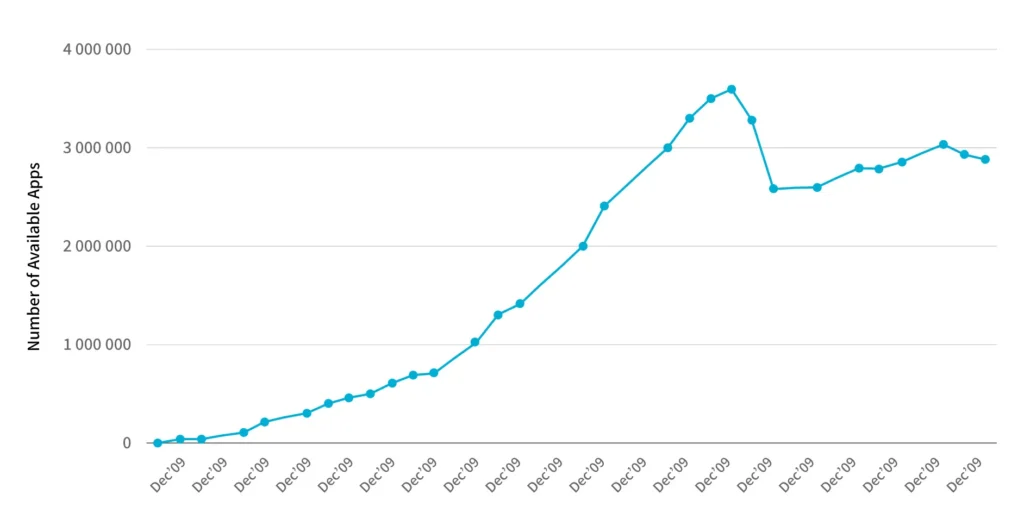
    Globally, there are more than 6.3 billion mobile phone users, according to Statista. According to some reports, the Google Play Store has 2.89 million apps available for download.

    Number of available Apps

    Defining UI design in mobile apps

    The abbreviation UI stands for User Interface. It is how users interact with mobile applications. User interface design for mobile apps is to make interactions between users and the programme as simple, enjoyable, and successful as possible.

    UI in mobile app development A UI in mobile app development refers to any device that allows people to interact with displays, screens, or overlay buttons. The main purpose of mobile app user interface concepts is to deliver the best possible interaction.

    Defining UX design in mobile apps

    The term ‘UX’ refers to the user’s experience. User experience design aims to create a system that provides the best possible experience for users. 

    According to UX principles, customers become loyal customers when they have a positive experience with mobile apps. The user experience (UX) is in charge of a user’s journey via a mobile app or website, which defines the company’s success. UX Design in Mobile Apps

    App for mobile devices UI and UX design are always combined since they are mutually beneficial. To be successful, an app must be the greatest.

    Difference between UI and UX

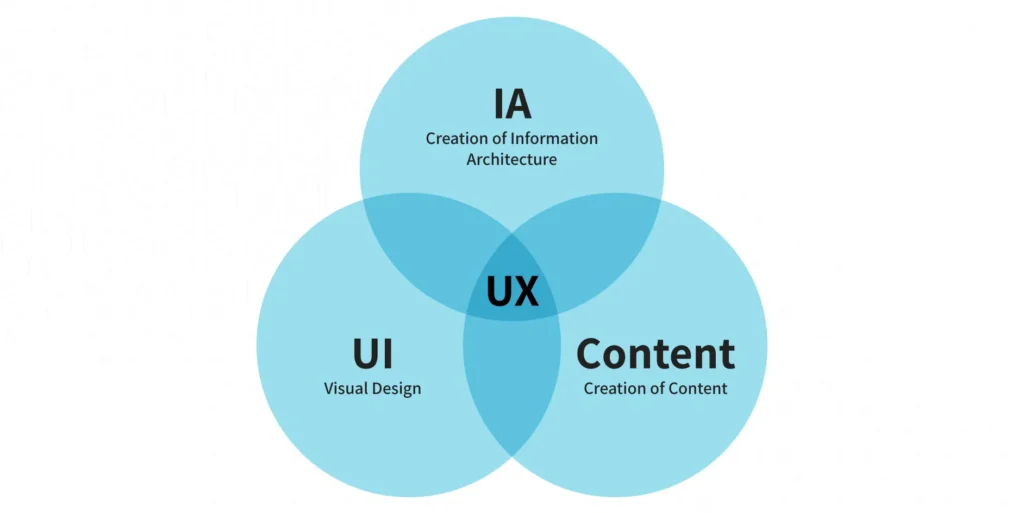
    Let’s start with an understanding of what UI and UX mean. The result of a mobile application’s User Interface (UI) and User Experience (UX) is understood as Creative Design. Both of these concepts are sometimes used interchangeably, but it’s a mistake to think of UI and UX in the same way when it comes to design.

    The user interface (UI) determines the application’s appearance and interacts with the user’s requirements to determine their level of satisfaction.

    Difference between UI and UX

    In the UI/UX design services, the UX part works as a systematized approach for increasing consumer happiness by improving the app’s usability. In other terms, UX specifies how an app appears to a user. As a result, both UI/UX are critical for a mobile application to function properly and achieve its goals.

    Deliverables of the UI/UX app design development.

    Any UI/UX designer’s work is divided into several stages. Various deliverables are provided for clients during the UI and UX design process of android and iOS app development.

    These deliverables are developed for multiple purposes, including improved client communication, documentation, and effective presentation of ideas.

    Both UI and UX have their deliverables; let’s look at them to better grasp the significance of mobile app UI/UX design in the development process.

    What are the key UI/UX services?

    1. Mood boards

    Mood boards are used to showcase new ideas in an easy-to-understand format.

    Mood boards

    It aids clients in comprehending the app concept on which the designer would be working. You can save your own or anyone else’s schedule by making a mood board instead of giving long talks with a presentation.

    2. Dynamic prototyping

    Dynamic prototypes are another one of the UI deliverables—prototypes aid in refining the app’s overall functionality and making adjustments as needed.

    UI deliverables—prototype

    A mobile app development company can develop UI according to the clients’ wishes using dynamic prototypes.

    3. Visual designs

    Visual designs will aid in comprehending the effects of design aspects. With visual designs, the effects of elements such as photography, typography, space, colours, layouts, images, and so on may be better understood.

    4. UX deliverables

    User personalities

    Designers must ensure that their clients know what their customers require and anticipate from their products. Creating a buyer persona aids in understanding and explaining customer behaviour to clients. User research is used in the UX process to determine the behavioural pattern.

    Competitive analysis report

    The competitive analysis report is designed to assess your app’s level of competition. All of your efforts will be for nought if your app is in a highly competitive market or if you are not prepared to outperform your competition. A competitive analysis report can reveal the strengths and weaknesses of a competitor’s app.

    Journey of the user, maps, and user flows

    Users’ entire behaviour toward a product is depicted in experience maps. The experience maps show the expectations, time spent, feelings, ideas, and wants, among other things. 

    User journeys, also known as user flows, are the actions performed by a user to interact with a product at various phases. These could be actual or future interactions with a product.

    Interactive prototypes

    Another one of UX’s deliverables is interactive prototyping. In the initial prototyping phase, you will be able to save a lot of time and effort, and it does the job well enough.

    Interactive prototypes

    Prototypes aid in displaying how the final product will function with what clicks and taps leading to the next action. It also aids the designer in effectively communicating their ideas.

    Let’s move on to the relevance of UI/UX design in providing a custom product now that we’ve looked at what UI and UX stand for and what part mobile app UI/UX design plays in the development process.

    Significance of mobile app UI/UX design services

    It becomes critical to understand the importance of UI/UX design in app development. Most developers construct a high-performing app but neglect to focus on the design, which leads to the app’s demise. It isn’t easy to balance an app’s usefulness and relevance in UI/UX design, but it’s necessary.

    One of the most prominent characteristics that might define the success of a mobile application is its ease of use. In terms of appearance, feel, and navigation, providing an unrivalled user experience is simple.

    1. Catch users’ attention

    In the UI/UX design for mobile apps, the designs pique users’ interest and encourage them to interact with the app. Users should, however, be able to grasp the designs and navigation well enough to stay for the long haul.

    2. Form a good impression

    The value of a UI/UX design for a startup or any small business rests in forming the first impression. When consumers first visit your app, they should be immediately hooked and want to come back for more. 

    A good app will have a longer usage period, which may be achieved through the app’s UI/UX design.

    3. Feature in the app store

    The number of users who like a mobile app determines whether it is good. Satisfied consumers’ ratings and reviews will propel your mobile app to the top of search results. 

    Make sure your app’s UI/UX is good to have it highlighted in the Play Store or App Store. Having your app appear in the top rankings of any category will automatically increase its popularity.

    4. Loyal customers

    Appealing apps indeed have more users. Apps with amazing UI/UX, such as Instagram, Facebook, Candy Crush, and others, have attracted millions of users. Users become loyal because of their satisfaction from a positive user experience.

    5. User satisfaction

    Make sure you know your app’s users before you start building the user interface. This will aid you in making changes to your app to suit the demands of your users better. A successful user interface design includes insightful content and straightforward navigation, which leads to client satisfaction.

    Check to see if your app contains all of the necessary features. You should also have a clear structure and an appealing CTA button in the right place.

    6. Save cost and time

    When you start with a solid understanding of mobile app best UI/UX practices, you can rest assured that app maintenance and updates will be minimal.

    And, because those two issues will be addressed, the obstacles you may have following the app’s introduction will be minimal.

    7. Brand building

    Investing in a successful Ul/UX design increases customer happiness, resulting in happy consumers. Individuals like to work for companies that make them happy.

    They’ll be willing to accept features that can be enhanced and, as a result, invest resources in improving your app.

    As a result, your company’s credibility grows, and customers form positive ties with your company and brand. The value of your company and your brand name will increase due to this.

    8. Enhanced traffic

    Users are more prone to stick around if the UI/UX is nice. Nothing can stop them from researching the predetermined target and converting users into invaluable clients if your website or mobile app is well-built and has an outstanding client experience.

    As a result, it is your obligation and that of the UI/UX developers to ensure that your site/application has the best UI/UX possible.

    It’s a widespread misconception that you don’t require any additional guidance if you’ve mastered the UI/UX development process. However, considering how the impact of UI/UX design may be long-lasting, there’s little harm in going over some sure-fire tips.

    9. It makes your business unique

    Suppose you aspire to make your business unique and different from others. You will have to understand your customers and their needs. You may influence new users and increase sales conversions with an excellent UI/UX design.

    Planning mobile development?

    Ready to elevate your app development projects? Partner with us for seamless app development solutions.


    Book your free consultation

    Image CTA

    How mobile application design and development services can ensure successful UI/UX?

    You will find many companies that offer mobile application design & development services in your town. That’s why it becomes critical for you to choose the best one.

    1. Leveraging UI elements

    Ensure that all elements, such as buttons, icons, colours, contrast, and symbols, are consistent. The elements are the one that users frequently interact with.

    UI elements

    It will make it easier for users to become accustomed to the elements, and they won’t need any additional instructions to continue using the app. It will boost consumer’s confidence and provide security when using your mobile app, which they can also share with others.

    2. Try to keep it engaging

    Apart from the app’s look, you must concentrate on moving from one window to the next. Try to develop an app that is more engaging for the users.

    3. Set uniformity

    Try to keep your app’s layout consistent across all windows. 

    Set uniformity

    The skilled developers recommend that the consistent design makes it simple for the audience to carry out their actions.

    4. Faster and smoother

    When working on your app’s UI, make it a goal to ensure that it doesn’t take too long to load. It may result in users losing interest in your software right from the start. It is preferable to optimise your mobile application so that it loads in a fraction of a second so that users cannot switch to another app.

    If your application takes longer than expected to load for any reason, it’s a good idea to let users know. This will inform your users of the delay, and they will wait for the programme to load.

    5. The simpler, the better

    A user will only download a mobile app if it promises to give top-notch services with minimal effort. As a result, it becomes our primary priority to keep this in mind while creating a mobile app, which can be accomplished by decreasing the number of steps to be performed throughout the download process.

    6. Build user-friendly designs

    In the age of touch screens, it’s your responsibility to ensure that all icons and buttons are the right sizes. 

    7. Hire the right UI/UX designers

    Working with experts is highly suggested if you focus on the mobile app user interface design and experience. To ensure that your app’s UI/UX designs are on point, you can outsource app development to a professional app development business. All end-to-end user interactions should be understood by the UI/UX designers and incorporated into the app.

    8. Consider platform-based designs

    The UI design of iOS app development differs significantly from that of Android app development. Similarly, the iOS app UX design differs from the Android app UX design because both platforms are designed at the device level. 

    What matters is that you comprehend both Material Design and Human Interface Design and the aspects that distinguish them.

    The minimal approach in the beginning of UI/UX for mobile app development

    Creating UI/UX development processes frequently concentrates on too many components at once, resulting in a poor user experience. If there are many things ongoing on the screen, the user will be unable to focus on the app’s content.

    Another approach to quickly lose users is to overcrowd the screen with stuff. You must have a thorough and deep understanding of your target market.

    After all is said and done, the only thing that can prevent the bad effects of UI/UX design is a thorough understanding of your users.

    You can only give a memorable experience to your user base and the rest of the world if you know who you’re producing the product for. A well-planned product discovery workshop is one approach to accomplish this.

    The only thing that you are required to do now is work with a trustworthy and professional app design business. You can increase your mobile UI/UX design services with the support of a good app design and development business.

    How effective can UI/UX design make your mobile app successful?

    Mobile consumers prefer app designs that are both exciting and straightforward. You must create a user-friendly interface and easy navigation for them.  

    The development of a well-designed app determines the success of a company. Most users prefer visually appealing and user-friendly software with amazing features and functionality.

    user-friendly software

    As a result, creating a superb user interface will provide your users with a realistic experience while using your software. 

    Furthermore, it continuously offers updated information. More traffic will be generated if more individuals utilize your app daily. This will boost sales conversions and strengthen your brand’s identification.

    Conclusion

    UI and UX designs help establish a brand and improve its online visibility. All the netizens expect a high class user experience in today’s world when it comes to using the mobile app. As a result, they look for apps with a user-friendly and engaging layout.

    A flawless UI/UX design for mobile application will enhance your company’s visual identity. As a result, it will keep expanding. Use the best UI/UX design techniques and follow the current mobile app UI/UX design trends if you aspire to stand out in the digital world. 

    Find the best mobile app development company that can deliver the best mobile app for your business as per your requirements.

  • Enterprise Mobile App Development Process: Platforms, Frameworks, Languages, and Cost

    Enterprise mobile app development is the process of designing intricate, scalable, secure, and powerful software solutions to suit the precise requirements of large enterprises. Enterprise apps are intended to automate processes, facilitate workflow, promote communication, enhance efficiency, and increase productivity within different departments and business operations. Business apps have interactions with current business systems such as CRM, ERP, and HR systems. Enterprise apps are under rigorous security controls and even require special deployment and maintenance processes. Enterprise apps are geared towards functionality that hopefully equates to business functions and strategic plans.Key goals are to make workers more productive, make processes easier, improve communications, make data more available for making decisions, improve security, and possibly improve partner or customer experience. Enterprise apps have important contributions in agility, instant information availability, worker engagement, improved security, being competitive, and saving the cost of doing business through effectiveness in this mobile age.Development is targeted towards platforms such as iOS and Android. The main frameworks used to develop enterprise applications are React Native, Flutter, Xamarin/MAUI, and Ionic. The main languages used to develop enterprise apps are JavaScript, Dart, and C#. The cost to develop enterprise application development ranges from $50,000 for simple apps to over $500,000 for highly complex solutions, depending on factors such as features, integrations, security, and testing.Listed below are the steps to develop enterprise applications.

    • Define Enterprise Business Goals: Defining enterprise business goals involves the definite identification of the clearly defined business objectives that the enterprise mobile application is designed to accomplish.
    • Assess Security Requirements: Assessing security requirements is a detailed review of the business and data that the enterprise app will handle, security threats, and compliance needs.
    • Choose suitable platforms: Choosing suitable platforms is the choice of which mobile platforms, such as iOS and Android, the app will be created for.
    • Estimate Budget & Resources: Estimating budget and resources is used to estimate the cost investment to be spent on the entire development process of an enterprise app, such as design, development, testing, deployment, and maintenance.
    • Select Development Team: Selecting a development team is the procedure used in the selection of the individual or third-party vendor who will be creating the enterprise mobile application.
    • UX/UI Design for Enterprise Needs: UI/UX design for enterprise needs workflows with clean common sense, unimpeded navigation, and an accessible interface suitable for the specific needs of the workers or other end-users.
    • Develop Core Features & Integrations: Developing core features and integrations is where the mobile app is coded, and functionality and features are written as necessary.
    • Conduct Security & Performance Testing: Conducting security and performance testing is when the application is seriously tested to know and fix any security risks, performance flaws, bugs, or usability bugs.
    • Deploy & Integrate with IT Infrastructure: Deploying and integrating with IT infrastructure means the software application that has been developed is deployed to the targeted market and integrated with the organization’s current IT infrastructure, such as servers, networks, and device management systems.
    • Ensure Updates & Compliance: Ensuring updates and compliance is a continuous process that ensures the app remains current with frequent updates to repair bugs, introduce new features, improve performance, and ensure continued compatibility with evolving operating systems and devices.

    1. Define Enterprise Business Goals

    Defining enterprise business goals in enterprise application development brings realistic advantages such as enhanced operational efficiency, internal or external communication, availability of information, and measurable goals. Defining business goals involves collaboration with a mix of executive management and end-users to discover their needs and expectations. Best practices for defining enterprise business goals include identifying goals that translate into specific, measurable, achievable, relevant, and time-bound (SMART) objectives to develop a clear outline for the entire development process. Without a clearly defined strategic vision, the company can waste precious resources on a mobile application that lacks a clearly defined purpose, doesn’t address significant business issues, and doesn’t offer the desired return on investment.

    2. Assess Security Requirements

    Assessing security requirements in an enterprise mobile application development requires careful deliberation over security requirements. It’s a thorough review of potential security threats and the complex matrix of relevant compliance laws, the intended use, and the confidential information. Assessing security needs includes a correct taxonomy of the various sets of sensitive data the app will read, process, and store, and a thorough threat modeling exercise to predict realistic attack surfaces and threats. Best practices to assess security requirements in enterprise apps include detailed knowledge of all applicable regulatory and industry-mandated compliance requirements, such as GDPR, HIPAA, or PCI DSS. Therefore, a proper set of security controls includes such aspects as secure authentication, authorization controls, and encryption controls in transit.

    3. Choose Suitable Platforms

    Choosing suitable platforms in the development of enterprise mobile applications is done for the app’s level of reach, cost, performance features, and viability in the long run. Selecting the right platform entails a strategic and informed decision-making process for selecting the mobile operating systems, such as iOS and Android. The platform selection is an optimal trade-off between achieving the largest user base and minimizing development time and cost. The best practices for choosing suitable platforms in enterprise apps include organizational technology strategy and the current skill sets of the internal development staff. It results in achieving the desired performance level and availability of device-specific features and aligning with the long-term maintenance and scalability requirements of the enterprise.

    4. Estimate Budget & Resources

    Estimating budget and resources for enterprise mobile application development entails careful and detailed estimation of the financial budget and deployment of required resources throughout the project life cycle. Estimating a budget requires careful identification and tactical assignment of all the required resources, including human resources in terms of qualified developers, competent designers, thorough testers, successful project managers, technology infrastructure, software licenses, and development tools. Best practices of estimating budget and resources in enterprise apps include a well-established budget that gives the company a clear picture of the cost of ownership and allows it to secure the necessary funds. Inefficient resource or budget distribution results in project schedule delays, reduced quality, and eventual failure of the project.

    5. Select Development Team

    Selecting a development team for enterprise mobile application development is a careful deliberation of selecting the individuals, internal personnel, or external partners to take charge of constructing the mobile application. The selection of the development team process considers a variety of key factors, such as detailed technical skills, a proven history of creating similar enterprise-level applications, and good communication and teamwork skills to ensure compatibility of working within teams. Best practices for selecting a development team for enterprise apps include not considering a team with poor experience or communication failure that can cause excessive delays, expensive mistakes, and an end product that fails to meet expectations.

    6. UX/UI Design for Enterprise Needs

    Designing UX/UI for enterprise application development focuses on the intentional creation of a user experience (UX) and user interface (UI) that is explicitly designed for the particular needs and context of enterprise users. The development process of enterprise apps is centered on functionality, quick access to key information, and overall ease of use to increase productivity and reduce training needs. Best practices for UX/UI design in enterprise apps include an appropriately designed UX/UI in an enterprise environment that directly converts into higher user adoption rates and more productive workers.

    7. Develop Core Features & Integrations

    Developing core features and integrations in enterprise application development involves the actual coding and deployment of the functionalities defined through the requirements gathering and designing stages. Developers implement the fine-grained technical specifications as functional software, developing each feature with performance, scalability, and maintainability considerations. Best practices to develop core features and integration in enterprise apps include the successful implementation of key features that accurately meet business needs and thoroughly tested integrations that support effective data exchange and business process automation.

    8. Conduct Security & Performance Testing

    Conducting security and performance testing in enterprise mobile applications is a phase of security and performance testing that is required. Conducting performance testing entails a systematic review of the application, addressing any possible security vulnerabilities. This step detects any performance problems, software defects, or usability problems that would harm the user interface. The best practices to conduct security for enterprise apps include the testing phase, utilizing a combination of techniques and tools such as full security scanning, simulated penetration testing, comprehensive performance, and rigorous user acceptance testing.

    9. Deploy & Integrate with IT Infrastructure

    Deploying and integrating with the IT infrastructure in enterprise mobile application development entails planning and carrying out the deployment of the application to employee mobile phones. Deployment requires accurate setting up of the required server environments, databases, and network settings to enable the runnability of the application. This includes the use of APIs, secure communication channels, and compliance with the IT policies and security guidelines of the organization. The best practices to deploy with IT infrastructures in enterprise apps include a properly planned and executed deployment plan that reduces user disruption and results in a successful roll-out of the new mobile application. Seamless integration enables the application to exchange information and interact seamlessly with other big-enterprise software systems, enabling smooth workflows.

    10. Maintain Updates & Compliance

    Maintaining updates and compliance in enterprise mobile application development includes ongoing investment in constant maintenance through periodic maintenance. The objectives include long-term compatibility with future releases of mobile platform operating systems (iOS and Android), and support for an enormous volume of hardware are long-term necessities. It helps scan the security horizon to find new weaknesses and threats, and implement the security patches and upgrades promptly to secure sensitive enterprise data. The best practices of maintaining updates in mobile apps include staying vigilant and in sync with the latest industry protocols and compliance mandates, and modifying the application accordingly.

    Is the enterprise mobile app development process the Same for all types of mobile apps?

    No, the enterprise mobile app development process varies for each category of mobile apps. Enterprise mobile app development processes vary due to the focus, work, and concerns in the planning, security, integration, user management, and deployment phases. For example, developing a simple calculator app is very different from the rigorous security and complicated integration of an ERP mobile app. A social media app is worried about UX and scalability differently than internal business apps. The development process is customized for each category of an app’s particular requirements.

    What is enterprise web app development?

    Enterprise web application development is a process of creating advanced, secure, and combined web applications for large organizations that are usually internal and made to automate business processes and facilitate collaboration. The life cycle involves requirements gathering, planning, front-end/back-end and database development using programming technologies such as Spring, .NET, and JavaScript (Angular, React), legacy system integration, strong security integration, adequate testing, deployment, and maintenance. The cost of developing enterprise web apps ranges from $50,000 to $500,000, depending on complexity and technologies used.

    What are Mobile Enterprise Application Platforms (MEAPs)?

    Mobile Enterprise Application Platforms (MEAPs) are sets of software that facilitate easier development, deployment, management, and security of mobile apps. MEAPs involve development tooling, backend enablement middleware, rich security components, deployment and management features, MDM support, application lifecycle management, and cross-platform. The focus of MEAPs is to simplify development, secure data, offer centralized management, and improve security, compliance, and workforce productivity. The set of tools being utilized in enterprise app development includes IDEs such as Android Studio and Xcode; frameworks such as React Native and Flutter; backend technology such as Node.js and Java Spring; database systems such as PostgreSQL and MongoDB; and API management tools such as Swagger and Postman.

    What are the frameworks used to develop enterprise-level applications?

    Listed below are the frameworks used to develop enterprise-level applications.

    • Spring Framework (Java): Spring Framework is an open-source Java framework used for enterprise application development as it provides Control (IoC) and Dependency Injection (DI) support, loose coupling between components, and greater testability and maintainability for complex enterprise systems. Security, high-level data access, integration with other enterprise services, and web application development support are included with Spring MVC and Spring Boot rapid development support.
    • .NET (C#): .NET is a Microsoft-developed framework used for enterprise application development as it provides a rich environment to develop any kind of application, like enterprise-class and scale-out web applications (ASP.NET Core), desktop applications, mobile applications (Xamarin/MAUI), and cloud applications. The programming language is C # .NET, which has a single platform with an excellent set of libraries and fair tools (Visual Studio). ASP.NET Core is deeply high-performance, cross-platform, and secure, and therefore deeply appropriate for building new enterprise websites. .NET has a gigantic, highly active community of developers, especially in those businesses dependent on Microsoft technology. In early 2025, GitHub survey reports that .NET has between 6 and 8 million active developers.
    • React (JavaScript): JavaScript is a user interface rendering library used for enterprise app development because it provides a view layer in MVC or similar architectures. React’s virtual DOM makes updating the user interface efficient and fast, with a highly responsive, silky smooth user experience demanded in complicated enterprise applications. Its component reuse, along with a huge quantity of state management libraries (like Redux or Zustand) and routing libraries, makes it highly flexible to construct complicated UIs. React is among the most commonly used front-end technologies worldwide, with around 4.8% to 6.2% of the top websites globally.
    • Angular (JavaScript/TypeScript): Angular is a front-end framework used to develop enterprise apps for building single-page applications (SPAs) because it provides solid architecture design patterns (component-based, module-based, and service-based) and feature richness. Angular raises code quality and scalability in high-end apps. Angular has a mature ecosystem and is widely used to create enterprise-grade front-end apps. Although its adoption curve has been driven aggressively by React, it still has 300,000 weekly downloads in the enterprise sector for firms wanting a more prescriptive, feature-oriented world.
    • Node.js: Node.js is a framework used to develop enterprise mobile applications because it offers highly scalable and performant enterprise back-end APIs and services. Node.js’s non-blocking approach to I/O makes it extremely lightweight when it comes to concurrency.
    • Django (Python): Django is used to develop enterprise mobile applications and provides several features, such as ORM, admin interface, and security-related features, as it gives the framework room to be an economic business web application development trendsetter. Database interaction is made simpler by its ORM, and the return on database administration is brought instantly by its admin interface. Django excels in business web development, particularly for businesses that utilize Python in backend infrastructure, machine learning, and data science. Django possesses a very large and active community and is utilized by different business organizations to host multiple web applications.

    What programming languages are used to develop enterprise-level applications?

    Listed below are the programming languages used to develop enterprise applications.

    • Java: Java is a cross-platform programming language used to develop enterprise mobile applications because it provides maturity level, a broad ecosystem, and performance. Java is associated with the Spring framework for creating well-designed and scalable enterprise apps. Statista suggests that there are over 9 million Java developers worldwide as of early 2025.
    • C#: C# is a cross-platform general-purpose language developed by Microsoft used to develop enterprise mobile applications because it provides native performance, scalability, and robust security features. C# is used extensively in web app development within the enterprise space (ASP.NET Core), services, and Windows desktop applications within the Microsoft realm. According to a GitHub survey, there are 6 to 8 million .NET developers worldwide as of early 2025.
    • JavaScript: JavaScript is a cross-platform front-end language used to develop enterprise mobile apps, as it creates enterprise apps’ user interfaces through frameworks such as React and Angular. According to a Statista report, JavaScript is one of the most popular programming languages, with 16 million developers worldwide as of early 2025.
    • Python: Python is a cross-platform back-end development language used to develop enterprise mobile apps with frameworks such as Django and Flask. Python’s readability, robust library support (especially data science and AI libraries), and quick development-favorable nature. According to the 2025 Statista report, more than 10 million developers worldwide are using Python.
    • TypeScript: TypeScript is a cross-platform language developed by Microsoft used to develop enterprise mobile apps. Angular is now being adopted by React and Node.js to ensure maintainable and scalable large business apps. In 2025, Statista indicates that 16 million developers are using TypeScript.

    What are the examples of enterprise-level app development?

    The examples of enterprise app development are as follows.

    • Human Resources Management Systems (HRMS)
    • Business Intelligence (BI) and Analytics Dashboards
    • Field Service Management Applications
    • Healthcare Electronic Health Record (EHR) Systems
    • Financial Accounting and Bookkeeping Systems
    • Project Management and Team Collaboration Tools
    • Internal Communication and Team Collaboration Platforms

    What is the cost to develop an enterprise-level application?

    The cost to develop an enterprise-level application ranges from $50,000 to $500,000. A normal enterprise app with a limited set of features, such as user authorization, a user-friendly interface, and basic data management, runs between $50,000 and $150,000. A medium-complexity enterprise application with additional features, multistage integrations, and custom UI/UX ranges from $150,000 to $500,000. A high-complexity enterprise application with complex features, multiple-system integration complexity, high-security needs, and high user experience, the price increases from $500,000 and even in the million-dollar-plus range. The main factors to develop an enterprise-level application include complexity, integration, platforms, security requirements, testing, and quality assurance.

    How much time does it take to develop an enterprise-level application?

    Developing an enterprise-level application ranges from a few months to more than one year. The enterprise mobile app development timeline depends on the scope and complexity of the application, team size and composition, technology stack, integration needs, data management requirements, UI/UX design, strict testing and quality checks, security standards, regulatory norms, project management effectiveness, stakeholder engagement, and external risks. The statistical evidence indicates that small applications take 3-6 months, medium-sized applications take 6-12 months, and large, complex systems take 12-24 months or more, with time spread across design (15-20%), coding (35-40%), testing (20-25%), and deployment (5-10%).

    Are enterprise-level applications hard to develop?

    Yes, enterprise apps are harder to develop than average consumer apps due to rich functionality, advanced legacy system integrations, strict security, compliance requirements, scaling, and high-level admin requirements. Developing enterprise apps takes longer with process frameworks such as Agile, using native or cross-platform approaches. Developers with the security, integration, and scaling skill sets required for such advanced projects.

    How can an enterprise application development company help with enterprise mobile solutions?

    An experienced company in enterprise mobile application development assists enterprises in creating customized mobile solutions through end-to-end solutions like ideation, design, native and cross-platform application development, integration with existing enterprise infrastructure, proper security implementation, stringent testing, secure deployment, and continuous maintenance and support. Zennax is an enterprise mobile app development company that enables enterprises to have specialized skill sets, improve time-to-market, and offer improved quality, reliability, and scalability. Our company reduces development costs, enables core business focus, offers the latest technology access, improves security and compliance, provides constant support, and offers excellent value by developing efficient and secure mobile solutions that automate and increase productivity.

  • What is the Role of DevOps in Mobile App Development?

    A tech project manager of the next big tech startup looked blankly at his monitor. His heart was sinking. The last release was a train wreck of bugs, missed deadlines, and overworked teams. The first word that came to his mind was“ DevOps!” “What would have happened if I used it?” he thought.

    This is the story of several project managers and software development teams, even in 2024!

    With the focus on mobile in modern software development, the role of DevOps in app development has become crucial. It enables faster releases and fewer defects, allowing businesses to scale operations quickly.

    Such benefits have led to a DevOps market reaching revenues worth $10.4 billion, indicating how more organizations are embracing this methodology.

    You’re missing out on an excellent opportunity to release your app faster and smoother if you are still not using DevOps.

    This article will discuss DevOps in app development and provide you with the six Cs of successful implementation.

    role of devops in app development

    What is DevOps?

    DevOps is an amalgamation of “Development” and “Operations.” This name perfectly captures the essence of its end goal: connecting the Dev and Ops teams.

    So, let’s demystify it before we understand what role DevOps plays in mobile apps.

    DevOps allows organizations to improve collaboration between development and operations teams. These teams share tools, techniques, and objectives to develop mobile apps faster and more efficiently.

    What makes DevOps an essential practice for most businesses is the agility to respond to changing customer needs while maintaining quality and user experience.

    But is DevOps, to some extent, similar to Agile?

    No, it isn’t.

    How is DevOps Different From Agile App Development?

    DevOps aims to improve software delivery by breaking the silos between ops and dev teams following the conventional approach of app development.

    Agile targets an iterative development approach that creates dynamic responses to change and customer feedback. Both methodologies aim to provide rapid response and efficiency in app development.

    While Agile may have specific limitations, DevOps extends beyond the dev and ops team. You can implement DevOps culture across the organization so that cross-functional teams can collaborate and enhance software delivery.

    The Roles of DevOps in App Development

    DevOps changes how we build and support mobile applications, creating streamlines and effective processes. It fills the gap between cross-functional teams and manages the entire development lifecycle.

    Below are the critical roles of DevOps in app development.

    #1. Enhance Collaboration and Communication

    DevOps makes teams unify IT ops and developers to work as one entity. Think of a team composing code for a new app feature while setting up the release environment.

    DevOps plays a significant role in app development by ensuring seamless team collaborations. This includes,


    • Encourages different teams to share knowledge and work together towards common goals.

    • The open communication approach from DevOps improves constant connection

    • Faster task completion and asynchronous collaborations improve agility

    • A high level of trust infused by DevOps culture improves decision-making among teams

    #2. Improve app Quality and Reliability

    DevOps is not only about speed; it offers higher app quality and reliability. DevOps teams conduct continuous testing to identify bugs and resolve them on time. For example, a banking application that updates without interruptions or data loss.

    The role of DevOps in such apps is significant, with every release improving on the last after its implementation.

    But how does DevOps ensure better quality?

    It helps you by,


    • This includes continuous testing and integration, where every change to the codebase is automatically tested.

    • Automated testing, deployment, and monitoring ensure consistent quality at every stage.

    • Employing a shared responsibility among teams for quality results with better communication, faster feedback loops, and a collective focus.

    • Allowing teams to identify and fix issues sooner, preventing them from reaching production.

    #3. Enhancing app system’s scalability and stability

    DevOps is crucial in making app systems more scalable and stable. Automating deployments, DevOps allows apps to effortlessly handle peak loads without compromising performance.

    This adaptability ensures an e-commerce app remains responsive even during massive sales events.

    DevOps ensures scalability by implementing CI/CD pipelines and automating deployments across systems. With the dev and ops team continuously testing the system and working on errors, system stability can be ensured.

    #4. Acceleration of app Delivery

    DevOps streamlines every development phase, from coding to deployment. This means updates and features reach users faster than ever.

    For instance, a social media platform can rapidly roll out new filters or features, ensuring higher engagement and a competitive advantage.

    Accelerated feature delivery emphasizes the role of DevOps in app development. If you are a business looking to enter a market and timing the product right, DevOps implementation is what you need!

    #5. Cost Reduction

    DevOps is not only about velocity but also about an approach that keeps your development budget optimized. Consider how a company can save money by avoiding a massive software glitch!

    Source

    It can save the cost of recalling a product or recovering crucial data. Catching a bug early and automating processes by implementing DevOps can result in significant cost savings.

    #6. Encourage Continuous Learning and Improvement

    DevOps fosters an environment where continuous learning and improvement are part of the daily routine. This culture encourages teams to experiment, fail, and learn faster. It turns mistakes into lessons, driving innovation and efficiency forward.

    Understanding DevOps’s role in modern app projects is essential. It ensures faster delivery, better quality, and higher customer satisfaction. Now that you know DevOps’s role in your app development project, here are some key benefits.

    Benefits of Adopting DevOps

    DevOps feels like unlocking a secret level in app development. It’s all about teamwork, speed, and getting things right.

    So, here are the standout perks of using DevOps.

    #1. Better Time-to-market

    DevOps drastically reduces the time needed to release new iterations by automating the deployment process.

    Imagine pushing out app updates in days instead of weeks. It’s like having a fast-forward button for your app development process.

    #2. Efficient Resource Management

    DevOps maximizes resource efficiency, eliminating waste through automation and collaboration.

    For example, automated testing frees up developers for more critical tasks, optimizing team productivity. It’s intelligent resource management in action, ensuring nothing is squandered.

    #3. Eliminate Bottlenecks

    DevOps streamlines workflows, removing bottlenecks that delay app releases. Continuous integration, for example, allows instant feedback on code changes, preventing logjams. 

    This method keeps development moving smoothly, enhancing project timelines.

    #4. Better Feedback

    DevOps encourages continuous feedback, which is crucial for refining apps. This loop allows for immediate improvements, enhancing user satisfaction. For instance, any user-reported issue can be addressed in the next update cycle, keeping the app in line with user expectations.

    Applying DevOps is like supercharging your app development process. It’s not just about making things faster; it’s about being smarter and more in tune with users’ needs.

    Challenges with Mobile DevOps

    The DevOps journey brings its own set of obstacles. It’s a field where precision and adaptability collide. Here are the hurdles that teams often face.

    #1. Different OS version

    Every mobile app platform is different. Take Android and iOS. Both have different native requirements crucial for mobile app development projects.

    So, if you are applying for DevOps, you must be mindful of the difference between native environments and platform-specific requirements.

    #2. Hardware

    From high-end smartphones to more modest devices, your app needs to work seamlessly across the board. Picture a gaming app that must deliver the same latency and immersive experience on every device.

    So, you need a well-planned DevOps strategy to overcome the challenges of hardware-based issues across platforms and devices.

    #3. Keeping a balance between App Quality and Consumer Demands

    Balancing app quality with consumer demands has always been challenging for businesses. Users want cool new features, but not at the expense of performance or reliability.

    The changing market dynamics and consumer demands keep changing, which means your DevOps implementation needs more adaptability.

    Further, DevOps plays a crucial role by providing quick and responsive updates.

    These challenges test the resilience and innovation of DevOps teams.

    Overcoming them is critical to delivering stellar mobile experiences.

    The 6 Cs of DevOps Adoption

    DevOps is a framework built on key principles for successful adoption. Here are the 6 Cs that will help you adopt DevOps successfully.

    #1. Continuous Planning

    Continuous planning is about keeping your strategy agile and your goals aligned.

    Imagine plotting your app’s journey on a constantly evolving map. It’s a way to stay ahead of changes and ensure your team knows where they’re headed next.

    This stage is about creating a roadmap of DevOps implementation across the organization. You need to define roles, teams, and tasks for strategic implementation.

    #2. Continuous Integration

    Continuous integration involves combining code written by different team members frequently.

    This approach catches conflicts and errors early. For instance, when a developer adds a new feature, it’s integrated and tested immediately, ensuring it meshes well with the existing app.

    #3. Continuous Testing

    With constant testing, your application will always be ready for the spotlight. Every change triggers automated tests to find bugs early.

    It is like having a safety net, guaranteeing new errors do not disrupt app operations.

    #4. Continuous Monitoring

    Continuous monitoring is a process of analyzing the app’s performance and user interactions to identify app problems.

    It allows you to find critical issues of applications like scalability problems, security threats and others to fine-tune system performance.

    #5. Continuous Delivery

    Continuous delivery is having your codebase in a state where it can be released anytime. It is a software development practice where code changes are automatically prepared for a production release.

    Continuous delivery helps software development teams get their code changes from development to testing and get them into the hands of users more quickly.

    #6. Continuous Deployment

    Continuous deployment is when code changes are automatically deployed to production after passing automated tests.

    It is an advanced DevOps practice that extends continuous delivery by automatically releasing changes validated through the CI/CD pipeline directly to customers.

    The role of DevOps in developing mobile applications is to simplify the process from idea to customer. With these 6 Cs, the team can maximize the advantages of mobile app development through DevOps.

    How to Implement Mobile DevOps?

    Starting DevOps in your project can seem daunting but is ultimately rewarding. Here are the essential steps for implementation.

    #1. Continuous Integration and Delivery

    Merge your development work often, automating the build and deployment processes.

    This ensures new changes integrate without disruption. For instance, automatically deploy a feature as soon as it’s ready, reducing manual effort and errors.

    #2.Testing and Monitoring

    Implement automated testing and continuous monitoring to catch bugs early and often.

    Automated tests run with each update, ensuring nothing breaks. Monitoring app performance in real-time helps identify and fix issues before they impact users.

    #3. Quality Control

    DevOps plays a significant role in maintaining high standards through rigorous quality control measures.

    It’s not just about finding bugs but ensuring the app meets all user expectations for functionality and usability. Users’ feedback can guide developers on what needs improvement.

    These steps will effectively integrate DevOps into your development cycle, streamlining processes and enhancing outcomes.

    Don’t Be Left Behind- Implement DevOps

    Team up with us to unlock streamlined DevOps solutions for your business.


    Book your free consultation

    The ROI of Mobile DevOps

    Exploring the ROI of Mobile DevOps reveals its substantial impact on app development. Here are the key benefits and outcomes.

    #1. Enhanced customer experience

    DevOps ensures your app always performs at its best, directly boosting user satisfaction. Fast updates and seamless functionality make a big difference.

    It allows users to interact with your apps dynamically by continuously introducing new features and functionalities.

    #2. Increased innovation

    DevOps reduces the time teams spend fixing bugs and allows them to focus more on the innovation of new features.

    This change promotes an innovative environment where new ideas are developed quickly.

    #3. Better app quality

    DevOps practices like continuous integration and testing make your application highly available, efficient, and fault-tolerant.

    They help achieve better quality through constant monitoring, ensuring no performance gap.

    #4. Reduced risk

    DevOps reduces the possibility of significant failures by identifying and dealing with issues early.

    Less downtime and bugs ensure a safer app. It also improves security by ensuring no vulnerabilities in your applications that cyber attackers can expose.

    The ROI of Mobile DevOps is very high. Here are some tools to maximize that ROI.

    Tools and Technologies Used in DevOps

    advanced tools

    Jenkins

    Jenkins automates building, testing, and deploying software, streamlining DevOps processes. It enhances efficiency, allowing teams to focus on development rather than manual tasks. Jenkins is adaptable, supporting various programming languages and platforms.


    • Enables robust build pipeline support

    • Integrates a comprehensive workflow plugin

    • Incorporates a test harness for JUnit

    • Facilitates a rapid release cycle

    • Simplifies the configuration setup

    • Supports continuous integration and delivery

    Docker

    Docker streamlines deploying and running applications in isolated containers, enhancing security and portability. It’s integral for DevOps, improving efficiency across development workflows.


    • Simplifies configurations with Dockerfiles

    • Isolates applications for security

    • Boosts productivity by easing development

    • Manages clusters with Docker Swarm

    • Manages multi-container apps via Services

    • Facilitates connectivity with Routing Mesh

    • Enhances security with robust tools

    • Enables quick, easy system scaling

    • Streamlines software delivery

    • Supports software-defined networking

    • Reduces container size, saving resources

    Ansible

    Ansible automates software provisioning, configuration management, and application deployment. It simplifies complex workflows, making DevOps more efficient and reliable.


    • Provides easy-to-use automation for complex deployments

    • Facilitates consistent environment setup across development, testing, and production

    • Enhances security with automated compliance policies and configuration enforcement

    • Supports scalable infrastructure management without additional agents

    • Enables centralized management for multi-tier deployments

    • Accelerates operational workflows with reusable playbooks

    • Integrates seamlessly with existing DevOps tools and environments

    Kubernetes or K8s

    Kubernetes, or K8s, is pivotal for managing and orchestrating containerized applications across various environments. It ensures efficient deployment, scaling, and operation of applications.


    • Enables infrastructure and configuration as code for seamless automation

    • Automates deployment, scaling, and management of containerized applications

    • Supports containerization at scale, enhancing application consistency and portability

    • Offers observability for in-depth system analysis and troubleshooting

    • Facilitates on-demand infrastructure, adapting to workload changes

    • Ensures zero-downtime deployments for continuous availability

    • Provides flexibility through pods, allowing grouped container management

    • Guarantees reliability with robust failover and backup mechanisms

    • Simplifies updates and rollbacks for application version control

    Git

    Git, a cornerstone of DevOps, enables distributed version control for seamless collaboration among developers. Its flexibility in handling code versions streamlines the development process.


    • Tracks changes and history, ensuring work is never lost

    • Free and open-source, accessible for all types of projects

    • Facilitates non-linear development, allowing for multiple parallel workflows

    • Creates backups, providing a safety net for developers

    • Scalable to accommodate projects of any size

    • Enhances collaboration, allowing teams to work concurrently

    • It simplifies branching, making the feature and fix integration smoother

    • Supports distributed development, enabling remote work

    Prometheus

    Prometheus, a vital tool in cloud-native monitoring, supports infrastructure and application tracking. Its capabilities enhance operational insights and performance analysis.


    • Uses a multi-dimensional data model for complex metrics

    • Features PromQL for advanced data queries

    • Operates with a pull model over HTTP

    • Facilitates dynamic target discovery

    • Offers extensive graphing and dashboarding tools

    • Supports scalable and reliable deployments

    These tools and technologies form the center of successful DevOps implementation.

    Conclusion

    The role of DevOps in application development is significant as it acts as a link between development, operations, and quality assurance. What makes it a valuable practice for organizations is the amalgamation of several key benefits, such as faster releases, high performance, and agility.

    DevOps helps teams develop high-quality applications that meet market demands and user expectations. It is the driving force of modern mobile app development, resulting in successful deployment for several businesses.

    So, if you are looking to embrace the DevOps practices for your app development, Zennaxx can offer,


    • Strategic DevOps services

    • Automated CI/CD pipelines

    • End-to-end app development

    • Comprehensive tech support

    Get an estimate of your project now for more details on how we use DevOps to help optimize costs and performance.

    Read Also: 

  • 11 Cross-Platform Mobile App Development Frameworks

    A cross-platform mobile app development framework is a development platform that allows developers to build applications for multiple operating systems, such as iOS, Android, and Windows, using a single codebase. Cross-platform mobile app development frameworks simplify app development by offering pre-built components, UI toolkits, rendering engines, and APIs that reduce time-to-market and minimize maintenance efforts.Multi-platform frameworks have become essential for reducing development costs, increasing code reuse, and ensuring a uniform user experience across devices. 46% of developers globally prefer using Flutter for cross-platform development, according to Statista. The global cross-platform app development framework market is projected to grow from USD 15.67 billion in 2025 to USD 42.60 billion by 2034, exhibiting a compound annual growth rate (CAGR) of 11.75% during the forecast period. Businesses are increasingly adopting cross-platform frameworks due to their reduction in development costs by up to 30%. Advancements in cross-platform frameworks have significantly improved app performance and user experience, with Flutter’s custom rendering engine allowing for smooth animations that lead to a 95% satisfaction rate among developers.

    Listed below are the 11 best cross-platform mobile app development frameworks.

    • Flutter: Flutter is a cross-platform app development platform developed by Google for building high-performance applications from a single codebase. Flutter is known for its hot-reload feature, rich widget library, and expressive UI.
    • React Native: React Native is a cross-platform app development platform created by Meta (formerly Facebook) that enables developers to write apps using JavaScript and React.
    • Ionic: Ionic is a cross-platform framework that combines the flexibility of web technologies (HTML, CSS, JavaScript) with mobile-optimized UI components.
    • Kotlin Multiplatform: Kotlin Multiplatform is a cross-platform framework from JetBrains that allows code sharing between Android, iOS, backend, and web.
    • NativeScript: NativeScript is a cross-platform app development framework that enables developers to build native Android and iOS apps using JavaScript or TypeScript with frameworks like Angular or Vue.
    • Unity: Unity is a cross-platform framework primarily used for building mobile games and simulations, supporting over 25 platforms.
    • .NET MAUI (Multi-platform App UI): .NET MAUI is the evolution of Xamarin.Forms that allow developers to build cross-platform apps for Android, iOS, macOS, and Windows from a single .NET codebase.
    • PhoneGap: PhoneGap, formerly maintained by Adobe, was one of the earliest cross-platform app frameworks based on Apache Cordova. PhoneGap allows apps to be built using HTML, CSS, and JavaScript.
    • Appcelerator Titanium: Appcelerator Titanium provides a JavaScript-based platform for developing cross-platform mobile apps across different platforms.
    • Ext JS: Ext JS JavaScript framework for building data-intensive, cross-platform web and mobile applications.
    • Framework7: Framework7 is an open-source cross-platform framework for developing mobile, desktop, and web apps with a native look and feel.

    1. Flutter

    Flutter is an open-source cross-platform UI toolkit developed by Google that allows developers to build natively compiled mobile, web, and desktop applications from a single codebase using the Dart programming language.​ Flutter is known for its ability to deliver high-performance cross-platform apps with a consistent look and feel across platforms. Flutter’s hot-reload feature accelerates development by allowing real-time code changes.Flutter’s architecture includes a high-performance rendering engine that ensures smooth animations and a responsive interface. Flutter offers extensive support for Material Design and Cupertino widgets, aligning with Android and iOS design standards.​ Flutter is not the optimal choice for applications that require extensive platform-specific functionalities or those that need to maintain a minimal application size because Flutter apps are larger due to the inclusion of the Dart runtime.​ Flutter is particularly well-suited for developing Minimum Viable Products (MVPs), e-commerce applications, and apps with rich graphical interfaces. Flutter’s ability to provide a uniform experience across platforms makes it ideal for brands that aim for consistent cross-platform user engagement.​

    2. React Native

    React Native is an open-source cross-platform framework that enables the creation of mobile applications using JavaScript and React. React Native allows developers to build apps that function smoothly on iOS and Android platforms.​ React Native is favored for its code reusability, which allows a significant portion of code to be shared between cross-platform environments.The React Native framework provides access to native components to ensure that applications look and feel consistent with native apps. React Native supports third-party plugins to enhance its extensibility across multiple apps. React Native is not suitable for applications that require intensive computational tasks because performance is impacted compared to fully native solutions.​React Native is commonly used for developing social media applications, e-commerce platforms, and simple to moderately complex mobile apps where rapid development and cross-platform compatibility are priorities.​

    3. Ionic

    Ionic is an open-source framework for building cross-platform mobile applications using web technologies such as HTML, CSS, and JavaScript. Ionic is utilized for its ability to create hybrid mobile apps that can run on multiple platforms from a single codebase. Ionic offers a library of pre-designed UI components, facilitating rapid development and a consistent user interface.​Ionic’s integration with Cordova or Capacitor allows access to native device features through JavaScript, bridging the gap between web and native functionalities.​ ​Ionic applications experience reduced performance in graphics-intensive tasks or complex animations. ​Ionic’s reliance on web technologies can lead to challenges in achieving responsiveness comparable to native applications.Ionic is ideal for developing Progressive Web Apps (PWAs), simple mobile applications, and prototypes where development speed and cross-platform deployment are more critical than achieving native performance.​

    4. Kotlin Multiplatform

    Kotlin Multiplatform is an extension of the Kotlin programming language that allows developers to share code across multiple cross-platform environments that include Android, iOS, and web.​ Kotlin Multiplatform reduces duplication of business logic across platforms while allowing for platform-specific implementations where necessary.​Kotlin Multi Platform enables developers to designate specific sections of the codebase for sharing across platforms to facilitate a customized approach to cross-platform development.​ Kotlin Multiplatform’s tooling support is less mature than other cross-platform frameworks, requiring proficiency in both Kotlin and native platforms.Kotlin Multi Platform is suitable for projects where sharing business logic is beneficial, but platform-specific UIs are desired, such as applications with complex user interfaces that need to adhere to platform conventions.​

    5. NativeScript

    NativeScript is an open-source cross-platform framework that enables the development of native mobile applications using JavaScript, TypeScript, or Angular. NativeScript allows developers to build apps for iOS and Android platforms from a single codebase.​ NativeScript is employed for cross-platform app development to create truly native experiences on iOS and Android. NativeScript provides direct access to native APIs to allow developers to get platform-specific features without relying on third-party plugins. NativeScript offers a rich set of plugins and a vibrant community, facilitating the integration of various functionalities. NativeScript’s ability to use existing web skills for mobile development accelerates the development process. 28% of developers have been dedicated to using NativeScript for more than a year for various cross-platform application development projects. ​NativeScript offers extensive capabilities for cross-platform development, but it is not the ideal choice for applications requiring complex animations or those demanding the highest performance levels. NativeScript is ideal for developing business applications, e-commerce platforms, and applications that require access to native device features while maintaining a shared codebase across platforms. NativeScript integration with Angular and Vue.js makes it a favorable choice for developers familiar with these frameworks.​

    6. Unity

    Unity is a cross-platform game engine developed by Unity Technologies by utilizing the languages C++ and C#, that enables the creation of both 2D and 3D games and simulations across various platforms. Unity is used to develop interactive cross-platform games and simulations requiring complex graphics and physics calculations. Unity’s robust asset store and comprehensive development environment make it popular among game developers.​ The number of games available on multiple platforms has increased by 40% since 2021. Smaller studios using Unity, which previously focused on single-platform releases, have expanded their cross-platform game development by 71% in the past 2 years.Unity offers a comprehensive set of tools for game development that include a high-performance rendering engine, physics engine, and support for both 2D and 3D graphics. Unity’s AR and VR development support has made it a go-to choice for immersive cross-platform application development.​ Unity is not the most efficient option for non-gaming applications because its game-focused structure can add unnecessary complexity.

    Unity is used to develop interactive games, virtual reality experiences, and simulations requiring complex graphics and physics calculations. Unity’s versatility allows applications in industries such as architecture, automotive, and education to create immersive cross-platform experiences.​

    7. .NET MAUI (Multi-platform App UI)

    .NET MAUI is an open-source cross-platform framework developed by Microsoft, allowing developers to create native mobile and desktop applications using C# and XAML. .NET MAUI is the evolution of Xamarin.Forms that aim to provide a unified cross-platform framework for building applications across multiple platforms.​ .NET MAUI is designed to enable developers to build applications for Android, iOS, macOS, and Windows with a single codebase. .NET simplifies the cross-platform development process by providing a unified project structure and access to native APIs. The structural approach reduces development time and effort, as developers can share a significant portion of code across platforms..NET MAUI offers a rich set of UI controls and layouts, supports hot reload for rapid development, and integrates seamlessly with the .NET ecosystem, allowing for code sharing across cross-platform environments. .NET MAUI has been rapidly gaining popularity, ranking high in active users on GitHub within the .NET community and being among the top active repositories. .NET MAUI’s ecosystem and community support are still growing, which leads to limited resources and third-party libraries compared to more established cross-platform frameworks. Developers have reported issues with tooling and performance in .NET MAUI, which indicates the framework is still maturing..NET MAUI is suitable for enterprise applications, internal business tools, and applications that benefit from integration with other Microsoft services and products. The ability of .NET MAUI to target multiple platforms with a single codebase makes it an attractive cross-platform choice for businesses aiming to reach a broad audience.

    8. PhoneGap

    PhoneGap is an open-source cross-platform mobile development framework that enables developers to create mobile applications using standard web technologies such as HTML5, CSS3, and JavaScript.​ PhoneGap is designed to build cross-platform hybrid mobile applications that operate across multiple platforms using a single codebase. PhoneGap allows developers to utilize their web development skills to create mobile apps and makes it accessible to many developers.​PhoneGap provides a set of JavaScript APIs that grant access to native device functionalities, such as the camera, accelerometer, and contacts. These APIs bridge the gap between web applications and native mobile features to allow developers to build feature-rich cross-platform applications without writing extensive native code. Applications developed with PhoneGap experience performance limitations, particularly for graphics-intensive tasks or complex animations. PhoneGap relies on WebView components to render the user interface, and this reliance leads to less responsive interfaces compared to fully native applications.​PhoneGap is ideal for content-driven cross-platform applications, simple utilities, and prototypes where rapid development and cross-platform compatibility are prioritized over achieving native performance. PhoneGap examples include news apps, information portals, and basic productivity tools.​

    9. Appcelerator Titanium

    Appcelerator Titanium is an open-source cross-platform framework that enables the development of native mobile applications using JavaScript. Appcelerator Titanium allows developers to build cross-platform applications for iOS and Android platforms from a single JavaScript codebase.​ Titanium is utilized to create native applications while using web development skills. Titanium provides access to native APIs and UI components to facilitate the development of feature-rich applications with a native look and feel.Titanium’s SDK offers a cross-platform API for accessing native UI components and device functionalities. The Titanium framework includes Alloy, a model-view-controller (MVC) architecture that simplifies cross-platform development and encourages clean code practices. Titanium supports direct access to native APIs through Hyperloop, which enables integration of third-party native libraries for advanced functionality. Developers encounter challenges with complex UI designs and platform-specific nuances, which demand extra customization and unique code for each platform. Titanium enables the development of native applications, but achieving the same level of performance as fully native apps requires further optimization.Titanium is suitable for developing cross-platform data-driven applications, enterprise solutions, and applications that require integration with existing web services and APIs. Direct access to native functionalities in Titanium makes the framework appropriate for applications that rely on device-specific features.

    10. Ext JS

    Ext JS is a comprehensive JavaScript cross-platform framework used for building data-intensive, cross-platform web and mobile applications. Ext JS offers a range of pre-built components and development tools designed to create interactive and responsive user interfaces. Ext JS is used to build complex cross-platform web applications that require a fast and responsive user interface. Ext JS provides more than 140 high-performance UI components such as grids, charts, and forms, which support creating feature-rich cross-platform applications. Built-in responsive design features in Ext JS ensure compatibility across multiple devices and screen sizes.Ext JS includes an efficient layout manager, two-way data binding, and a powerful package for seamless data management and integration. Theming and styling capabilities in Ext JS allow developers to build visually consistent and appealing interfaces. Built-in testing and debugging tools further streamline the cross-platform development process. Ext JS has a steep learning curve because of its extensive features and complex structure. Ext JS is a proprietary cross-platform framework that includes licensing costs, which increases the total project budget. JavaScript-heavy UI definitions in Ext JS lead to larger application sizes, and larger applications directly affect load times and performance.Ext JS is commonly used for cross-platform enterprise-grade applications, advanced dashboards, and platforms that manage large datasets with complex user interactions. The component library in Ext JS supports the development of high-performance cross-platform applications for sectors such as finance, healthcare, and education.

    11. Framework7

    Framework7 is an open-source cross-platform framework for building mobile, desktop, and web applications replicating a native look and feel. Framework7 uses HTML, CSS, and JavaScript to support cross-platform application development. Framework7 simplifies hybrid mobile app development by offering a rich set of UI components that replicate native behavior on both iOS and Android devices. Rapid prototyping in Framework7 allows developers to build visually polished interfaces using familiar web technologies.Framework7 provides a range of pre-styled widgets and components that follow native iOS and Android design standards to deliver a consistent cross-platform user experience. Framework7 includes support for Electron and NW.js, which enables the development of native desktop applications using web technologies. Framework7 integrates with other libraries and frameworks, such as React and Vue.js, offering greater flexibility during cross-platform application development. Performance limitations appear in Framework7 when building complex or resource-heavy applications, as the framework does not match the speed of fully native solutions. Platform-specific functionalities in Framework7 require manual customization and direct integration with native code.

    Framework7 is ideal for developing cross-platform progressive web apps (PWAs), simple mobile applications, and prototypes where a native look and feel is desired without extensive development time. It is particularly useful for applications prioritizing a consistent user interface across platforms.​

    How to choose the best cross-platform mobile app development framework?

    You can choose the best cross-platform mobile app development framework by focusing on measurable project needs, technical priorities, and performance demands.

    Framework7 is ideal for developing cross-platform progressive web apps (PWAs), simple mobile applications, and prototypes where a native look and feel is desired without extensive development time. It is particularly useful for applications prioritizing a consistent user interface across platforms.​

    Listed below are the 7 key factors for selecting the right cross-platform framework.

    • Repeat Project Requirements and Complexity: Project requirements and complexity define the depth of features, third-party integrations, and user interactions in cross-platform development. 42% of developers note that Flutter and React Native handle complex UI better than hybrid cross-platform solutions such as Ionic.
    • Repeat Performance and User Experience: Performance and user experience are critical in cross-platform frameworks, and 67% of developers confirm native-like responsiveness in Flutter and React Native.
    • Repeat Development Team’s Expertise: The development team’s expertise with a cross-platform framework’s core language matters because 58% of developers select React Native since they already work with JavaScript in web development.
    • Repeat Community Support and Ecosystem: Community support and plugin ecosystem help developers fix issues faster and find ready-made solutions during cross-platform development. Flutter has over 152,000 GitHub stars and thousands of plugins, which reduces development time and avoids building everything from scratch.
    • Repeat Budget and Time Constraints: Budget and time constraints impact cross-platform framework selection by forcing teams to build faster without increasing costs. A shared cross-platform codebase reduces both development cost and duration by up to 40%, as reported in Stack Overflow’s 2025 developer survey.
    • Repeat Platform Compatibility: Platform compatibility in cross-platform development allows developers to build once and deploy on multiple systems without rewriting code. 70% of developers select React Native or Xamarin to publish iOS, Android, and Windows apps from a single cross-platform project.
    • Repeat Security Considerations: Security considerations in cross-platform development protect sensitive user data and maintain compliance with industry rules. Xamarin and .NET MAUI are often used in enterprise cross-platform apps because they support encrypted data transfer, biometric authentication, and secure storage.

    What is Cross-Platform mobile app development?

    Cross-platform mobile app development enables developers to build single applications that run across multiple platforms including iOS, Android, and Windows using unified codebases that save development time, reduce costs, and ensure consistent user experiences. The process begins with planning and requirements analysis to define app goals and features, preventing the 35% failure rate associated with unclear specifications, followed by framework selection where Flutter leads with 58% developer adoption and React Native serves as the second choice. UI/UX design creates intuitive interfaces addressing the 80% app uninstall rate caused by poor usability, while the fundamentals of cross-platform mobile app development rely on shared languages like Dart, JavaScript, and C# to reduce total development time by up to 50% compared to native builds.


    Native modules integration provides hardware access through platform bridges used by 60% of developers, while testing and debugging ensure functionality across devices using built-in tools utilized by 75% of developers to identify platform-specific issues early. Deployment and maintenance encompass store submissions and performance monitoring, with single cross-platform codebases enabling updates to be deployed 60% faster than native applications, significantly improving development agility and product cycle efficiency across all target platforms.

    What is the popular framework used to develop cross-platform mobile apps?

    Flutter is the most popular framework used to develop cross-platform mobile apps because it allows developers to build Android and iOS applications using a single codebase. 58% of global developers actively use Flutter, which places it ahead of React Native in adoption rate. Flutter offers faster development through hot reload and a wide range of customizable UI widgets that support platform-specific designs.

    Can you develop cross-platform mobile applications using other mobile app development frameworks?

    Yes, you can develop cross-platform mobile applications using other mobile app development frameworks that support multi-platform deployment from a single codebase. A mobile app development framework is a set of tools, libraries, and components that help developers build apps efficiently for different operating systems. Frameworks such as React Native, Flutter, Xamarin (.NET MAUI), and Ionic reduce development time, ensure UI consistency, and support access to device-specific features without duplicating code for each platform.

  • Top 7 Augmented Reality Frameworks for AR App development

    Best Augmented Reality Frameworks for AR App development An AR framework is a development platform that provides essential tools, libraries, and APIs for creating Augmented Reality applications. AR frameworks simplify the integration of 3D models, object tracking, scene recognition, and real-time rendering into mobile applications. The difference between AR frameworks and SDKs depends on their scope and functionalities. AR frameworks provide a complete development environment with built-in libraries, rendering engines, and object tracking, making them ideal for full-scale AR app development. AR SDKs (Software Development Kits) offer specific tools and APIs that enhance AR capabilities within an existing application but do not function as standalone development platforms.

    Listed below are the top 7 AR frameworks used for building high-performance AR applications.

    best augmented reality development frameworks

    • ARKit: ARKit is a frontend AR framework for iOS that enables developers to create high-quality AR experiences using Apple’s advanced tracking and rendering technologies.
    • Unity MARS: Unity MARS is a backend AR app development framework that extends Unity’s capabilities for AR content creation.
    • RealityKit: RealityKit is a frontend AR framework for iOS designed by Apple to work seamlessly with ARKit for real-time rendering and physics-based animations.
    • ARToolKit: ARToolKit is an open-source AR framework for Android and iOS that enables marker-based tracking and augmented reality rendering.
    • MRTK (Mixed Reality Toolkit): MRTK is a backend AR app development framework developed by Microsoft, designed for mixed reality applications on HoloLens, Windows Mixed Reality, and cross-platform AR devices.
    • Unity AR Foundation: Unity AR Foundation is a backend AR app development framework that unifies ARKit (iOS) and ARCore (Android) under a single development environment.
    • Unreal Engine AR Framework: Unreal Engine AR Framework is a backend AR development framework designed for photo-realistic AR experiences.

    1. ARKit

    ARKit is Apple’s augmented reality (AR) development framework designed specifically for iOS and iPadOS devices to enable developers to build interactive and immersive AR applications. ARKit was first introduced in September 2017 as part of iOS 11 to significantly enhance the capability of Apple devices to process AR experiences. Unique features of ARKit include accurate motion tracking, scene understanding, image recognition, and LiDAR-powered depth sensing. Major pros of ARKit are its ease of integration, high accuracy in real-time AR experiences, and strong performance optimized for Apple’s ecosystem. ARKit is best suited for scenarios such as gaming, interactive product demonstrations, navigation apps, educational experiences, and retail applications.

    2. Unity MARS

    Unity MARS (Mixed and Augmented Reality Studio) is an advanced AR development framework built on top of the Unity game engine. Unity MARS aimed was simplify the creation of AR applications across multiple platforms including iOS, Android, and mixed-reality devices. Unity MARS was launched by Unity Technologies in June 2020 to streamline complex AR development through intuitive workflows and enhanced environmental understanding. Unique features of Unity MARS include real-world object anchoring, intelligent scene recognition using AI, and adaptive AR content placement. Unity MARS features include efficient cross-platform compatibility, powerful simulation capabilities, and simplified workflows. Unity MARS is ideal for enterprise AR solutions, industrial training, interactive product visualizations, and complex simulations requiring adaptive and realistic AR interactions.

    3. RealityKit

    RealityKit is Apple’s high-performance AR framework specifically designed for developing realistic and interactive AR experiences on iOS and iPadOS. RealityKit is integrated seamlessly with ARKit and provides developers with advanced tools for building detailed 3D animations, realistic physics interactions, and spatial audio. RealityKit was first released on June 3, 2019, alongside iOS 13, complementing ARKit by enhancing the visual realism and interactivity of AR content. Unique features of RealityKit include realistic rendering, physics-based animations, spatial audio integration, and real-time reflections. RealityKit framework features include ease of use, native integration with Apple’s ecosystem, and optimized rendering performance. RealityKit is best for developers and scenarios focused on creating immersive and lifelike AR experiences such as gaming, product showcases, virtual try-ons, and educational simulations.

    4. ARToolKit

    ARToolKit is an open-source AR framework designed for building marker-based augmented reality experiences on multiple platforms including iOS, Android, Windows, and Linux. ARToolKit was released in 1999 and ARToolKit became one of the first frameworks enabling developers to easily track and display virtual objects over physical markers. Unique features of ARToolKit include real-time marker tracking, natural feature detection, camera calibration, and strong cross-platform support. The key pros of ARToolKit include its open-source flexibility, straightforward implementation, and effective performance on a wide range of devices. ARToolKit is best suited for academic research, experimental AR applications, educational purposes, and simpler AR projects where marker-based tracking is preferred.

    5. MRTK

    MRTK (Mixed Reality Toolkit) is a backend AR development framework developed by Microsoft and designed for mixed reality applications on platforms. MRTK was launched in December 2017 and provides advanced tools for developers creating complex AR and MR experiences. Unique features of MRTK include spatial awareness, intuitive hand-tracking, gesture interactions, and pre-built UI components tailored for mixed reality. MRTK framework benefits include robust interaction models, powerful integration with Microsoft services, and comprehensive documentation. MRTK is best for enterprise-level mixed-reality applications, interactive training scenarios, remote assistance solutions, and complex simulations.

    6. Unity AR Foundation

    Unity AR Foundation is a cross-platform AR development framework by Unity Technologies and helps to build applications that smoothly operate on Android and iOS devices. Unity AR was launched in 2019 and provides a unified abstraction layer to simplify AR development across multiple platforms. Unique features of Unity AR Foundation include plane detection, image and object tracking, face tracking, environment probes, and robust integration with Unity’s real-time 3D engine. Unity AR Foundation has cross-platform compatibility, streamlined workflow, and an efficient development pipeline. Unity AR Foundation is best suited for developers needing consistent AR experiences across Android and iOS, especially in gaming, education, social AR apps, and large-scale commercial projects.

    7. Unreal Engine AR Framework

    Unreal Engine AR Framework is a high-performance augmented reality solution provided by Epic Games and built on the powerful Unreal Engine for creating visually realistic AR applications. Unreal Engine AR was introduced by Epic Games in 2017 and empowers developers to build AR apps capable of photorealistic graphics and seamless AR-VR transitions. Unique features of Unreal Engine AR Framework include advanced rendering capabilities, real-time lighting, visual scripting via Blueprints, and realistic physics interactions. The key advantages of the Unreal Engine AR Framework include exceptional graphics quality, versatility in content creation, and strong integration with VR platforms. Unreal Engine AR is best suited for high-end gaming applications, cinematic AR experiences, architecture visualization, and scenarios requiring AAA-quality graphics and immersive visual experiences.

    What Are the Best AR Frameworks for Android?

    The best AR frameworks for Android are ARCore, Unity AR Foundation, and Vuforia, as they provide advanced AR capabilities, cross-platform support, and strong development tools. ARCore is Google’s native AR framework and offers motion tracking, environmental understanding, and light estimation. Unity AR Foundation enables developers to create AR experiences that run on both Android and iOS without separate implementations. Vuforia is used for marker-based AR experiences and features advanced object recognition and cloud-based AR tracking.

    What Are the Best AR Frameworks for iOS?

    The best AR frameworks for iOS are ARKit, RealityKit, and Unity AR Foundation, as they provide high-performance AR capabilities optimized for Apple’s hardware and ecosystem. ARKit is Apple’s proprietary AR framework and offers high-precision tracking, LiDAR support, and seamless integration with iOS devices. RealityKit enhances ARKit’s functionality by providing realistic rendering, spatial audio, and physics-based interactions. Unity AR Foundation allows developers to build AR applications for both iOS and Android while maintaining native performance and compatibility with ARKit.

    What are the best Augmented Reality application SDKs?

    best augmented reality sdks The best Augmented Reality application SDKs provide developers with essential tools, libraries, and APIs to create immersive AR experiences. These SDKs facilitate object tracking, scene mapping, motion detection, and 3D rendering.

    Listed below are the best Augmented Reality application SDKs.

    • Unity 3D (with AR Foundation): Unity 3D (with AR Foundation) is a cross-platform AR development framework that integrates ARKit (iOS) and ARCore (Android) under a single environment. Unity 3D provides developers with a powerful real-time 3D engine, physics-based interactions, and cross-platform AR support. Unique features of Unity 3D include plane detection, object tracking, light estimation, and seamless AR/VR compatibility.
    • Unreal Engine 4 (with AR Framework): Unreal Engine 4 (with AR Framework) is a high-performance AR development engine designed for creating photo-realistic AR experiences with advanced rendering capabilities. Unreal Engine 4 provides developers with real-time lighting, physics-based simulations, and cinematic-quality visuals. Unique features of Unreal Engine 4 include Blueprint visual scripting, high-fidelity graphics, and AR/VR cross-integration.
    • AppGameKit: AppGameKit is a beginner-friendly AR development platform that enables developers to create AR applications with simplified coding and cross-platform support. AppGameKit provides built-in 2D/3D rendering, physics engines, and easy integration with mobile devices. Unique features of AppGameKit include its BASIC-like scripting language, rapid prototyping tools, and multi-platform deployment.
    • AR.js Integration for Web AR: AR.js is an open-source WebAR framework that allows developers to create browser-based AR experiences without requiring a separate app installation. AR.js provides efficient marker-based tracking, lightweight JavaScript implementation, and seamless integration with HTML and WebGL. Unique features of AR.js include fast performance, cross-browser compatibility, and mobile-first optimization.

    How AR Frameworks and SDKs Are Used in AR App Development?

    AR frameworks and SDKs are essential in Augmented reality app development as they provide the necessary tools, libraries, and APIs to create immersive and interactive experiences. AR frameworks enable structured augmented reality application development by handling 3D rendering, object tracking, motion detection, and real-world interaction mapping. AR SDKs enhance these capabilities by offering marker tracking, SLAM (Simultaneous Localization and Mapping), and AR cloud integration. The importance of AR frameworks and SDKs in augmented reality application development depends on their ability to streamline development, ensure cross-platform compatibility, and optimize performance.

  • 40+ Best Web App Ideas for entrepreneur in 2024

    How can you make money online or start any business online in 2024? The best ideas for making money online and starting your business are web applications. The best way to start generating good revenue and expanding all types of business can be done by building a web app and IoT things.

    In the future, web applications will be necessary for any big or small business. The only way to make your name in the market is to build a robust web application to battle with your marketing competitor.

    Now you are thinking about firing the market, how to get out of this race of online business, and which field gives you more revenue from the market? Worry not. Here, we provide you with 40+ of the best web app ideas to expand your business in 2024.

    web development tools

    What are Web Apps?

    Web app is an online program that can be run on any internet device without software installation. So it is easy for your user to access anytime without any other software. It is easy to access and use the functionality on every device without any problem.

    Nowadays, unlike traditional market apps, web apps are in the most demand because of their flexibility. Web apps are safer and more secure because all users operate on the same version, which reduces the chances of compatibility problems.

    Some examples of web applications include emails, online retail sales, spreadsheets, instant messaging, and photo and video editing apps. Many new no-code platforms have made web app development more accessible. Using this whole book of full-stack web application ideas, you can quickly get innovative ideas that raise your business online.

    Best Web App Ideas for Projects

    After so much industrial and marketing demand study and research, we selected 40+ web app ideas to quickly grow your business in the market without so much effort. We choose every marketing demand across industries to help you make the right decision.

    This comprehensive guide provides many web development ideas for starting your online business quickly.

    1. Wellness and Fitness Apps

    Wellness and fitness app development is a great way to enter this growing market. After the COVID-19 pandemic, the wellness and fitness areas are expanding rapidly. People highly care about their health and body fitness with online information and tutorials.

    Create a web-based app where people can get full health-related support.

    2. Travel Accommodation Selection Service Provider Apps

    The travel sector is growing through internet booking and sightseeing, which are necessary for travelers before reaching their destination. Create a web-based app that gives customers flexible options for managing travel. This web app creation business gives you more opportunities to stabilize your business in a hot field. 

    3. Online Classroom Web App Idea

    Online learning classes and tuition are some of the excellent web app ideas. Students and teachers both get total flexibility and peace from outside. Developing a web app for an online classroom is also more demanding in this digital world. Several education systems are also creating web applications for online classes.

    4. Online Pharmacy Web Application Idea

    It was no surprise that online pharmacies would be on trend in 2020. Still and all, these web apps will continue to thrive in the post-pandemic age as well. You can order medications from the comfort of your home and have them delivered, bypassing the long lines and busy markets.

    5. Dating Web App Project Idea

    Create a dating app and target Gen Z since it is easy to expand a business. A dating web app is the most trending business idea in the market right now. People love exploring online with Strangers on online platforms. It is the correct full stack web application idea for covering your lots of customers with this web application.

    6. Automated Chat-bots Web App Ideas

    Develop AI and ML-powered chatbots to respond to your customer queries and don’t make them feel bored. Live chats change perspectives on customer service by providing continuous support, with businesses incorporating automated chat boxes on their websites to give 24/7 accessibility.

    7. Payments Apps Idea to Make Money

    If you want a higher chance in the web application market, develop a UPI payment app and launch it with attractive offers and a user-friendly design. Because digital transactions are the most popular option for people worldwide, creating a secure UPI payment app can help you tap into a growing market.

    8. Workflow Management Apps

    Developing a web app for managing the workflow of the daily regular tasks of office workers’ attendance and chats. Because of the remote working culture, the demand for management apps is increasing, and everyone is finding flexible web applications to manage and save tasks.

    9. On-demand Grocery App for Beginners

    Many grocery web apps are available online, but more popularity is needed because of user-friendly interfaces and features. Develop a web application for grocery delivery with a smooth and flexible interface to get more users.

    10. AI-Powered Personal Assistant

    Consider developing AI-powered assistants to manage your daily tasks and schedule based on your routine work. Easily schedule and remind your day-to-day tasks and make reminders before you forget to attend. This web application makes more business revenue nowadays.

    11. Eco-Friendly Product Marketplace

    Finding eco-friendly and sustainable products on a web app with a curated selection of eco-conscious goods. From organic skincare to recycled fashion, an eco-friendly web application promoting eco-friendly products dramatically impacts your business idea.

    12. Language Learning Platform

    Create a new language learning platform where users can access interactive language lessons, live tutoring sessions, and educational resources on a web app catering to diverse learning needs and skill levels. From vocabulary drills to immersive conversations, everything is provided on one Platform.

    13. Simple Web Application Ideas for Beginners

    If you are new in the web application business, here are some full-stack ideas

    That can quickly enter the market without facing high requirements and demands. 

    Such a web app now has many business and customer options in the market. Create unique services that fulfill the basic needs of industries at a low cost and provide top-notch solutions to the users.

    Planning web development?

    Ready to elevate your web projects? Partner with us for seamless web app solutions.


    Book your free consultation

    Image CTA

    14. Website Building Apps

    Simple web development apps like customers can develop online websites using templates. Creating and reducing some challenges is easy, like designing a name, hosting, and running a website. This innovative web application idea is easy to buy and use for small businesses by direct purchasing. 

    15. CRM Tools Web Application Project idea

    CRM software is now the most demanding tool for handling the whole business, but small startups need help to afford the high cost of CRM software. You can create such tools as CRM web applications for small investors, which is the best idea for web development in 2024.

    16. Youtube Radio App

    YouTube is a vast content source; finding the gems in it takes work for some. So many masterpiece audios are still hidden behind this Platform. Consider developing a radio application that includes the top content and sells it to the audience.

    17. Crypto Exchange Platforms

    Cryptocurrency is a hot trend in the mind of every business person. Building a simple cryptocurrency exchange app can give you a lot of revenue from the market quickly. It is not only for demand, but this web application can brighten your business features, too.

    18. Platforms for Hobbyist

    Using multimedia and the internet, people most love to share different arts and hobbies and create interest in various hobbies. Develop a web app platform where people can engage, connect, share ideas, and build a community. Start making a web-based app that covers every social media user and provides an upgraded interface to attract their mind.

    19. Child Tube Web App Idea

    Many parents are always searching for accessible platforms for children to access and get colorful and funny content to make their children calm and engaged. The Child Tube web application idea is one of the best ideas for starting a business on a low budget. 

    20. Home Renovation designer

    From design inspiration to project management, the Platform streamlines the renovation process by creating a web application that helps engineers draw a proper visual design of the new structure and share it with the customers. New technological and estate innovative web application ideas help to create your business online.

    21. Stock Trading Web Apps

    Traders and new beginners always look for new apps to help them invest in stocks and track their portfolios. Create a web-based app for stock investment that is quick, simple to use, has a smooth interface, and provides trading updates to help you grow in industries.

    22. Gift Delivery App

    Sending a personal gift from far away is not accessible to some online stores, but develop a perfect innovative web application app that gives various gifts and toys and shows pic with gift wrapping options. 

    People can directly donate the gift using your application, a creative web application idea for new business startups.

    23. Web App For Auction

    Create a trustable and secure auction web app with accessible functions. Being able to connect people globally and help in business is one of the right ideas for creating customers. Develop a functional web auction app that gives more flexibility in auction options and a smooth user experience.

    24. Web App for Pet Care

    Many people start adopting pets in their homes, but caring for them requires many rules and guidelines in their schedule, as well as food care and treatment at home. Developing a web app for pet care parents that helps pet parents guide them in parenting and care.

    25. Online Gaming Apps

    Online server gaming is not a hot trending topic to jump on. Take expert support and develop a customized video gaming web app with the right technology. Online games easily reach the right players and are played by several users worldwide simultaneously.

    26. Memes and GIFs Making Apps

    Memes dominate these days, as do social media and social groups. People like to share memes and love to create personal memes for fun. Also, it is an excellent platform for earning money. Building memes and GIFs and developing an app is also a good idea.


    27. Docket Management Web App

    Organizations prefer secure, interactive, and user-friendly applications because the documents are private and require advanced security. Many organizations are responsible for managing a large number of sensitive documents. Gdrive, Dropbox, and similar services must help them develop a customized docket management web app that solves their issues.

    28. Web Application Project Ideas

    Know more business project-related innovative web application ideas when you can start a business and quickly build your business web application online. Here are some advisable full-stack web application ideas that give you new startup-related ideas when you think about establishing your business. If you have any queries or new ideas, share them with us and contact us for development-related queries.

    29. Music streaming Web Apps

    People crave to listen to music online whenever they can do their daily tasks or travel somewhere. Develop a music library app full of popular charts and different playlists, including some trending shows.

    30. Online Personal Styling and Fashion Advice Service

    Receive personalized fashion recommendations, style tips, and outfit suggestions from professional stylists via a web app. Whatever fashion-related new tricks and how to prepare for the latest fashion, expert advice and curated looks tailored to their taste, body type, and lifestyle elevate their fashion sense and confidence.

    31. Motor Services and Wash App

    In many countries, providing door-to-door services is the priority option for people. For the same, these days, cars are used or serviced in their place, and people want to use services like that. Develop web-based applications like a car wash or bike service, create a chain between vehicle owners and garages, and build your business worldwide.

    32. Medical Consultation Web App

    Medical consulting apps are also the most increasing opportunity, reducing the mundane tasks that reach more people with the help of the internet. You can create a web-based app that connects patients and doctors, offers 24-hour consultations, and delivers medications online, among other features. For more information, visit our blog on.

    33. Ride-sharing Web Apps

    Increasing the traffic in megacities and burning uncalculated fuels are unsuitable for the global market. Think in a new way when people can switch to on-demand cab and carpooling services. This brand new idea of designing full-stack web application ideas to provide cab service facilities and ride-sharing facilities to people in a city or country can quickly boost your business.

    34. Collaborative Study Space

    Build a student community web application where students share study-related information and guide other students. Where students can collaborate on group projects, share study materials, and organize study sessions, fostering a supportive and productive learning environment. 

    35. E-commerce Applications

    Online e-commerce application building with the right ideas and public demanding needs. Try to provide a feature-rich e-commerce application for things that are needed daily. Developing a web app for Ecommerce idea with flexible designs and more discountable dealing options has become more popular.

    36. Student Entrepreneurship Hub

    Design is a platform where aspiring student entrepreneurs can access resources, mentorship, and networking opportunities to launch and grow their startups, fostering innovation and entrepreneurship on campus. These Innovative web application ideas help to push new businesses fast, and new ideas come into the market marketplace.

    37. Online Therapy and Mental Health Support

    Create an application where people can connect and talk with licensed therapists for emotional support and mental health resources via a web app. Develop a personal space for customers who struggle with any mental illness and can quickly heal themselves through your web application.

    38. Legal Document Preparation Service

    Simplify the process of drafting legal documents such as contracts, agreements, and wills with a web-based app that provides templates, guidance, and document review services. From business contracts to personal legal matters, the Platform offers accuracy and compliance, saving time and resources for individuals and businesses navigating legal issues.

    39. Astrology Apps for New Projects

    Business and new project dealers believe in astrology and time-related future prediction talks. Many people use mobile phones and Google to predict the time to invest or develop. Create a web-based app that allows people to search for question-related success, relation, education, and investment.

    40. Crime Alert Web Application Ideas

    Crimes and fraud rates are increasing, and people don’t know what is happening around them. So, developing a web app where people update and know the details about any crimes happening around them and make strong communication is an essential idea for new businesses.

    41. Professional Services Web App

    Many people need professional support but can’t fit in because riPlatformsform is available. Suppose you have a good community of services like cleaning, helping, or house-related professional services. In that case, you can build a web app and connect many businesses and services with one Platform.

    42. E-commerce Stores

    Build an e-commerce store with the right niche and unique product that people find only in your store. Make your brand and product and create an online e-commerce store that attracts multiple people and grows your business revenue in a short time.

    43. Unique Web App Project Ideas for Students

    Student project ideas for the college and its students are easy to develop, code, and manage. College students can create projects like this in college submission and final year project ideas. We have many web development ideas to work on to make your submission project demanding future marketing applications.

    44. Food Delivery Apps for New Business

    Online food delivery apps are the right topic for students to improve and provide to people. Do some research on how to make it more flexible, make some needed improvements, and develop a food delivery web app that showcases hotels, restaurants, and cloud kitchens; everything merged into one Platform and provides flexible delivery.

    45. Job Portal Web App Ideas

    Job portal web apps still need to be more precise and more time-consuming online applications. Build a job portal web app that can easily direct seekers to the right place and directly connect them with job providers. It saves people from providing money to job-searching agencies every time.

    46. Fitness Challenge App

    Develop a fitness app that encourages people to participate in wellness challenges. People can use this web application to set fitness goals and track their progress, promoting physical activity and healthy habits in the community. Because of challenges and new people connections, this helps encourage people to use this web application.

    47. Career Guide Web App

    Guide the students to suitable careers and introduce them to every future career option in one application. It is a good idea to create a new web application. You can guide several students who need clarification about the career-choice phase. You can also introduce the importance of AI and ML in future careers.

    48. Flower and Gift Delivery App

    Any memorable moments are incomplete without cake, flowers, and gifts. Finding everything on one Platform is one cup of tea. Make a flexible platform to celebrate a special day in one order. Customers can discover every need on one Platform, which makes your business more popular. Like this new innovative web application idea, create a full stack web application to start new services.

    49. Table Booking App Idea for New Project

    Who likes to wait out of restaurants and cafes with family and full hunger? A perfect table booking app provides every restaurant and cafe table data and allows booking from anywhere at the right time. People use it to schedule meetings, occasional dinners, and hangout parties by giving a vast crowd of customers details and revenue.

    50. Personal Finance Management Tool

    Develop a web application to track customer financial data, such as spending and earnings. With this data, it can manage how to track expenses, set budgets, and monitor investments for better savings. People use your web application to make secure savings and create future goals.

    51. Book Review Web Application

    Authors and book readers also read everyone’s opinion before reading any book. Develop a book review web application when they find a massive database of every book review and comment. Also, they can share reviews on it and guide new readers and writers in a right-leaning way.

    52. Car Rental Platform

    From compact cars to luxury SUVs, the flexibility and affordability of the offer for travelers and commuters alike are available only on one Platform. Customers can book transparent pricing and find the perfect vehicle through your web application. A car rental web app lets Customers conveniently explore vehicles and book peer-to-peer car rentals.

    53. Photo and Video Editing App

    People give more importance to posting videos and photos on social media. This is not only the internment but is also a good source of generating income from it. Developing a web application that can easily edit and download photos and videos in high-quality resolution. This will provide video features and editing tools to make it more user-popular.

    54. Second-hand goods Buying and Selling Platform

    Selling and buying second-hand goods, furniture, and electronic tools is now the most helpful tool for working couples and busy customers in the office. People look for easy, reliable options without fraud and hassle-free payment. Developing web-based applications where customers can easily buy and find things of good quality and with money options.

    55. Language Translation Web Apps

    Create a smooth and flexible language translation web application that can easily be used by travelers, reporters, and elders to translate anything with a click. Try to make the experience smooth with this AI and machine learning technology. Build an all-in-one language translator web application to help people immediately, anywhere. 

    56. Interior Designing Apps

    Designing applications that help to boost artists’ creativity to another level, artists use your application to make their minds sharp and taste their ideas. Interior designing web apps allow people to make raw designs of homes and cut the extra cost of designing.

    57. Travel Experience Platform

    Build a travel community app where people share every travel experience on your web application, from iconic landmarks to hidden gems. This Platform offers immersive storytelling, interactive maps, and virtual tours that transport users to distant lands and inspire wanderlust, fostering a deeper connection to the world and its diverse cultures.

    58. Volunteer Matching Service

    Create a platform where people can find volunteer opportunities and connect with local organizations needing volunteers based on their required skills. It helps travelers find accommodation by providing them with skills and services. This is also one of our innovative web application ideas that is currently in demand.

    59. Task Management Apps

    Businesses now use digital assistant apps that handle all tasks. Create a web-based app that performs various functions, including calendar management, daily reminders, note-taking, etc. This is one of the most popular innovative web application ideas, and it can boost your business growth.

    Conclusion: Ideas for Web Application Projects

    Every web application idea is unique, as per marketing demands. I hope some of these innovative web application ideas help you start your business and ignite your sharp mind.

    Using Internet services, many companies make more than seven figures in revenue by using ideas like this and establishing their businesses worldwide. Stay focused on providing value to your users and adapting to their changing needs to ensure long-term success for your web application project.

    Getting the right idea and working with the proper planning gives you more opportunities to create a successful business. Start working on starting your business online by quickly creating your personal business idea.

    Zennaxx is a software development consultancy that helps companies with cutting-edge technology and solutions achieve their goals and grow their online presence. Our team of experts is dedicated to supporting your business as it reaches its full potential in the digital world. Contact us for your estimate and any web application development-related queries.

    Frequently Asked Questions (FAQs)


    • WHAT ARE SOME GOOD IDEAS FOR WEB APP PROJECTS?

    • For a college student or a Technological field student who can build a project app, We suggest projects like Build a Task Management App, Creating a platform where users can access interactive language lessons and educational resources to enhance their language skills.

    • WHICH WEB APP IS BEST?

    • The best web app depends on various factors, such as target audience, market demand, and personal interests. Some of the best web app examples are Online Classroom Web Apps, Education and Learning Apps, Productivity and Task Management Apps, and Financial Management Apps.

    • WHAT ARE SOME COOL APP IDEAS?

    • As per marketing demand, some excellent web applications are created where people can build a community and share their personal experiences and three skills; in short, people can earn by using their skills. Examples are Astrology Apps for New Projects, Eco-Friendly Product Marketplace, and Travel Experience Platforms.

    • WHAT KIND OF WEB APPS ARE IN DEMAND?

    • New marketing demands for web applications, such as crypto, share market-related, and traveling marketing applications, are rising. You can also build applications based on photo and video editing apps.

    Read Also: 

  • Top Mobile App Development Company in Canada

    Canada recorded a significant boost in mobile usage and custom app solutions. Approximately 33 million more users than the previous year. This boom in mobile usage was observed right from the beginning of January. It indicates a solid start to the year for the mobile app development company in Canada.Canada is widely known as an IT hub. Its strong tech industry continues to attract both domestic and international companies.

    The increasing number of mobile users has created a growing demand for innovative app development solutions for startups. This presents several opportunities for the mobile app development company to expand its reach and capitalize on this trend.

    To boost your marketing business’s reach and overcome competition, invest in mobile app deployment in Canada. Also, listen to the needs of the growing number of mobile users.But here is a question: How can you guarantee that your mobile app stands out from the competition?

    There are thousands of mobile app development companies in Canada. Also, the mobile app market is constantly evolving, and new apps are being released every day.

    Every mobile software development company provides innovative app development solutions. They use their expertise and knowledge in the field.So, for your solution, here we list down the top mobile app companies in Canada. mobile app development company

    Zennaxx

    Zennaxx is at the top of the list of the most successful mobile software development companies in Canada in the past 10 years, with a strong background in delivering high-quality mobile applications and solutions in Canada. 10+ years of experience in the technological field provides you with assured and top-quality support and management.Zennaxx has a 50+ members team of skilled developers and designers. Your projects are maintained under their experienced manager for better results.

    They consistently stay ahead of the latest industry trends and technologies. Zennaxx software services provide not only mobile app development services but also web development, software development, and IT-related solutions.

    Their expertise extends to web development, UI/UX design, and software testing. They prioritize client satisfaction and strive to deliver innovative solutions that meet their specific business needs.

    Zennaxx is most known for being the best mobile app development company in Canada, with 92% satisfied client reviews all over the world and completed 700+ high revenue generating successful projects.

    Services offered: Android & iOS app development, Cross-platform app development, Web designing, UI/UX design

    Expertise and technologies used: PHP, Node JS, java, HTML5, Angular, ReactPortfolio and client references: Mitsubishi, Hitachi, Nike

    Mindsea

    Mindsea Software Services is another reputable company in the industry. It offers a wide range of mobile app development services in Canada.

    They specialize in creating user-friendly and visually appealing applications for both the Android and iOS platforms. Mindsea ensures that its clients receive top-notch solutions that align with their business goals. They do this through their expertise in UI/UX design and software testing.

    Mindsea has an experienced team of developers. They provide high-quality code and efficient project management. As a result, Mindsea delivers projects on time and within budget.With the mobile app solution, Mindsea has completed health-related projects in history. Their commitment to innovation and customer satisfaction has earned them a reputation as one of the leading mobile app development companies in Canada.Services offered: UX designs, App development and technology, Digital Health SolutionExpertise and technologies used: JavaScript, React.JS, Laravel, React Native, HTML5Portfolio and client references: University Health Network, HUSO On the Go, 99 Walks

    Fullestop

    Fullestop is a leading web design and app development company in Canada. IT mainly works on digital product development projects. With their expertise in digital production, we chose this company on the list of the best mobile app development companies in Canada.Their team of skilled professionals has a proven track record. They deliver high-quality websites and mobile applications that meet the unique needs of their clients.Fullestop’s commitment to innovation and customer satisfaction sets them apart from other companies in the industry.

    Their experienced team not only provides a service but also wins many awards. They receive recognition for their best performance, creativity, and expertise. They also provide various services related to development and web solutions.

    Fullestop stays up-to-date with the latest technology. This dedication ensures their clients get cutting-edge solutions. It gives them a competitive edge in the market.Services offered: e-commerce development, software development, AI developmentExpertise and technologies used: WordPress, JavaScript, Python, SQLPortfolio and client references: Walkswagon, Adidas, and Scoda

    Techware Hut

    Techware Hut is a premier digital agency. It has been providing services worldwide for over 22 years and have extensive experience in mobile app development, custom web development, and application development.

    It also has experience in staff augmentation, SEO, SMO marketing, and cloud application development. In the journey of 22 years, the company has completed over 7,500 projects in the development industry.

    My broad experience in the development industry ensures the best practices and top-notch skills in all kinds of technology to complete projects. Full stop has a team of highly skilled professionals.

    The team has earned a reputation for delivering innovative and cutting-edge solutions to clients across various industries.

    They stay updated with the latest technological advancements. This commitment allows them to exceed client expectations and deliver exceptional results.

    Services offered: mobile application development, web development, and IT consultingExpertise and technologies used: B2B apps, AngularJS, WordPressPortfolio and client references: Fair and Handsome, Scoda, Adidas, Sony

    Bytes Technolabs

    Bite Technolabs provides mobile app development services for all kinds of small and large industries and entrepreneurs. They also offer Google app engine development services. During this development, Bite Technolabs provides UI/UX design.

    They also offer web app development, eCommerce development, CMS development, emerging technologies, quality assurance, software testing, infrastructure, and DevOps.

    Company developers are skilled in creating efficient and scalable custom mobile app solutions. They use the Golang and Lavarel frameworks and have extensive experience in building robust applications.

    They cover all the unique requirements of each client. The company has a team of over 150 developers. With this skilled team, the company has around 425 global clients. They provide top-notch mobile app development solutions in Canada and around the globe.

    Services offered: Mobile App Development, Shopify, Web Development

    Expertise and technologies used: Python Django, .Net, Drupal, Golang

    Portfolio and client references: Alliance consumer group, Ragnar, Healthy Planet

    Master Of Code Global

    Master of Code Global is known for Android mobile app development. They are a mobile app development company with the best practices. They also make conversational chat and voice solutions enabled by AI. 

    It started in 2004 and has since grown to become a leading global software development company with 250+ masters in international. They are committed to delivering innovative and high-quality software solutions to clients worldwide.

    Master of Code Global can handle large-scale projects effectively because of its large team. Their team of experts guarantees that each project is delivered on time.

    The projects also meet the highest standards of quality. Additionally, their dedication to staying at the forefront of technology trends allows them to provide cutting-edge solutions to their clients.

    Services offered: eCommerce Development, Mobile App Development, AI Development

    Expertise and technologies used: Android, Cross-Platform, WordPress

    Portfolio and client references: Luxury Escape, Aveda, eBags, Burberry

    Multiverse Software

    Multiverse Software is an award-winning mobile app development company. With mobile app development, they also contribute to the growth of your business and applications. Multiverse software provides mobile app development services.

    They also offer website development, branding, marketing, and all kinds of IT services. They provide start-to-end support in all types of services.

    The Multiverse software team achieved the 2017 GMASA Awards and Google’s Made for Billions. They got these awards for their hard work and good development practices.

    Their expertise in mobile app development has not only earned them recognition and awards. It has also helped numerous businesses thrive in the digital market. 

    Multiverse Software offers a comprehensive range of services. This ensures that clients receive holistic support for all their IT needs. They are a trusted partner for businesses who are seeking mobile app development

    Services offered: Mobile app development, It services, Graphic designs 

    Expertise and technologies used: Laravel, Flutter, React Native

    Portfolio and client references: Huawei, Gujarat Advocates, Healstation Foundation

    Build Me App Inc

    Build Me App Inc. is a 22-year-old mobile app development company in Canada. They specialize in creating innovative and user-friendly mobile applications for various industries.

    With a team of experienced developers and designers, Build Me App Inc. has successfully delivered numerous successful projects to satisfied clients worldwide.

    With the use of an AI-based estimator, this mobile app consultancy service provides a business estimate for team timing and the cost of developing a whole business.

    Buid Me App Inc. can provide you with superior development with its massive team of 500+ developers and support team to handle your projects easily.

    This team has over 200 products on the market, generating good revenue for their business. Build Me App Inc. They stay up-to-date with the latest technological advancements and industry trends. This allows them to deliver cutting-edge solutions that drive business growth and success.

    Services offered: Mobile App Development, Web Development

    Expertise and technologies used: JavaScript, Python, Django, Flutter

    Portfolio and client references: Colibri, gSwop, Swop Market

    Openxcell

    Openxcell is a CMMI Level 3 and ISO 9001:2008-certified company. It successfully developed over 3000+ mobile applications and customized 2000+ software. Companies are ready to sign a non-disclosure agreement for project confidentiality.

    This is because they have good expertise in mobile app development. Openxcell’s skilled developers and designers ensure the highest level of security and privacy for their client’s projects.

    Openxcell covers all development from simple business mobile app development to complex enterprise-level eCommerce solutions. The Openxcell team of certified SCRUM developers supports your development.

    They also provide top-notch technology solutions for your business. Openxcell has extensive experience in mobile app development. They are well-practiced in handling projects of any complexity.

    Services offered: Software Development, Product Engineering, AI & ML Machine Learning

    Expertise and technologies used: Next.js, Python, Android

    Portfolio and client references: Byju’s, Hubble, Pedigree

    Designli

    In the list of the top ten mobile app development companies in Canada, we finish this blog by adding Designli Mobile Development Company to this list.

    Design specializes in developing new technology for mobile applications. This mobile app development company provides new software concepts to the market.

    Designli is also an Agile Software Development Agency, which means the success rate of development increases by 150% with this method. This methodology helps you generate 60% more revenue and profit in your business. 

    The 70% of Designli teams are experts in agile methodology. They have a proven track record of delivering high-quality mobile applications within tight deadlines. Designli ensures efficient collaboration.

    Their expertise in agile methodology enables quick adaptation to changes in project requirements. This company’s dedication to innovation and customer satisfaction sets it apart from other mobile app development companies in Canada. 

    Services offered: Mobile App Development, Software Development, IoT

    Expertise and technologies used: Node.js, Android, Flutter

    Portfolio and client reference: Thingealogy, Secur. Space, Paidback

    Planning mobile development?

    Ready to elevate your app development projects? Partner with us for seamless app development solutions.


    Book your free consultation

    Image CTA

    Conclusion

    The list of the top 10 mobile app development companies in Canada is based on their previous projects and successful output. These development companies help you to build the best mobile app with a high-quality customer experience.

    They have a team of skilled professionals who specialize in variousaspects of app development, such as design, coding, and testing.

    These companies also stay updated with the latest trends and technologies in the mobile app industry to ensure that your app is innovative and competitive in the market. 

  • Cross-Platform Application: Definition, Development, Frameworks, Languages, Pros and Cons

    Cross-Platform Application: Definition, Development, Frameworks, Languages, Pros and Cons A cross-platform application is software developed to operate on various operating systems like Android, iOS, and Windows using the same code. According to Statista, up to 40% of mobile apps use cross-platform frameworks. Flutter leads with 46% adoption. The Business of Apps claims that companies can launch apps 30–40% faster and save up to 50% on development costs. Cross-platform apps are effective because 80% of users demand a faultless experience across devices.Cross-platform app development is creating applications that function on multiple platforms with the same code. These apps are developed using frameworks that allow code reuse and optimize performance across various operating systems. Compared to native app development, this method assures faster development cycles and efficient maintenance. Cross-platform apps follow similar UI/UX principles as mobile apps. However, they differ in their use of shared codebases and platform-independent logic. Unlike mobile apps, cross-platform apps use a write-once, run-anywhere approach.Cross-platform apps rely on frameworks that enable multi-platform compatibility. Cross-platform apps use languages such as JavaScript, Dart, and C#. The cross-platform process includes UI/UX design, coding, testing, and deployment. The process ensures a seamless user experience across devices. The most recognizable cross-platform frameworks include Flutter, which uses Dart and offers a highly customizable UI. React Native, which is JavaScript-based and widely used for hybrid apps. Ionic which leverages HTML, CSS, and JavaScript for lightweight applications.Cross-platform apps stand out due to their single codebase. These apps eliminate redundancy and cost-effectiveness, which help reduce development expenses and faster deployment. The cross-platform apps speed up market entry and broader audience reach to ensure a smooth experience for users across different platforms.

    What Is A Cross-Platform Application?

    cross platform mobile app definition

    A cross-platform application refers to various computing platforms such as macOS, Linux, Android, iOS, and Windows and device types such as desktop and mobile. Cross-platform apps streamline development, reduce costs, and ensure consistency across devices. Primarily, mobile app development relies entirely on native coding, iOS apps using Objective-C, and Android apps using Java. This approach was time-consuming and expensive. The early 2010s saw the emergence of hybrid development tools like .NET MAUI and Ionic. React Native and Flutter revolutionized cross-platform development in the mid-2010s. Today, frameworks like Flutter, Kotlin, and Ionic continue to expand cross-platform capabilities.

    Cross-platform frameworks such as React Native, Flutter, and Xamarin create platform-specific differences. UI components ensure a consistent look and feel. Platform-specific APIs offer access to features like cameras, GPS, and sensors. To improve functionality, backend services handle data storage, authentication, and cloud integrations.Cross-platform apps follow a structured development process. The chosen framework compiles the code into a native-like format that works across different operating systems. The five major examples of cross-platform mobile app development include Instagram, Facebook, Google Ads, Microsoft Teams, and Spotify.

    What Are the Features of a Cross-Platform Application?

    cross platform mobile application features Cross-platform applications offer multiple features that make them highly functional for multi-platform development. Cross-platform apps enable developers to develop and manage apps for multiple operating systems with minimal effort. These apps provide benefits such as faster development cycles, cost savings, and the ability to provide a consistent user experience across platforms.

    Below are the key features of cross-platform applications.

    1. Single Codebase: A single codebase uses one code for all platforms in cross-platform apps, which reduces repetition and maintenance efforts.
    2. Platform Independence: Cross-platform apps work on different operating systems, such as macOS, Android, and Windows, with a single codebase.
    3. Reusable Components: Across different platforms, code and UI elements can be reused to save time and ensure consistency in cross-platform applications.
    4. Native-Like Performance: Modern frameworks offer native-like performance in cross-platform applications.
    5. Faster Development: Cross-platform apps avoid the need for platform-specific code with short development time.
    6. Cost Efficiency: Reduced development and maintenance costs eliminate separate codebases for each platform in cost-platform apps.
    7. Cloud Integration: Cross-platform apps offer easy integration with cloud services for flexible backend solutions.
    8. Consistent UI/UX: Cross-platform apps assure a unified design and user experience across devices.

    What Platforms Support Cross-Platform Applications?

    Cross-platform applications are designed to run on multiple operating systems, such as iOS and Android, to decrease development time and cost. Cross-platform apps are supported by multiple frameworks that include Flutter, Ionic, React Native, Unity, and Electron. Cross-platform applications offer compatibility across different devices to make them efficient and flexible.

    What Is Cross-Platform Application Development?

    Cross-platform application development is the development of mobile apps that run on multiple operating systems with a single code. Cross-platform apps do not require separate code for each platform, like native apps. Cross-platform development leverages frameworks like React Native, Flutter, and Xamarin to streamline the process.

    A cross-platform application development service is a service provided by app development agencies and freelance developers to create apps that run across various platforms. Cross-platform app services deliver efficient and expandable mobile or web apps using cross-platform tools.Cross-platform app development services include consultation and planning, UI/UX design, app development, testing, deployment, and post-launch support. The cross-platform app development services offer businesses fast delivery, reduced costs, a smooth user experience, expert guidance, and flexibility.Cross-platform application development is creating apps that run seamlessly on multiple operating systems like iOS, Android, and Windows using one code. The structured process begins with idea generation and research, where developers examine market needs, define features, and choose the right technology stack. Designing and prototyping, wireframes, and UI/UX designs are formed to ensure a smooth user experience. The development phase involves writing and integrating code. Testing and debugging identify and fix performance issues.

    Developing cross-platform applications involves multiple structured steps that are listed below.

    1. Generating Ideas and Researching

    Generating ideas and researching is the first stage where app ideas are conceptualized and researched for feasibility.

    • Market Research: The market research examines user needs, competitors, and industry trends. It conducts surveys, studies app store trends, and analyzes competitors’ strengths and weaknesses. The market research best practices are to focus on a target audience, identify main points, and ensure a unique value proposition.
    • Feature Planning: Future planning lists and prioritizes essential and additional app features such as platform-specific features, data synchronization, and push notifications. It is done by creating a feature roadmap using MoSCoW (Must-have, Should-have, Could-have, Won’t-have) prioritization. The feature planning best practices are to keep the core functionalities simple and avoid unnecessary complexity.
    • Technology Selection: Technology selection chooses the best frameworks, programming languages, and tools. It evaluates frameworks based on platform compatibility, performance, and community support. The technology selection best practices are to use technologies like Flutter or React Native for better maintenance and support.

    2. Designing and Prototyping

    Designing and prototyping create the app’s visual structure and an interactive prototype to define the seamless user experience.

    • Wireframing: Wireframing is a low-fidelity layout that highlights the app’s structure and navigation. It uses tools like Figma or Adobe XD to make blueprints of the app screens. The wireframing best practice is to keep it simple, focus on user flows, and ensure logical screen transitions.
    • UI/UX Design: UI/UX design the visual aesthetics and user interactions for a flawless experience. It uses design principles like consistency, minimalism, and accessibility to create intuitive interfaces. The UI/UX design best practices are to follow platform-specific guidelines like Material Design for Android and Human Interface Guidelines for iOS.
    • Prototyping: Prototyping creates a responsive and clickable model of the app before actual development. It uses tools like InVision or Figma to simulate app interactions. The prototyping best practice is to gather early feedback from users to refine the design before coding begins.

    3. Developing and Integrating

    The development and integration phases involve code writing, implementing features, and integrating third-party services such as developers through APIs to create an efficient application.

    • Frontend Development: The frontend development makes the app’s user interface and interactions. It uses frameworks like Flutter, React Native, or Ionic. The fronted development best practice is to ensure prompt layouts, smooth animations, and functional rendering.
    • Backend Development: Backend Development sets up databases, authentication, and business logic. It develops RESTful APIs or GraphQL using backend technologies like Node.js, Firebase, or Django. The backend development best practice is to ensure security, scalability, and efficient data management.
    • API Integration: API integration connects external services such as payments, maps, or authentication. It uses SDKs and APIs such as Stripe for payments or Firebase for authentication. The API integration best practice is to ensure seamless integration, low-latency API calls, and error handling.

    4. Testing and Deploying

    Testing and deploying ensure the app is free of bugs, performs well, and is ready to submit to app stores.

    • Unit Testing: Unit testing consists of individual components to ensure they function as required. It uses testing frameworks like Jest, Mocha, or Flutter Test. The unit testing best practice is to automate tests to find issues quickly and reduce manual errors.
    • Performance Testing: Testing checks app speed, promptness, and stability under many conditions. It uses tools like Firebase Test Lab or Xcode Instruments. The performance testing best practice is to optimize code, reduce load times, and test on multiple devices.
    • Deployment: Deployment circulates the app on platforms like the Google Play Store and Apple App Store. It obeys app store guidelines, signs the app with proper credentials, and turns it in for review. The deployment best practice is to monitor user feedback, release updates regularly, and fix reported issues promptly.

    What Are The Uses Of Cross-Platform Applications?

    Cross-platform apps run on multiple devices with one code and offer cost-friendly solutions for businesses and developers. These applications are best for social media platforms, e-commerce stores, financial services, gaming experiences, and business productivity tools.

    Below are the uses of cross-platform applications.

    1. Social Media Apps: Cross-platform apps help users interact with family, friends, and colleagues through social media apps such as Facebook, Instagram, and Twitter.
    2. E-Commerce Apps: Cross-platform apps offer platforms such as Amazon and eBay for a flawless shopping experience for users.
    3. Banking and Finance Apps: Cross-platform apps provide mobile banking apps that enable secure transactions and account management.
    4. Gaming Apps: Cross-platform apps offer games such as PUBG and Among Us to reach a wider audience.
    5. Business & Productivity Apps: Cross-platform apps offer Slack, Trello, and Microsoft Teams for efficient collaboration across different OSs, such as iOS, Android, and Windows.
    6. Healthcare Apps: Cross-platform apps offer telemedicine, and fitness tracking apps to operate on both Android and iOS.
    7. Education Apps: Cross-platform apps provide e-learning platforms such as Coursera and Duolingo for accessibility across devices.
    8. Entertainment & Streaming Apps: Cross-platform apps created Netflix, Spotify, and YouTube to ensure seamless media consumption across platforms.

    How Much Does It Cost To Develop A Cross-Platform Application?

    Cross-platform mobile app development costs range from $20,000 to over $150,000. Basic apps cost $20,000–$40,000, medium apps $40,000–$100,000, and complex apps over $150,000. Cross-platform mobile app development price depends on app complexity, developer rates ($30–$150/hour), and extra charges for licensing, third-party tools, cloud services, and maintenance.

    What is the average salary of a cross-platform application developer?

    The average salary of a cross-platform application developer is around $80,000 to $120,000 per year, which solely depends on developers’ experience and location. The average salary of a cross-platform app developer in the United States is around $102,000 per year. The beginner developers earn around $65,000 annually, while senior developers make more than $150,000 per year. In Europe, a cross-platform app developer makes around £50,000 to £70,000 per year.

    Are cross-platform applications developed in the same way as other types of mobile apps?

    No, cross-platform applications are not developed in the same way as other types of mobile apps. The mobile app development cycle of cross-platform apps includes research, design, development, testing, and deployment. The cross-platform apps differ in how the code is written and executed across platforms. Cross-platform apps differ in approach, tool selection, and performance optimizations compared to native or hybrid applications.

    What programming languages are used to develop cross-platform applications?

    JavaScript, Dart, Kotlin, and C# are programming languages that are used to develop cross-platform applications. JavaScript is used in React Native and Ionic. Dart is used in Flutter, which is Google’s cross-platform framework. C# is used in Xamarin for native-like cross-platform development. Kotlin allows sharing logic between Android and iOS.Cross-platform development based on languages that allow running code on multiple operating systems.

    What frameworks are used to develop cross-platform applications?

    Flutter, React Native, Ionic, and .NET MAUI are frameworks that are used to develop cross-platform applications. The cross-platform application development frameworks enable developers to write one codebase that runs on various operating systems. These frameworks use different programming languages and tools to guarantee compatibility, performance, and smooth user experiences.

    Popular cross-platform frameworks are listed below.

    1. Flutter: Flutter is made by Google, and Flutter uses Dart to create high-performance mobile, web, and desktop apps. This framework also uses a custom rendering engine for smooth animations and a native-like UI. Flutter supports hot reload, which allows developers to see real-time changes during development.
    2. React Native: The React Native framework is developed by Facebook. It uses JavaScript and React to build mobile apps. This framework facilitates code reuse between web and mobile apps. React Native offers a vast library of third-party plugins and has strong community support.
    3. Ionic: The Ionic framework uses HTML, CSS, and JavaScript to develop hybrid apps with a single codebase. This framework works well with Angular, React, and Vue frameworks. It offers UI components to make development faster.
    4. .NET MAUI: .NET MAUI is a framework used to develop cross-platform apps from a single codebase, such as C# for Android and iOS. This framework is open-source and is the extended version of Xamarin.

    What are the pros and cons of cross-platform applications?

    cross platform mobile application pros cons

    The pros and cons of cross-platform applications include code reusability, faster development, wider reach, easy maintenance, limited native access, performance limitations, and larger app size.

    The key benefits of cross-platform application development are listed below.

    • Code Usability: Cross-platform apps use a single codebase for multiple platforms.
    • Faster Development: Cross-platform apps reduce development time and cost.
    • Wider Reach: Cross-platform apps support multiple OSs, such as iOS and Android, without extra effort.
    • Easy Maintenance: Cross-platform apps update sync across all platforms.

    The disadvantages of cross-platform application development are listed below.

    • Performance Limitations: Cross-platform apps are slower than native apps in heavy processing because cross-platform apps need an extra layer to interact with platforms’ features.
    • Limited Native Access: Cross-platform apps have device-specific features such as GPS, cameras, and push notifications that require additional work.
    • Large App Size: Cross-platform apps are heavier when compared to native apps.

    What is the future of cross-platform applications?

    The future of cross-platform application development is based on growing with better frameworks, improved performance, and AI-driven optimizations, which makes it a dominant choice for businesses and users. The future of cross-platform applications looks promising. There will be improved efficiency, versatility, and client engagement. The major key point of cross-platform applications’ future includes wider adoption, development ease, and integration with emerging technologies.

    Are IoT apps going to die?

    No, IoT apps are not going to die because of advancements in AI, edge computing, and 5G. IoT apps will see a shift in prominence as replacements like cross-platform frameworks evolve. IoT apps will remain crucial for industries that need high performance, improved security, and deep hardware integration.

    How are cross-platform applications different from other types of mobile applications?

    cross platform apps vs other mobile apps

    Cross-platform applications are different from other types of mobile applications in 3 different ways such as platform compatibility, framework dependency and performance trade-offs.

    The first difference is that cross-platform apps run on multiple platforms with the same code. The second difference is framework dependency, which means cross-platform apps require specific frameworks like React Native and Flutter. The third difference is performance trade-offs. Cross-platform apps cannot match native apps in performance, but cost-platform apps are cost-effective.

    What are the differences between cross-platform apps and native applications?

    The differences between cross-platform apps and native applications are different code structures, platform dependency, and cost-effectiveness. Cross-platform apps use shared code across platforms, whereas native apps are built specifically for one platform like iOS or Android. Native apps offer better performance and full access to device features, while cross-platform apps provide cost efficiency and faster development.

    What are the differences between cross-platform apps and hybrid applications?

    The differences between cross-platform apps and hybrid applications are performance level, frameworks, and web technologies. Cross-platform apps use frameworks like Flutter or React Native for native-like performance, while hybrid apps use web technologies like HTML, CSS, and JavaScript. Hybrid apps are easier to develop but have poorer performance than cross-platform apps.

    What are the differences between cross-platform apps and web applications?

    The differences between cross-platform apps and web applications are offline capabilities and installation methods. Cross-platform apps are installed on devices and work across OSs. Web applications are accessed through a browser and do not require installation. Cross-platform apps can function offline, while web apps work only with an internet connection.

    What are the differences between cross-platform apps and PWA apps?

    The differences between cross-platform apps and PWA apps are different installation methods, frameworks, and access to device features. Cross-platform apps are built using frameworks and installed from an app store. Whereas, PWA apps work with offline capabilities and are installed through a browser. PWA apps are lighter than cross-platform apps. Cross-platform apps have unlimited access to device features, while PWA apps have limited access.

  • A Complete Guide on Healthcare App Development

    After COVID-19, the healthcare sector has exploded quickly. According to Statista, global sales in healthcare are expected to reach $57.86 billion by 2023 and $85.95 billion by 2027.Medical groups are using healthcare mobile apps more frequently to improve services, which is contributing to this growth. COVID-19 created opportunities for healthcare apps, prompting businesses to consider questions such as workforce health and safety, expense management, and social responsibility.
    These apps use AI insights and real-time data analytics to improve patient care and, in some cases, transform medicine.

    The global digital health market is expected to grow to nearly $190 billion by 2025. If you are thinking about developing a healthcare mobile app, this resource will inform you about everything you need to know whencreating healthcare apps.

    Build a Healthcare App

    What is a Healthcare App?

    Developing a healthcare app means making a mobile app that helps people manage their health worries using their phones or tablets. This could be things like tracking medical appointments, accessing electronic health records, dealing with insurance claims, and many more.

    Software consulting in healthcare develops medical applications in every field. Medical fields are also starting to do many tasks online for patients and doctors. 

    Benefits of developing a healthcare app

    For doctors: These apps help doctors keep track of patients, schedule appointments, and manage their staff.

    For Patients: People can use these apps to book appointments, talk to their doctors online, or get health advice.

    Lots of firms are developing healthcare apps. Here are some figures about them:

    • There are about 45,478 healthcare apps available on Apple’s App Store.
    • The Play Store has around 43,285 healthcare apps.
    • In 2022, the global mHealth industry made $ 56.26 billion and is expected to grow to $ 861.40 billion by 2030. exhibiting a CAGR of 40.2% during 2023–2030.
    • A survey by Accenture found that 75% of patients understand why health apps are essential.
    • The telemedicine software solutions are predicted to grow to $17.14 billion by 2026.

    Today, there are many different kinds of healthcare apps for various needs and functions.

    Professional Healthcare Apps

    Professional healthcare apps are specifically designed to connect doctors to the communication and treatment processes between patients and healthcare providers.

    These apps serve as mediators for facilitating interactions and managing medical information. Here are different types of professional healthcare apps:

    • 1. Doctor appointment apps:
    • 2. Electronic medical/health records apps:
    • 3. Medical reference apps:
    • 4. Database apps:
    • 5. Health tracking apps:
    • 6. Networking apps (for doctors):
    • 7. Telemedicine apps:

    Healthcare Apps for Patients

    These apps typically do not require direct support from doctors, but they provide valuable information and features to patients. Here are different types of healthcare apps for patients, each with its own set of features:

    • 1. Medical education apps
    • 2. Reminder apps
    • 3. Healthy lifestyle apps
    • 4. Dieting apps
    • 5. Diagnosis apps for preventive purposes
    • 6. Fitness apps

    You have a ton of options for your startup idea with this broad spectrum of possibilities.

    Different Types-of-Medical Apps inner image

    Different Types of Medical Apps

    We are now going to discuss the different types of apps developed by software consulting in healthcare. The utilization of applications and their priorities will vary depending on the department and personnel human uses.

    Here, we discuss a few different types of medical applications.

    1. Health Apps for Patients

    Patients should manage their routing and stay updated by using these apps. Patient’s health apps include keeping track of their regular checkups, scheduling appointments, or providing information about medical conditions and treatments.

    2. Health Apps for Providers

    Doctors and nurses use this health application to manage the routing schedule and time. They could help with things like managing patient records, accessing medical literature, or communicating with colleagues.

    3. Health Apps for Medical Administration Staff

    Workers in healthcare settings who perform administrative or office-related tasks can use these apps. They might help with tasks such as scheduling appointments, managing billing and insurance, or organizing patient information and records.

    4. Telehealth Apps

    In between busy schedules, telehealth apps provide online help to participants. Patients don’t need to physically visit a clinic when using telehealth apps to communicate with their healthcare providers via video calls or messages.

    5. Medical Networking Apps

    Medical apps connect healthcare professionals for collaboration, learning, and sharing information. it can be used to discuss cases, ask questions, or connect with colleagues in the field. This apps are used to build an extensive professional network.

    6. Medical prescription apps

    These apps help doctors and other healthcare providers manage prescriptions for their patients. They might include features like electronic prescribing, medication reminders, or drug interaction checks.

    7. Medical Record Apps

    These apps store and manage patients’ medical records digitally. This kind of application makes it possible for healthcare providers to quickly and easily access important information like previous treatments, test results, and allergies.

    Healthcare Apps for Patients and General Users

    8. Healthcare Apps for Patients and General Users

    General healthcare apps help with routing and provide general health information to their users. Helped manage physical and mental health and offered helpful data to users to take care of their regular health needs.

    Some apps also offer features such as medication reminders, symptom tracking, and virtual consultations with healthcare professionals.

    9. Mental health apps

    Mental health applications are focused on mental well-being. This app provides tools and techniques for managing stress, anxiety, depression, or other mental health concerns. Users can access resources like guided meditation, therapy sessions, or mood tracking to improve their mental wellness.

    10. Health monitoring apps

    These apps help users track their health metrics and progress over time. They may include features for monitoring health signs like blood pressure, heart rate, or glucose levels.

    Users can use these apps to keep track of their health and make informed decisions about their lifestyle and habits.

    11. Medical Education Apps

    Medical education apps are designed to make users aware of various medical topics, conditions, and treatments. They provide reliable information and resources to help users understand their health better.

    Users can access articles, videos, or interactive tools to learn about medical issues and make informed decisions about their health care.

    12. Health and Lifestyle Apps

    The Lifestyle app provides lifestyle-related information and encourages users to adopt healthy lifestyles.

    Built-in features like exercise routines, nutrition plans, and wellness challenges to help users improve their overall health. Users can keep track of their progress, set goals, and receive personalized recommendations for leading a healthier lifestyle.

    Software consulting in healthcare provides every type of solution related to medical industries.

    You can solve every development problem by contacting the right medical software consulting company for app development. You can directly share your project idea and get an estimate by visiting Zennaxx software consultancy.

    Planning mobile development?

    Ready to elevate your app development projects? Partner with us for seamless app development solutions.


    Book your free consultation

    Image CTA

    Why is Healthcare App Development Essential for Businesses?

    According to the reports, 6.5 billion smartphones are active in the world, and Current numbers show that the industry will experience a 14% growth year, so you can imagine how quickly this industry is growing.

    So, bringing up with software consulting in healthcare app building support, we provide you the step-by-step healthcare app building guide for the best application development in an easy, professional way to cover all the areas.

    6 Steps to Build a Healthcare App

    Healthcare IT consulting services have some differences from other app development. You have to understand many specific needs and be concerned about some differences. If you want to know about a clear development road map, see this guide on development to give you clear direction and avoid making mistakes.

    Step 1 – Do Market Analysis

    You have to do a deep market analysis before building a healthcare app, and you have to include user pain points and needs. Fins, the competitor’s strong and weak sides, help you focus on the healthcare app’s development goals. Do research on the apps on the market, understand their simple UI/UX designs, and try to make them simpler than competitor’s apps.

    Step 2 – Study Your Audience

    Do complete user research during this process. Good market research helps you cover every user’s points in your healthcare application. You have to handle all kinds of sensitive issues directly through the app. It can be challenging to understand users’ problems while maintaining social rules when conducting focus groups, surveys, or interviews.

    Know how people want to use your application by deep analysis with healthcare IT consulting services. What kind of hospital process can users wish to permeate the healthcare app? Know more about acute needs and their requirements before making a final list of your application. This study helps implement every helpful feature in your healthcare app.

    Step 3 – Choose App Type

    Now, it’s time to choose the application type. What kind of app will work more smoothly and help users? Read your functionality list and try to understand how these features get into your healthcare application. With a clear vision, you can create clarity between your needs and the development process. This choice is based on the problem in your application, your target audience, and the intended use case. 

    Step 4 – Create Design

    The design and UI/UX parts are the main reasons behind your application’s goal, and the health app layout should be consistent and intuitive. You have to focus on your application layout and navigation process. With a simple design, users like to use most of your application, and for a better user experience, make it work smoothly on every device. We also recommend that you minimize the cognitive load of your application for a better user experience.

    Step 5 – Make it HIPAA-compliant

    We cannot adequately point out how sensitive the healthcare topic is, and developing healthcare applications takes work. If you want to create a healthcare app, you must follow specific regulations.

    The USA region will require your app to comply with all HIPAA regulations. HIPAA was created to protect personal healthcare information for both patients and healthcare providers. If you want to understand this in more detail, read this paragraph on HIPAA compliance in healthcare app development.

    Specific user roles have access to the health data of other users. Only the treating doctor has access to their patient’s profile, which includes analysis, progress, diagnosis, and other information.

    Developers must use trustworthy encryption protocols to protect all personal health information. The IT team must keep information in multiple copies on different servers in case of a crash or error and respond to any alerts as soon as possible.

    Every healthcare mobile app development service must be HIPAA compliant. When working on one of the projects, you must use secure chat, which is HIPAA compliant.

    Please keep in mind that this is a partial list of what to include in your app complaint. We primarily concentrated on technological concerns, but there are also administrative requirements, such as assigning specific responsibilities and developing policies.

    Check the official guidelines to make sure you’re not breaching any regulations. You can also work with companies that provide HIPAA audits to assist you in becoming or remaining compliant.

    build mvp

    Step 6 – Build MVP

    Now you have an idea about choosing the health application types and security guidelines. Before the launch of the actual product, you can buy the MVP because you will get an idea of market demand and user preferences. When developing a healthcare app MVP, please keep the following guidelines in mind: build it quickly and make it viable.

    Before starting to build an MVP, make sure you have covered every feature users have needed and are solving every single problem.

    MVP gives you a competitive advantage because you can enter the market faster and collect feedback from real users than if you built a full-fledged product right away.

    Solving any difficulties and making minor improvements as per user feedback will make your application strong for the market at every point. 

    It saves your product’s market value while also informing customers about your new upcoming product.

    Zennaxx Software Consulting provides a valuable solution for your project. Share brief details about your idea and get support to make it accurate by reaching out to us now!

    develop an educational app.

    Healthcare App MVP: Features Checklist

    Here is a concise checklist of necessary features for a healthcare app by using every software consulting in healthcare development: Minimum Viable Product (MVP):

    User Authentication: Secure login and registration processes for patients, doctors, and other healthcare professionals.

    Profile Management: Application Users can create and manage their own profiles, like data of personal information, medical histories, and preferences.

    Appointment Scheduling: Functionality to schedule, reschedule, or cancel appointments with healthcare providers.

    Telemedicine/Video Consultations: Capability for remote consultations between patients and healthcare professionals via video calls.

    Electronic Health Records (EHR): Storage and access to digital health records, including diagnoses, medications, lab results, and treatment plans.

    Prescription Management: A feature for doctors to prescribe medications electronically and for patients to view and refill prescriptions.

    Health Monitoring: Tools for users to track vital signs, symptoms, medications, and other health-related data.

    Notifications and Reminders: Automated alerts for appointments, medication reminders, and essential health updates.

    Secure Messaging: Secure messaging functionality for communication between patients and healthcare providers.

    Integration with Wearable Devices: Compatibility with wearable devices for seamless data transfer and monitoring.

    Data Privacy and Security: Implementation of robust security measures to protect patient data in accordance with regulations such as HIPAA or GDPR.

    Feedback and Rating System: A mechanism for users to provide feedback and rate their experiences with healthcare IT consulting services.

    This 12-point checklist covers the core features necessary to create a functional healthcare app MVP. Additional features may be added in subsequent iterations based on specific requirements and the target audience.

    Custom Healthcare App Development Cost and Time

    The total cost of developing a wellness and health mobile application is defined by the number of features and capabilities.

    With the growth of new technologies and systems, we have to take advantage of the best software consulting in healthcare to develop the best healthcare development with low-cost and quality features.

    It depends on some essential roles and management; let us also take a look at the team requirements. To create a healthcare mobile app, you will need the team of:

    Require Team

    • Frontend Designer
    • Back End Developer
    • DevOps
    • Business Analyst
    • UI/UX Designer
    • Team Project Manager
    • Quality Assurance

    Our healthcare mobile apps for patients provide services that are specifically curated to help you get the best results from the product.

    The cost estimate will consequently be predicated on the inclusion of features from a single, viable product.

    Let’s get an idea about the development time of some essential application parts and solutions.

    Cost Of Development

    We can calculate the cost based on the number of hours required to develop the health app. To create a mobile healthcare app, you can use one of three types of development services.

    • In-house team
    • Freelancers
    • Outsource

    Among one of these options, an in-house team will produce a high-quality product, which may be costly.

    When you’re just getting started, hiring and maintaining an in-house team is expensive. It may charge $100 to $200 per hour.

    The second option is to employ freelancers from all around the world. That’s another great way to save money.

    However, quality is not guaranteed when freelancers design your application. So, what is the ideal strategy for creating a medical application?

    It is possible to obtain the most competitive rates by hiring an outsourcing agency. When comparing service prices and developing a healthcare mobile app, we found that outsourcing has the lowest hourly rates and the highest quality development.

    For application development in the healthcare industry, the going rate is about $40 per hour.

    All The total costs of healthcare application development are in the table below.

    This table provides you with the lowest estimated cost for buying a simple healthcare application. Contact us anytime to discuss your queries and problems. We help create healthcare applications from scratch with our experienced team of developers.

    Challenges in Medical App Development

    Medical app development is a project that includes our security plus government regulations and rules. Healthcare applications are not like developing games; we have to develop health-related software, so it is essential to care about solving every development challenge. Also, care about some points as per below:

    • Regulatory Compliance
    • Smooth Integration
    • Clinical Validation
    • Scalability
    • Compatibility
    • Updates & Maintenance

    Several challenges come with the development of medical health applications. Some are that you have to be aware of, but software consulting in healthcare knows about every little rule and regulation and solves challenges.

    Lack of Detailed Focus in One Domain

    Medical software consulting focuses on medical areas or healthcare needs when making a medical app. If this wasn’t the case, the app might not be able to meet the particular needs of a specific medical profession or group of patients.

    Non-Compliance with the Law

    Medical apps have to follow strict rules and laws to protect patients, keep data private, and be correct. Not following these legal requirements can lead to harsh penalties, such as fines and legal action.

    Lack of Security

    Medical apps handle sensitive patient information, such as medical history and treatment records. If the security measures aren’t strong enough, people who shouldn’t be able to can get this info and steal your identity or breach your privacy.

    Presence of Multiple Channels and Devices

    To reach a wide connection and meet users’ needs, medical software needs to work smoothly on a number of different devices and platforms. Building and maintaining compatibility across various channels, on the other hand, can be challenging and takes more time and money.

    You have to be aware of every tiny change and challenge users have to face. Try to solve it covered by new features and technology, which gives you a chance to grow more in the market.

    Essence

    Software consulting in healthcare means helping healthcare organizations use technology by giving them skilled advice and support.

    One of the main goals of software advising is to help organizations choose the best software solutions that are best for them. Software consultants in healthcare work closely with healthcare workers to learn about their processes, problems, and goals.

    The population health management software experts are minimal and understand the health and the medical field deeply.

    Healthcare technology solutions carefully look over current systems and procedures to find ways to make them better and then suggest software solutions that fit the organization’s needs and budget.

    So, if you are thinking about developing a healthcare app, consult the software results for better guidance and support.

    FAQs For Healthcare App Development


    • HOW MUCH DOES IT COST TO DEVELOP A HEALTHCARE APP?

    • According to an internet study report, A simple healthcare app might cost between $35,000 and $75,000, but more complicated apps might cost more than $100,000. The primary cost of developing a healthcare app depends on the features, how difficult they are, the location, and the development team’s expertise.

    • HOW DO YOU MAKE AN EFFECTIVE MEDICAL MOBILE APP?

    • First of all, focus on finding out your user’s needs, doing deep market research, designing an easy-to-use interface, following HIPAA compliance for data security, adding features like appointment scheduling and tele-medicine, and regularly updating and maintaining the app to make sure it works at its best.

    • HOW LONG DOES IT TAKE TO DEVELOP A MEDICAL APP?

    • Application building time depends on the features and complexity of the medical application. A fully working healthcare app can take anywhere from six months to more than a year to make. Rapid prototyping and MVP development can speed up the launch process.

    • DO ALL THE HEALTHCARE APPS NEED TO BE HIPAA COMPLIANT?

    • Yes, a healthcare app that works with protected health information (PHI) must follow the rules set by the Health Insurance Portability and Accountability Act (HIPAA) to protect patient data’s privacy and safety. If you don’t follow the rules, you could face legal consequences and fines.

    • IF YOU COULD GIVE ME ONE PIECE OF ADVICE TO HELP ME CREATE AN EXCELLENT HEALTHCARE APP, WHAT WOULD IT BE?

    • Put the safety of your users and their info ahead of everything else. Please focus on the user when making the app, and make sure it’s simple and easy to use. Also, HIPAA rules must be strictly followed to protect patients’ privacy and trust.

    • HOW CAN WE USE BLOCKCHAIN TECHNOLOGY IN MEDICAL SOFTWARE?

    • Blockchain technology can improve medical software by keeping patient records safe and open, promoting data integrity, letting healthcare providers share medical data safely, speeding up the claims process, and making it easier to track drugs and manage the supply chain.

    • HOW CAN I MAKE SURE MY PATIENT APPLICATION REMAINS COMPETITIVE?

    • To stay competitive, make sure you regularly add new features and improve existing ones based on what users say and how technology changes. Keep up with changes and trends in your business, work on making the user experience better, and spend money on marketing and advertising to stay visible and bring in new users.

    Read Also: 

  • How to Make an App like Uber: Process, Cost & Tips

    If you are reading this blog post, we know you are coming here with some questions and ideas. Your mind is thinking of creating something new in this digital world. You have a clear vision and plan to make something new to accelerate this digital era. 

    Upon investigating the on-demand economy, one is presented with a picture of expansion in which companies utilizing this model have achieved great success and have gradually gained investor favour. 

    Today, many distinct categories comprise an on-demand ecosystem: food delivery, ride booking, at-home services, and even job on-demand.

    When you look at the on-demand taxi booking app market, you’ll notice that apps like Uber and Lyft dominate a large portion. However, when it comes to Eastern nations such as the Middle East, Careem is the clear market leader. 

    Creating an app like Uber typically ranges from $70,000 to $100,000 for just one iOS or Android platform. If you want to add more platforms or features, the development cost increases accordingly. In this blog, we cover everything from the start to discuss each factor of the cost of developing an app like Uber.

    How Much Does It Cost to Build an App Like Uber

    How Does Uber App Work?

    The main thing that affects how much it costs to make an app like Uber is what it can do. Even though it seems like just one app to users, it has many different parts.

    Let’s look at what the app can do, for instance.

    Depending on where you are, people using Uber can choose from different kinds of rides:

    • UberX: This is the regular option for booking a ride for up to 4 people.
    • UberXL: This is for bigger groups, up to 6 passengers.
    • Uber Black: This is a fancy taxi service.
    • Uber Black SUV: These are premium rides for up to 5 passengers.
    • Car seats: These are cars with seats for kids.
    • WAS: These are rides in vehicles that are easy to get into for people in wheelchairs.

    But Uber isn’t just about rides. It’s significantly grown and now includes other services like Uber Eats and Uber Rent.

    So, how much it costs to make an app like Uber depends on all these different things, and we’ll look at all the critical factors.

    The Number of Apps Needed

    Did you know that creating an app like Uber actually involves making not just one, but three different apps? 

    Here’s what we’re talking about:

    1. Driver app: This app is specifically for drivers. They use it to accept trips, see trip details, get paid, and keep track of their earnings.

    2. Passenger app: This one is for people looking for rides. Passengers use it to book drivers, find nearby drivers, pay for their rides, and rate their experience.

    3. Admin panel: This is like the control centre for your app. It lets you manage everything, from users to payments to reports and analytics.

    And remember, all these apps rely on a backend system to work properly. So, when you’re thinking about the cost of making an app like Uber, don’t forget to include the backend development too.

    Want to Explore All Aspects of Uber App Development?

    Uber app development includes different aspects. It includes technical aspects, business aspects, and marketing aspects. Each has various cost factors and requires a unique approach to calculating its value and determining the cost of Uber app development. 

    So, these aspects clear your mind to choose the correct option in development.

    1. Type of the vendor

    When it comes to developing an app like Uber, you’ll need to choose the right type of vendor to help you. Here are the three options you can choose from:

    Freelancers:

    You can hire individual freelancers to work on your app. While this might seem cost-effective initially, there are challenges. You may have little control over the development process, and quality’s not guaranteed.

    Plus, if issues arise, you might have to start over. Freelancer costs vary widely, but you might expect to pay anywhere from $20 to $150 per hour, depending on their expertise and location.

    In-house team: 

    Another option is hiring developers to work directly for your company. However, this comes with its own set of challenges. You’ll need to pay salaries regardless of whether there’s work for them, and there are additional costs like office space and dealing with HR matters. This might work well for larger companies but could be risky for startups with tight budgets and deadlines.

    Outsourcing to a app development company:

    This can often be the best choice. By outsourcing, you hand off the development work to a third-party company. They handle everything, including ensuring quality and meeting deadlines. Costs for outsourcing can range from $50,000 to $140,000 for one platform (iOS or Android), depending on the complexity of the app and the company you choose to work with.

    This option can be desirable to avoid the hassles and bureaucratic issues of managing development in-house.

    Outsourcing to a app development

    How to find the best software development vendor?

    Choosing an Uber app software development vendor not only affects your app development cost but also impacts the quality and success of your project.

    Researching vendors’ portfolios, client reviews, and communication styles can help you find the best fit for your needs and budget. Consider scheduling consultations with potential vendors to understand their expertise and software development approach better.

    Schedule 1:1 consultations with Zennaxx

    2. Number of supported platforms

    Choose the right operating system between Android and iOS. Everyone chooses both at the start of development, but then it becomes somewhat costly, and in the end, it increases more than the budget sometimes. We prefer the option to try MVP testing to find the right platform; this helps you so much with marketing and upgrading your app like Uber and is more helpful than it.

    Now, why not develop for both platforms? That’s an option if your users are evenly split between Android and iOS and if you’re ready to invest heavily in development without testing the waters first with a minimum viable product (MVP).

    3. Uber Application Features

    The app uses GPS technology to detect the user’s location, allowing for precise pick-up and drop-off points and a hassle-free experience. The Uber application offers diverse ride options, including UberX, UberXL, Uber Black, UberPool, and UberWAV, catering to various needs and preferences.

    You need to concentrate on the safety features for user and driver satisfaction. Must focus on features like real-time tracking, requiring users to share their trip details with trusted contacts, and driver background checks to verify their credentials.

    A critical factor in high security is the availability of multiple payment options in select regions, including credit and debit cards, digital wallets, and cash.

    Fare estimates and transparent pricing ensure that users know the cost before confirming their ride. Extra valuable features like the Uber app add feedback and rating features, allowing users to provide valuable insights and maintain service quality. 

    4. Technology

    Choosing the right technology according to your budget and adding artificial intelligence (AI) and machine learning (ML) features to your app can make it super bright. Still, it can also cost more to develop.

    Developing and fine-tuning the unique algorithms your app needs, plus setting up the tech to make it all work, also adds to the cost. Testing and ensuring everything runs smoothly is also important, which adds to the bill.

    All the ins and outs of AI Development

    AI development includes problem definition, data collection, preprocessing, model selection, training, evaluation, fine-tuning, deployment, and ongoing support. All these cutting-edge features required professional development teams and new technology.

    This step became costly.

    For AI development, you must have sound data about customer development and your application requirements.

    Also, it needs to be cleaned, organized, and prepared for analysis. Developers must do deep research on AI worlds and learn about patterns and relationships within the data, adjusting its parameters to minimize errors and improve performance.

    5. UX/UI design

    Give full importance to the application UX/UI designs. Choose the proper layout that is more accessible and flexible with users. Only the right colors, layout designs, and good-looking interface are not measured in UX/UI. It combines good information structure, interface layout, page hierarchy, and user flow. 

    You can only create an excellent UX and UI design if you understand your target audience. Like creating logos and other branded elements, audience analysis also drives up the cost to build apps like Uber.

    6. Quality assurance & testing

    Quality assurance (QA) is like giving the app a final check to ensure it’s good to go before it’s released. QA engineers test the app and all its parts in different situations to find any problems.

    Their goal is to catch bugs so that the app runs smoothly and doesn’t have any issues that could bother users. They check if everything looks good, works right, and doesn’t slow down. 

    They also make sure the app works well on different devices and platforms. This process usually costs between $5,000 to $20,000, depending on the complexity of the app and the extent of testing required. By doing this, they ensure that people can use the app without any trouble when the app is out.

    Learn how to make an app like Uber: process, costs, and tips. Start your ride-hailing app development journey now!

    Cost to Build an App Uber – Like: Features for Passengers

    When you think about building an app like Uber, it is divided into three phases. Passenger App(user app), Driver app (Customer app), and Admin app (Main app). These three different applications combine to create a whole app that works as an Uber.

    Understanding each feature and the developing time and cost makes it straightforward to make changes and upgrade some features in your plan. Start with understanding passengers’ features one by one.

    1. Registration & login

    The main door for customers is registration and login in your app. It creates the first impression of your application. Ensure the registration process is simple and doesn’t take long for the customer.

    Connect with other accounts and social media to log in with one click to make it more straightforward, such as Google or Facebook. This will streamline the registration process and make it more convenient for users.

    This takes around 50 to 160 hours to build up, and as per the development rate, it costs you around $4000 per location and development team selection.

    2. User profile

    Users should be able to edit their data, including phone numbers, credit card information, profile pictures, and any other pertinent information, based on the final set of features. This functionality typically requires a development time of 50–60 hours, totaling $2500 to $3000.

    3. Geolocation, routing & direction

    Uber depends on GPS technology for tasks like tracking drivers, users, car movement, distance, and pickup location, ensuring efficient and accurate transportation.

    You can expedite the development process by integrating your app with the Google Maps SDK for Android and MapKit for iOS. The installation of these features typically takes 100–400 hours, ranging from $6000 to $25,000, depending on the complexity and final feature set.

    4. Payments

    You will need to put in some effort and figure out how your app will be paid for as you work on making it similar to Uber. Here are some facts you have to focus on.

    • Base fare: A flat fee is charged at the beginning of each trip.
    • Cost per minute: Charges incurred based on the duration of the trip.
    • Cost per mile: Charges based on the distance travelled.
    • Surge pricing: Additional charges during peak hours or high demand periods.
    • Sales ride fee: Additional fees or taxes that may apply depending on the region.

    If you want to integrate cashless payments into your app, you must concentrate on financial data protection. PCI compliance is required for securely storing and processing credit card data. Secure payment gateway takes under 100 hours with the best software development team and costs you around $5000 to $6000.

    5. Notifications

    Any mobile app must have push notifications to notify users of updates. To successfully implement this functionality, you will need to use platform-specific services.

    6. Apple Push Notification Service (APNs):

    This service helps send push notifications to iOS devices. By connecting with users on iOS devices, you can keep them interested in your app’s newest features and updates.

    7. Firebase Cloud Messaging (FCM):

    Firebase Cloud Messaging is the go-to solution for Android app development. Users can be informed about significant app-related events using its reliable and efficient push notification system to send messages to Android devices.

    Push notification functionality can be provided across both iOS and Android platforms using APNs for iOS and FCM for Android. Building this feature takes around 80–100 hours and around $4000.

    8. Rider-driver communication:

    Create a path where the rider or driver can communicate and share the location and any vital message if needed. It helps customers quickly find each other with straightforward navigation in any area. This feature costs around $3000.

    9. Scheduling rides in advance

    Ride scheduling is a more demanding feature in this fast-paced world. It is beneficial, and customers and riders also get more benefits from work and time management.

    The application offers advanced features, surpassing other driving apps, costing between $5000-$6,000 to boost popularity.

    10. Booking rides for others

    This feature is excellent and advanced to use in this application when someone can send a ride to another friend or family member to be picked up for some good reason, and without any problem, they get a good treat for the loved one.

    The feature, though time-consuming and costing over $6000, is highly recommended for integration into your application.

    11. Splitting a fare

    You also have to think about these features that cut the cost of customers and give reasonable trips to the user, the same as a local fair.

    This feature increases the risk of using your application for students and people who need help to afford the high-paying riding online app. This feature will cost about $7000.

    12. Penalty-free ride cancellation

    You can think about both types of customer rides, and users must follow ride cancellation rules to save on extra penalties and feature improvements. Uber allows riders to cancel a ride within two minutes without facing penalties or fees issues. This feature will cost around $2500.

    Here, we explain the features provided for passengers in apps like Uber. 

    With the lump sum cost of developing each future for this application, you can add more features to make this application more flexible. Contact our team to explain your idea for making more implementations of these features and cost-related queries. 

    Want to create app like uber?

    Ready to elevate your app development projects? Partner with us for seamless app development solutions.


    Book your free consultation

    Image CTA

    Uber App Features for Drivers:

    You’ll also need to design an app for drivers as part of your Uber-like app development. The cost of developing such an app can be substantial.

    Let’s review some of the fundamental and advanced features you’ll need to develop for drivers.

    1. Registration

    Just like for the passenger profile, the sign-up and sign-in options are required for drives. Also, you can integrate the driver app with social media and google for a fast sign. This is the same process we use in the passenger app. This costs around $4500 because of some extra details and security.

    2. Personal profile

    All driver data will be kept in a personal profile, allowing drivers to manage other pertinent details, upload and edit profile photos, and update personal information.

    This profile is a centralized repository for driver-related details, allowing for seamless updates and maintenance of accurate records. Building these features will cost around $4000 and 50-70 hours.

    3. Push notifications

    Like a passenger app, push notifications are also crucial in the driver app, or you can customize and provide eye-catching pop-up notifications. It takes around 40-60 hours and costs around $4000.

    4. Ride cost estimation

    Drivers can also be aware of the cost of the ride and route. This feature helps drivers decide the right path and choose the right one if they get more than one offer. The feature of the cost estimate takes only around $3000 and is easy to build up.

    5. Driver Reporting

    Passengers rate drivers based on their experience, identifying potential issues. Provide driver reports based on their previous work and build a strong profile to get many more rewards and customer trust.

    Administrators can ban low-rated drivers, promoting excellent service. High-rated drivers receive priority rides. The estimated cost of the feature is $3500, and it takes 20-30 hours to build.

    6. Route optimization

    A smooth and straightforward route optimization finds the short way for both driver and passenger. An app can help with the work by making route optimization recommendations based on traffic data collected in real-time. This is why an app should be linked to mapping services.

    7. Active/Inactive option

    We should provide the option to the driver to turn on/off the working time for any emergency work or lunchtime. This feature not only helps drivers but also helps the system to not make sure the other drivers have inactive their location. It will cost around $2000 with the right budget team.

    8. Driver-passengers communication

    Direct communication between drivers and passengers is most necessary for standing out among the market competition. Using this feature, the driver and passenger can communicate whenever needed. It cost around $3500.

    9. Heat maps

    Heat maps help find the location where drivers can get high demand for taxi services and great ride deals. The heat map feature is handy for riders to get more payments in cost depending on your recommendation and requirements.

    Driver-side features are most important and should be more accessible to users. Improving the driver side helps to get more business in the competitive market. 

    Uber Features for Admins

    After creating passenger and driver apps, you need an admin application to control both. The application panel is where you oversee the entire app and its users. You can add features as needed for your business, but each new feature adds to the cost.

    Here are a few essential features that you may need to include:

    • Main admin profile (super admin that can manage other admins)
    • Adding and deleting admins for big business
    • Managing admin access
    • Drivers’ verification and selection
    • List of drivers based on filters
    • Updating drivers’ data
    • Managing price rules for rides
    • Passenger control (booking history, payment history, profiles)
    • Driver Control (booking history, payment history, profiles)

    Advanced features include a revenue dashboard, data filtering capabilities, advanced analytics, and any other functionality your company requires. 

    Back-End Development to Create an App Like Uber

    Developing the back end of an application can be much more expensive than creating all its features together. Apps like Uber have a complicated back-end that links the driver app, passenger app, and the admin panel.

    The back end handles communication between different parts of the platform. It needs to be built with scalability in mind so you don’t have to overhaul the entire app architecture later due to scalability issues.

    Typically, the back end takes care of tasks such as:

    • Authentication and authorizing users
    • Running algorithms for ride pricing, driver recommendations, etc.
    • Storing data and files
    • Managing payments, subscriptions, premium features, etc.

    The development process for the back end usually takes between 2,500 and 3,500 hours and around $ 100,000.

    Overall Time to Design an App Like Uber

    The app development process doesn’t start with code creation. It starts a lot earlier with the creation of UX and UI design. You’ll also need to create designs for passenger and driver apps.

    Design for a passenger app:

    • Wireframes (UX) – 70 – 100 hours
    • Mockups (UI) – 50 – 70 hours (for one platform)

    Design for a driver app:

    • Wireframes (UX) – 40 – 60 hours
    • Mockups (UI) – 50 – 70 hours (for one platform)

    Costing Table for building an App like Uber

    The table below provides the time and cost of developing an app like Uber for a single feature.

    Driver App :

    Customer App :

    Admin Panel :

    This timing and costing estimate number is according to the overall world developing costing and rates, so remember you can get many different costing as per choosing development company and location base. Additionally, the location where you outsource the development determines costs.

    How Addevice Can Assist with Uber-Like App Development

    If you’re considering building your app like Uber, our team at Zennaxx is here to help you through the process. One crucial step is more than just focusing on Uber as the benchmark in the industry. Instead, it’s wise to brainstorm and develop a unique app idea that sets you apart.

    • Ensuring passenger safety
    • Tracking the journey
    • Checking rates before booking
    • Implementing an online payment system
    • Automatically registering drivers with licences
    • Incorporating a rating system

    Our team successfully developed the minimum viable product (MVP) for Taxi App in a few months. This allowed our client to test their idea in the real world and gather valuable feedback. If you’re interested in creating a unique app like others, we’re here to assist you every step of the way.

    Do you want to create an app like Uber?

    If you want to create an app similar to Uber, our team can help you develop a customized solution that meets your needs and requirements. Zennaxx is an experienced app development company with the expertise and experience to bring your vision to life and create a successful app that stands out in the market. Contact us today to get started on your mobile app development journey.

    Frequently Asked Questions (FAQs)


    • HOW MUCH DOES IT COST TO BUILD A TAXI APP?

    • Our experienced talents have completed 700+ IT projects for clients in a wide range of industries. We have experience developing mobile apps, web apps, SaaS apps, or any other software product your business needs.

    • WHAT FACTORS INFLUENCE UBER-LIKE APP DEVELOPMENT COSTS?

    • Complexity of features, the number of platforms (iOS, Android), the choice of development team (freelancers, in-house team, or outsourcing to a development company), the technology stack used, the design requirements, and the need for backend development.

    • WHERE SHOULD I OUTSOURCE UBER APP DEVELOPMENT?

    • Look for companies with a proven track record, positive client reviews, expertise in relevant technologies, and good communication skills. Countries like India, Ukraine, and Eastern European countries are popular outsourcing destinations known for their skilled development teams and competitive pricing.

    • HOW LONG DOES IT TAKE TO BUILD AN APP LIKE UBER?

    • The time required to build an app like Uber can vary depending on factors such as the complexity of features, the number of platforms, the development approach, and the availability of resources. Generally, it can take anywhere from a few months to a year or more to develop a fully functional Uber-like app.

    Read Also: 

  • Android vs iOS: Differences, Pros and Cons

    Android applications are software applications designed to run on devices that use the Android operating system, such as smartphones and tablets from brands such as Samsung, OnePlus, and Google. iOS applications are mobile applications built for Apple devices such as the iPhone and iPad, running on the iOS operating system. The biggest difference between Android and iPhone is software control. Android runs on open-source software and supports various manufacturers such as Samsung, OnePlus, and Xiaomi. Apple tightly controls iPhone hardware and iOS software to ensure deeper integration and consistent updates.You should choose Android over iOS because it holds over 70% of the worldwide mobile market, with dominant usage in regions such as Asia, Africa, and South America. Android apps allow advanced customization, support more device types, and are published faster through Google Play. You should choose iOS over Android because Apple devices run on a tightly controlled ecosystem that delivers fast performance, high security, and stable updates. 80% of iPhone users upgrade to the latest iOS version quickly, which simplifies testing and reduces compatibility issues for developers.

    Listed below is a table of 13 main differences between iOS and Android.

    Features iOS Android
    Operating System Closed-source by Apple; iOS 18.4 (2025) Open-source via AOSP; Android 15 (2025)
    Market Share 28% globally; 71% in the premium market 72.15% globally; over 85% in emerging markets
    Security Closed system, Secure Enclave, frequent patches Open system, Google Play Protect, improved with Android 15
    Sales 231.8M iPhones shipped in 2024 1.24B Android phones shipped in 2024
    Performance A19 chip, 120Hz ProMotion, Adaptive Battery 2.0 Snapdragon G3 Gen 3, Vulkan API, AI battery optimization
    Cost $429–$1,599; ASP ~$903 $50–$1,800+; ASP ~$293
    UI/UX Simple, minimal, Human Interface Guidelines Customizable, dynamic, uses Material Design
    App Marketplace Apple App Store: 1.92M apps Google Play Store; 2.06M apps
    Founding Company & Net Worth Apple Inc., ~$3T (2025) Google (Alphabet Inc.), ~$1.8T (2025)
    Launch & Growth Milestones Launched 2007; 71% premium market share Launched in 2008; surpassed iOS in global share by 2011
    Available Forms iPhones, iPads, Apple Watch, Apple TV, Vision Pro Phones, tablets, TVs, watches, cars, VR, IoT, foldables
    Trending Apps Roblox, Disney+, Procreate, Royal Match Free Fire MAX, TikTok, Candy Crush, Google One
    Development Swift/Xcode; faster but stricter Kotlin/Android Studio: flexible but more complex

    1. Operating System

    Android and iOS are the 2 most used operating systems installed on modern smartphones, responsible for managing device functions, system behavior, and application environments. Android is known for its flexibility and openness, while iOS is preferred for stability and control.

    Android Operating System

    The current version of the Android operating system is Android 15, which was officially released in October 2024. Android is a mobile operating system developed by Google and introduced in 2008 under the Open Handset Alliance. The Android operating system is an open-source platform based on the Linux kernel, which allows developers and manufacturers to access, to modify, and to distribute the source code freely. Commercial Android operating systems depend on Google Mobile Services (GMS). GMS is a proprietary layer that includes essential apps such as Google Play Store, Maps, and Gmail.

    Google releases Android operating system updates, but manufacturers and carriers often delay or skip updates, which results in fragmentation across devices. Google releases security patches monthly, but their timely delivery depends on individual device makers.

    iOS Operating System

    The current version of the iOS operating system is iOS 18.4 and was officially released on March 31, 2025, after the major release of iOS 18 in September 2024. iOS is a mobile operating system developed by Apple and released for Apple devices. The iOS operating system is a closed-source system, which means its source code is not accessible or modifiable outside of Apple’s controlled environment. The iOS operating system follows a centralized model, where Apple manages hardware and software. iOS operating system integration ensures consistent performance, optimized battery life, and uniform user experience across all iPhones and iPads.

    The iOS operating system offers limited customization, and users cannot change default system apps, apply third-party launchers, or alter core system layouts. Customization of iOS applications is limited to app arrangement, widgets, and light/dark modes. Limited customization in iOS applications helps to maintain design consistency, improves app compatibility, and strengthens security by minimizing third-party interference. The App Store is the exclusive channel for app distribution on iOS. All iOS applications are strictly reviewed to ensure privacy, quality, and compliance with Apple’s guidelines.Apple releases regular operating system updates and security patches to all eligible devices simultaneously. Apple regularly updates to eliminate dependency on device manufacturers or carriers. This consistent delivery model strengthens platform security, improves app compatibility, and reduces software fragmentation.

    2. Market Share

    Android and iOS dominate the global mobile operating system landscape and collectively power over 99% of smartphones worldwide. Android leads with a 72% global market share, while iOS holds 28%, which means Android has over 50% more users than iOS globally.

    Android Market Share

    Android holds 72% of the global mobile OS market, which gives it a massive lead over iOS. Android has a 38.81% share in the United States and 50% market share in the United Kingdom. In Canada, Android dominates at 58.72%, while Android 14.0 alone holds 42.73% of Android users. Across Europe, Android maintains its lead with a 68.05% market share, which reflects its global dominance. In Australia, Android maintains a 53.4% share as of March 2024. In India, Android controls the market with 95.32%, which is due to affordability and device variety across brands such as Samsung and Xiaomi.

    Android app retention rates decline over time. Globally, 20% of users stay on Day 1, dropping to 5.6% on Day 7, and 2.1% by Day 30. Android performs slightly better in the Asia-Pacific region with 26% Day 1 retention, stabilizing at 6% by Day 30. North America shows lower engagement with 23% on Day 1 and 5% by Day 30. Android is preferred by older users, with 60% of Gen X and 55% of Baby Boomers choosing Android. Gen Z (57%) and Millennials (55%) also use Android. Android appeals to students, who frequently use educational apps such as language learning tools and academic platforms. Business professionals prefer Android because they depend on productivity apps such as Google Drive and Microsoft Office. According to Similarweb (Feb 2025), the most used Android apps include Google Chrome (browser), Samsung One UI Home (interface customization), Google Search (search engine), and Facebook (social media).

    iOS Market Share

    iOS holds 28% of the global mobile OS market, which means Android has approximately 44% more users than iOS worldwide. In the United States, iOS leads with 59.21%, followed by 46% in the UK, 40.79% in Canada, and 31.48% across Europe. iOS shows a strong presence in Australia at 47.9%, while in India, iOS holds only 4.13% due to high device costs and a limited model range.

    iOS keeps 18% of users on Day 1, which drops to 4% on Day 7, and 2% on Day 30. iOS users generate 65% of global app revenue, which proves higher monetization despite a lower user count. Younger generations prefer iPhones; 60% of Gen Z and 58% of Millennials choose iOS for its ecosystem, performance, and social media experience. Business professionals use iOS and depend on Apple Mail, Calendar, and secure work integrations. Affluent users choose iOS for its premium design and long-term brand loyalty. Based on Similarweb data (2025), the most used iOS apps include Safari (browser), Messages (Apple messaging), Instagram, YouTube, and TikTok. iOS users show high engagement in entertainment, productivity, and social media, making it a top choice for developers targeting premium and lifestyle-focused users.

    3. Security

    Mobile operating system security is critical in protecting user data, device access, and overall application behavior. Android and iOS implement multi-layered security systems, but their approach differs due to their underlying architecture. Android offers greater flexibility but faces higher exposure, while iOS relies on strict control and uniform updates to reduce vulnerabilities.

    Android Security

    The Android operating system is flexible and open-source, which allows broad customization but increases exposure to security threats. Android is hackable, and despite improvements, it remains a primary target for malware, phishing, spyware, and ransomware attacks. The Android operating system uses App Sandbox to isolate each application in its environment. App Sandbox prevents malicious apps from accessing Android system components or user data stored in other apps.

    Google Play Protect is a core Android security feature that scans over 100 billion apps daily to detect and block threats. Google uses a verified Boot check system integrity at startup and uses the Titan-M security chip to ensure that the Android operating system has not been modified. Android OS uses biometric Authentication, including fingerprint scanning and facial recognition. The Android operating system uses full-disk encryption and encrypted user data in transit with algorithms such as AES (Advanced Encryption Standard ) . Android 15 introduced AI-powered threat detection that allows the OS to recognize abnormal behavior, detect theft attempts, and respond in real-time. Android has experienced several high-profile security breaches, even after multiple system upgrades. The Cellebrite exploit, discovered in 2024, used chained vulnerabilities to leak kernel memory and target activist devices. The BadBox botnet infected over 190,000 Android devices by exploiting poor configuration settings in older operating system versions. The Android operating system has advanced its security over the years. Monthly updates, biometric security, and AI threat detection are now critical to maintaining protection in the Android ecosystem.

    iOS Security

    The iOS operating system is recognized as one of the most secure mobile platforms due to its closed ecosystem, strict control over apps, and deep hardware-software integration. iOS is hackable, but its strong security measures make it much harder to break into compared to Android. Apple manages every layer of the iOS environment, which helps prevent fragmentation and simplifies security enforcement across all devices. The iOS operating system uses App Sandbox to isolate every application, which prevents one app from accessing another app’s data or system resources.

    The iOS operating system uses full-disk encryption to protect all stored data. End-to-end encryption is applied to services such as iMessage, FaceTime, and iCloud Keychain. Passkeys were introduced with iOS 16 to replace traditional passwords using secure cryptographic keys. The Stolen Device Protection feature was introduced in iOS 17 and now requires biometric confirmation for actions such as Apple ID resets or turning off Find My iPhone.
    Rapid Security Response allows Apple to deliver urgent patches without waiting for full iOS updates. Apple ID theft cases occurred in 2023 when stolen pass codes were used to disable security features, and this issue was addressed through biometric requirements in iOS 17. Attackers exploited a WebKit vulnerability labeled CVE-2025-24201 during 2025 to escape the browser sandbox, and Apple resolved the flaw through a patch delivered in iOS 17.2. Apple continues strengthening iOS security with hardware-anchored protections, monthly security updates, and enterprise-grade tools such as Mobile Device Management.

    4. Sales

    Smartphone sales highlight the scale of Android’s global adoption and iOS’s premium pricing advantage. Android leads in unit sales across emerging markets, while iOS dominates app revenue and user monetization in high-income regions.

    Android Sales

    Android smartphone sales reached 1.05 billion units in 2020, 0.98 billion in 2021, 1.14 billion in both 2022 and 2023, and reached 1.24 billion units by 2024. Total Android device sales reached 5.55 billion units worldwide, which shows steady demand across global markets over the past 5 years. India remains the top country for Android sales, where the platform maintains a 94% to 95% market share across all smartphone segments. Growing regions such as South and Central Asia, Latin America, and Africa contribute the highest Android device sales due to affordability and brand diversity.

    The Google Play Store generated $6.75 billion in Android app revenue in 2020 and $13.54 billion by 2023, excluding games. Including mobile games, total Android app sales revenue hit $46.7 billion in 2024, which reflects the Android ecosystem’s strong commercial growth. Android made up 56% of all global smartphone sales in 2023, which reinforces its position as the dominant mobile platform. The average revenue per Android user (ARPU) reached about $12.80 in 2024, with higher returns seen in developed regions due to more subscriptions and in-app purchases. Android’s flexibility allows manufacturers to target every price segment from $50 entry-level phones to $1,800 foldables. Android is expected to maintain strong sales in the coming years due to growing AI features, improved device integration, such as smartwatches and car systems, and extended software support.

    iOS Sales

    iPhone sales were 196.9 million units in 2020, peaked at 242 million in 2021, then 232.2 million in 2022, 231.3 million in 2023, and 231.8 million in 2024. Across five years, Apple sold over 1.13 billion iPhones globally, with steady performance even during supply chain challenges and market slowdowns. China saw the highest iPhone sales volume, with 41 million units sold during Q2 of 2023. The United States recorded strong demand with 25 million units sold, and India added 20 million units during the same period. Oceania recorded the highest iOS market share, which is reaching 55.55% of smartphone users. North America was the second-highest region in iOS sales, where iOS held 54.76% of the market.

    The App Store generated $125 billion in global revenue during 2024, which includes subscriptions, in-app purchases, and advertising. Apple’s Services segment contributed $96.2 billion to total company revenue, which shows the central role of iOS users in Apple’s ecosystem. The average revenue per iOS user (ARPU) crossed $135 globally, which is more than 10 times higher than Android in several regions in 2024. The average iPhone selling price (ASP) reached $903 in 2024, which shows Apple’s premium positioning in the smartphone market. The iPhone lineup now covers a range from mid-tier models such as iPhone SE to ultra-premium devices such as the iPhone 15 Pro Max, which allows Apple to scale its reach without compromising on profit margins.

    5. Performance

    Android and iOS have made major performance advancements in 2025 to boost speed, stability, and energy efficiency. Android focuses on customizable performance across various devices, while iOS uses its vertical control over hardware and software to deliver consistent high-end results.

    Android Performance

    The hardware performance of Android devices improved significantly with the Snapdragon G3 Gen 3 chip, which delivers 30% faster CPU and 28% faster GPU speeds. The software performance of Android has become smoother with Jetpack Compose, which reduces UI delays. Android 15 introduced lazy loading, which prioritizes important UI elements for faster app visuals. The battery performance of Android devices is enhanced through Adaptive Battery, which uses AI to reduce background activity and extend battery life by 15–20%. Android Battery Saver modes increase standby time by disabling non-essential services.

    Android uses AI to dynamically adjust clock speeds to ensure high performance without draining battery. Multitasking on Android is handled through WorkManager and Coroutines, which allow apps to run in parallel without lag. The memory management of Android devices is improved with tools such as LruCache and sparse arrays, which lower RAM usage. The gaming performance of Android has reached new heights with Vulkan API enhancements and GPU overclocking that allows up to 144 FPS on select devices. Android uses Firebase Performance Monitoring to track app startup times and ensure cold launches stay under 500 milliseconds. Android boot speed improved by 25% through deferred service initialization. The overall system responsiveness of Android is enhanced by reducing background animations and widgets, which lowers CPU load by up to 18%. Android AI monitors device heat and adjusts processing power accordingly. AI integration in Android 15 plays a key role in resource management, adjusting CPU and GPU usage based on task type.

    iOS Performance

    The hardware performance of iOS devices is supported by the A19 Bionic chip, which delivers 18% faster CPU and 25% faster GPU speeds compared to A18. The software performance of iOS apps is more efficient, with 85% of new apps built using SwiftUI. iOS 19 introduces intelligent prefetching to render screens faster and enhance interaction. The battery life on iOS is extended by Adaptive Battery 2.0, which predicts behavior up to 12 hours ahead and pauses inactive apps. USB-C charging on iOS delivers 50% battery in 18 minutes without degrading long-term battery health.

    The processor speed of iOS on A19 Bionic chips balances peak performance with low power consumption. iOS’s multitasking performance is controlled through strict background activity control. iOS memory management improves efficiency by reducing RAM use by 15% during simultaneous app sessions. iOS’s gaming performance is powered by MetalFX Upscaling, which allows games to run at 120 FPS with less strain on the GPU. The Neural Engine in iOS manages real-time ray tracing in AR games, which improves both visual quality and device efficiency. The app launch speed on iOS is optimized with app slicing and data prioritization that keeps cold start times under 500ms. iOS 19 cuts boot time by 25% through parallelized loading of core services. iOS uses skin temperature sensors to adjust brightness or frame rate before overheating occurs. Apple Intelligence in iOS handles tasks such as Siri commands and predictive settings on the device without cloud support. Response latency in iOS is 60% faster due to on-device processing.

    6. Cost

    Android and iOS follow different pricing strategies, from device cost to accessories and long-term value. Android focuses on variety and affordability, while iOS is centered around premium pricing and long-term value.

    Android Cost

    Android smartphones range from $50 for entry-level models, such as the Nokia C12, to $1,800+ for premium foldables, such as the Samsung Galaxy Z Fold5. The average selling price of Android phones is estimated to be $293 in 2025. Accessory costs for Android devices are low, with broad availability across online platforms and retail markets. Fast chargers for Android are priced between $4 and $15, while protective cases cost between $1.50 and $10.

    The repair costs for Android smartphones are more affordable than iOS devices due to wider parts availability and third-party repair support. Screen replacements for flagship Android models, such as the Samsung Galaxy S23, range from $174 to $209. Android’s open-source nature eliminates software licensing fees and allows manufacturers to build fully customized user experiences without extra platform costs.Android security costs minimal due to built-in protection via Google Play Protect, which is included at no extra charge. Users often install premium antivirus apps such as Bitdefender or Kaspersky for extended security, which cost between $25 and $50 per year. Ecosystem integration on Android is flexible and cost-efficient across multiple brands. Android users connect devices through open standards using platforms such as Google Home and Samsung SmartThings. Accessories for Android ecosystems, including smart speakers, earbuds, and fitness trackers, are priced between $20 and $100.

    iOS Cost

    The device prices of iOS range from $429 for the iPhone SE (2022) to $1,599 for the iPhone 15 Pro Max (1TB model). The average selling price of iPhones reached $903 in 2024, which confirms Apple’s position in the premium smartphone segment. iOS devices provide long-term value with up to 7 years of software updates to allow users to keep their phones longer without sacrificing security or performance. The accessory costs for iOS devices are higher due to Apple’s other iOS accessories, which range from $20 to $80.

    The repair costs of iOS devices range from $29 to $35, and other accidental damage repairs are fixed for $99. Apple now permits verified third-party use of genuine parts, which helps reduce repair costs slightly in long-term ownership. The operating system cost of iOS is included in every iPhone’s retail price. The security features of iOS are provided at no additional cost and include Face ID, Secure Enclave, app sandboxing, and app signing. Users install apps such as Norton Mobile Security for extra protection at $14.17 per year, but most iOS devices already have strong built-in security that makes them unnecessary. The ecosystem integration of iOS is designed to work smoothly with Apple’s complete product line. Android device features such as AirDrop, Continuity, Handoff, and iCloud Sync create a unified experience across iPhone, iPad, MacBook, and Apple Watch. A basic iOS ecosystem setup, including an iPhone, Apple Watch, and AirPods, costs between $1,200 and $2,200, with total investment increasing as users add a Mac or iPad.

    7. UI/UX

    The user experience and interface structure of Android and iOS reflect different design principles. Android emphasizes customization and flexibility, while iOS prioritizes visual consistency and minimalism.

    Android UI/UX

    The interface style of Android is based on Google’s Material Design system, which emphasizes bold colors, structured layers, and clean visual layouts. Android offers a modern and adaptable experience that allows users and manufacturers to personalize visual elements without losing usability. Android devices now support smooth animations and refined motion across menus and apps.

    The learning time of Android UI/UX depends on the device brand and the level of device customization. Users quickly adapt Android UI/UX due to standard navigation patterns, built-in tutorials, and gesture hints. Customization in Android UI/UX is extensive and allows users to change themes, install third-party launchers, modify icons, and configure widgets. Android supports home screen layouts, gesture controls, and even full system overlays to make it ideal for users who want visual control. Android allows users to test new functions through public preview programs and integrates feedback faster than most closed ecosystems.The third-party support in Android UI/UX is broad, with thousands of launchers, icon packs, and widgets available on Google Play. Users replace default apps with alternatives for messaging, calendars, keyboards, and more without system limitations. The widget themes in Android UI/UX are fully customizable. The gesture support in Android UI/UX includes full-screen swipe navigation and legacy button controls. The accessibility features in Android UI/UX include color correction for color-blind users, screen readers such as TalkBack, and Live Caption for deaf or hard-of-hearing individuals.

    iOS UI/UX

    The interface style of iOS is strictly built around Apple’s Human Interface Guidelines, which focus on clarity, consistency, and minimalism. iOS maintains clean lines, subtle gradients, and uniform iconography that provide a polished and recognizable experience. Apple tightly controls the design uniformity and transitions in iOS to ensure that all animations, gestures, and screen layouts behave consistently.

    The learning time of iOS UI/UX is short, especially for users familiar with Apple products. Users easily add widgets, set Focus modes, and reorder apps, but full themes, icon packs, and launchers are not supported in iOS. The new feature requests in iOS UI/UX are reviewed through Apple’s official feedback system, but are rarely implemented immediately. The third-party support in iOS UI/UX is restricted but optimized. iOS Apps follow Apple’s design standards, and default app replacements are limited to select categories such as browsers or mail clients. The widget themes in iOS UI/UX are minimal, and users place widgets on the home screen and select sizes. The gesture support in iOS UI/UX includes swipe navigation, multi-touch gestures, and contextual actions. The accessibility features in iOS UI/UX include VoiceOver, color filters, RTT calling, AssistiveTouch, and Sound Recognition. iOS supports Back Tap, custom voice commands, and screen magnifiers for users with various physical, hearing, or visual needs.

    8. App Marketplace

    The app marketplace for Android and iOS plays an important role in how users discover, download, and engage with mobile applications. Android and iOS platforms maintain separate ecosystems with different approval processes, pricing models, and revenue strategies to offer unique advantages to developers and consumers.

    Android App Marketplace

    The official Android app marketplace is the Google Play Store, and remains the world’s largest mobile app marketplace. The number of available Android apps on the Google Play Store is approximately 2.06 million as of 2025. Android apps are spread across more than 40 categories, with popular ones including Games (15.2% of all apps), Business, Education, Health & Fitness, Finance, and Lifestyle. The Google Play Store mostly favors free apps, with around 97% available for free and just 3% classified as paid. Most developers on Android rely on in-app purchases and advertising for monetization to make the platform more accessible to a global user base.

    The app review process in the Google Play Store involves a mix of automated and manual reviews. Automated screening checks compliance with technical guidelines, while human reviewers verify functionality, security, and policy adherence. The app approval time usually ranges from 3 to 7 days, with delays during high-demand periods extending it up to two weeks. The in-app purchases in the Google Play Store include virtual currency, premium features, game upgrades, and subscription services. Android developers generate revenue from paid app downloads and in-app transactions, with Google retaining a standard 30% commission. The Google Play Store generates revenue through app sales, in-app purchases, subscriptions, and advertising inside free apps. Developers often adopt freemium models to scale user engagement and profitability, supported by flexible monetization tools offered by Google.

    iOS App Marketplace

    The official iOS app marketplace is the Apple App Store, which is the exclusive distribution platform for iOS applications on iPhone, iPad, and other Apple devices. The number of available apps on the Apple App Store is approximately 1.92 million as of April 2025, which makes it the second-largest mobile app marketplace globally. Apps are categorized into 26 distinct groups, with top categories including Games (over 206,584 apps), Education, Health & Fitness, Productivity, Finance, and Lifestyle. The Apple App Store shows that 95.4% of apps are free, while 4.6% are paid. Developers on iOS mainly monetize through in-app purchases and subscriptions to align with the platform’s focus on premium user experiences.

    The app review process in the Apple App Store includes both automated checks and detailed manual testing. iOS apps are evaluated for compliance, functionality, and content safety. The average app approval time is 24 to 48 hours, though developers request expedited reviews in urgent cases. The in-app purchases on the Apple App Store consist of digital goods, virtual currency, premium content, and subscriptions. The Apple App Store generates revenue through paid app sales, in-app transactions, subscriptions, and advertising managed through Apple’s proprietary ad platform. Developers benefit from high spending power among iOS users, which contributes to the platform’s leading global app revenue share.

    9. Founding Company & Net Worth

    Android and iOS are created by two of the most influential tech companies in the world. Each platform follows a different business model; Android favors open-source flexibility, while iOS uses a closed, premium ecosystem.

    Android Founding Company & Net Worth

    The founding company of Android is Android Inc., which was acquired by Google in 2005. Android was created by Andy Rubin, Rich Miner, Nick Sears, and Chris White, and was founded in October 2003. The headquarters of Android is located in Mountain View, California, USA, as part of Google’s global operations.

    The net worth related to Android is part of Alphabet Inc.’s market capitalization, which stands at approximately $1.8 trillion as of 2025. Android’s revenue streams include Google Play Store commissions, advertising through integrated Google services, and licensing fees paid by manufacturers. The main products under Android include Android OS, Google Play Store, Android TV, Android Auto, and Wear OS.The key executives managing Android include Sundar Pichai, CEO of Alphabet Inc., and Hiroshi Lockheimer, Senior VP of Android and related platforms. The business model of Android is open-source through the Android Open Source Project, but Google controls commercial versions by managing core apps such as the Play Store, Maps, and Search. The global presence of Android is dominant, with over 70% of global smartphone market share, though Android is less present in the premium segment, where Samsung leads in Android phones priced above $500.

    iOS Founding Company & Net Worth

    The founding company of iOS is Apple Inc., established by Steve Jobs, Steve Wozniak, and Ronald Wayne in 1976, and officially launched in June 2007. The iOS headquarters are in Cupertino, California, USA, where Apple continues to manage its entire product ecosystem.

    The net worth associated with iOS is reflected in Apple Inc.’s market capitalization, which is approximately $3 trillion as of 2025, which makes it the most valuable tech company in the world. iOS generates revenue through hardware sales (iPhones), App Store transactions with a 30% commission, subscription services such as Apple Music and iCloud, and wearables such as AirPods and the Apple Watch. The main products under iOS include the iPhone, iPad, MacBook, Apple Watch, AirPods, Apple TV, and iCloud services.The key executives behind iOS are Tim Cook, CEO of Apple Inc., and Craig Federighi, Senior VP of Software Engineering. The business model of iOS is completely closed-source, where developers are required to use Apple’s APIs and cannot modify the operating system. The global presence of iOS is strongest in the premium smartphone segment, where iOS holds a 71% share globally, especially in regions such as North America and Europe.

    10. Launch & Growth Milestones

    The evolution of Android and iOS shows their different philosophies and growth paths. Android expanded rapidly due to its open-source nature and broad hardware availability, while iOS focused on a premium, tightly controlled ecosystem.

    Android Launch and Growth Milestone

    Android was first introduced as a public beta on November 5, 2007, and officially released to users on September 23, 2008. The initial Android device, the HTC Dream (T-Mobile G1), was released in October 2008 and marked the entry of Android into the smartphone market. Android had a slow early adoption rate but reached 12% market share by the end of 2010 and overtook iOS globally in 2011.

    The major milestones in Android’s history include the launch of Android Market in 2008, Android Froyo in 2010 with tethering and SD card support, and Material Design in 2014. Android achieved its peak global market share of 76.18% in 2019. Android’s growth rate increased from 4.44% in Q2 2010 to over 50% by mid-2014, mainly because manufacturers adopted its free and flexible system to build low-cost smartphones.The market share achievement of Android stands at 72.15% globally as of January 2025, with Android holding over 85% penetration in emerging markets such as Africa and South America. New features such as Google Assistant, introduced in 2016, helped Android compete with Siri and expand into other segments such as Android TV, Wear OS, and Android Auto. The global reach of Android is strongest in mid-range and budget markets, though it has limited dominance in the premium space.The first million Android users came within the first year of the HTC Dream’s release. The Android developer community is large because the platform is open-source, which allows anyone to build and publish apps. The Google Play Store offers over 2.06 million apps, and Android earned $46.7 billion through app sales, ads, and in-app purchases on the Play Store.

    iOS Launch and Growth Milestone

    The launch of iOS took place on June 29, 2007, alongside the debut of the first-generation iPhone, initially branded as iPhone OS. The first iOS device included multi-touch gestures, visual voicemail, and a full web browser, which defined Apple’s new mobile experience.

    The major milestones in iOS history include the launch of the App Store in 2008, Siri’s introduction in 2011, and Apple Pay in 2014. iOS expanded into spatial computing with Vision Pro and introduced advanced AI through tools such as CoreML personalization between 2023 and 2025. The growth rate of iOS has remained steady, with especially strong performance in North America and Europe.The market share achievement of iOS sits at 28% globally as of 2024, but it dominates the premium smartphone market with a 71% share for devices priced over $600. iOS brought innovations such as Siri, Apple Watch, iPad, and Vision Pro. The global reach of iOS is strongest in developed countries such as the U.S., the UK, and Canada, with rising adoption in regions like India and Brazil.The first million iOS users were likely reached within months of the iPhone launch due to Apple’s early marketing and loyal customer base. The developer community for iOS is highly active, with over 1.96 million apps on the App Store and a focus on polished, secure applications. The revenue growth of iOS is fueled by its services division, with the App Store generating $125 billion in 2024, and total service revenue reaching $96.2 billion in Apple’s FY2024.

    11. Available Forms

    Android and iOS are not limited to smartphones; both OS power various modern devices across categories such as tablets, smartwatches, TVs, cars, home products, and more.

    Android Available Forms

    Android is the most used smartphone operating system and powers devices from brands such as Samsung, Xiaomi, Oppo, and Google Pixel. Android smartphones dominate markets across all pricing levels, from budget to premium. Android supports tablets that include popular models from Samsung’s Galaxy Tab series, Lenovo, and Amazon’s Fire tablets. Android runs on smartwatches through Wear OS, which powers Fossil, TicWatch, and Samsung Galaxy Watch devices. Wear OS includes fitness tracking, notifications, and voice assistant support. Android TV is the version of Android used on smart TVs and is available in brands such as Sony, TCL, and Hisense. Android TV provides access to streaming apps, Google Play, and voice controls via Google Assistant.

    Android Auto brings the Android experience to car infotainment systems, which are available in Ford, Hyundai, and Toyota vehicles. Android powers wearables such as fitness trackers and healthcare devices to offer real-time health data, activity monitoring, and smartphone syncing features. Android is used in smart home devices that include thermostats, cameras, refrigerators, and washing machines. Android supports gaming consoles such as Nvidia Shield, which runs Android for gaming and streaming. Android XR is used in VR and AR devices, such as standalone VR headsets and smart glasses.

    Android is available on set-top boxes such as Nvidia Shield TV, which offer 4K streaming and access to Android apps through a TV interface. Android does not run natively on laptops, but users access Android apps through emulators or custom ROMs. Chrome OS devices also run Android apps to offer partial support for laptop use.

    iOS Available Forms

    iOS runs on iPhones that include models such as iPhone SE, iPhone 14, and iPhone 15 Pro Max. iOS has a tablet variant called iPadOS, which runs on all iPads. iPads include productivity tools, Apple Pencil support, and multitasking features close to laptop performance. iOS powers smartwatches through watchOS, the Apple Watch operating system. Apple Watch offers features such as ECG, fitness tracking, Apple Pay, and Siri voice control. iOS extends to smart TVs via Apple TV, which runs tvOS. Apple TV provides access to streaming apps, Apple Arcade, and seamless integration with iPhones and iPads. iOS powers in-car experiences through Apple CarPlay, which works with most modern vehicles. CarPlay enables hands-free control of Maps, Messages, Music, and Siri.

    iOS supports wearables such as AirPods and Vision Pro, with Vision Pro running visionOS for AR/VR tasks. iOS is part of Apple’s smart home ecosystem, where devices such as HomePod and HomePod Mini work with Siri to control lights, locks, and smart appliances. iOS supports spatial computing through the Vision Pro headset, which enables AR and VR experiences using visionOS. This device expands iOS beyond mobile into immersive environments.
    iOS does not run on laptops directly, because Apple laptops use macOS but iPads with iPadOS and a keyboard offer many laptop-like features. iOS does not support Android-based set-top boxes, as Apple uses Apple TV for streaming.

    Trending Apps

    The app ecosystem on both Android and iOS continues to grow rapidly in 2025. Each platform has its own set of trending downloads, high-earning apps, and fast-growing categories.

    Android Trending Apps

    The most downloaded Android apps in 2025 include Roblox, Subway Surfers, Free Fire MAX, and Block Blast!, which remain popular across age groups. Top free Android apps include social media, gaming, and utility tools and 97% of apps on the Google Play Store are free. Apps such as TikTok, CalcKit, and Net Blocker continue to drive mass downloads due to ease of use, free of cost and broad appeal.

    The top paid Android apps focus on productivity, privacy, and specialized tools. Leading paid Android apps include Simple Gallery Pro, HotSchedules, and RadarScope, all of which provide premium features in exchange for a one-time payment. Top-grossing Android apps generate revenue through subscriptions and in-app purchases. Google One, MONOPOLY GO!, Candy Crush Saga, and Pokémon TCG Pocket make the most money because people play these Android apps often and spend on in-app purchases.Emerging app trends on Android include AI integration for smart personalization and AR/VR features for immersive gaming and shopping. Super Android apps are gaining attention by combining chat, payment, and shopping in one place, while apps optimized for foldable devices and IoT homes are seeing strong demand. App categories with the highest growth on Android include gaming, shopping, lifestyle, and education.

    iOS Trending Apps

    The most downloaded iOS apps in 2025 include Block Blast!, Township, Subway Surfers, Squid Game: Unleashed, and Whiteout Survival. Top free iOS apps include popular platforms like TikTok, Disney+, and Roblox. Social networking, entertainment, and mobile gaming continue to dominate the free download charts on iOS.

    The top paid iOS apps include creative tools and premium games. Minecraft, HotSchedules, and Procreate Pocket are among the highest-selling apps in the App Store due to their performance and utility. Top-grossing iOS apps generate large revenue through subscriptions and microtransactions. Platforms such as Disney+, Royal Match, Spotify, and Roblox remain top due to consistent user engagement and strong monetization models.Emerging iOS app trends include spatial computing integration with Vision Pro, and CoreML-powered on-device AI for smarter, privacy-focused apps. Developers are adopting SwiftUI for faster builds, while features such as Dynamic Island and App Clips improve user interaction and retention. The fastest-growing app categories on iOS include gaming, health & fitness, education, and finance.

    Development

    App development for Android and iOS requires different tools, programming languages, and levels of expertise. Android and iOS platforms offer modern development environments, but the approach, complexity, and flexibility vary.

    Android Development

    Android app development offers a flexible and open environment that supports multiple styles of app creation. Developers build Android apps using native tools such as Android Studio or cross-platform frameworks such as Flutter or React Native. The main programming languages for Android are Kotlin and Java, which are well-supported by the developer community.

    The development environment for Android is Android Studio, which is powerful but complex for beginners. Android apps often require more testing across devices due to hardware variety, which slows down development. Android development usually needs more resources for debugging, optimization, and UI adjustments on different screen sizes.Android integrates well with Google services such as Maps, Drive, and Firebase, which makes it easier to add cloud storage, push notifications, and analytics. The availability of Android APIs and SDKs is extensive, covering everything from biometric login to AR tools. Android fully supports cross-platform development through tools such as Flutter, Xamarin, and Unity, giving developers more flexibility.The Android developer community is large and active, with support available through forums, documentation, and GitHub. Frequent updates and open-source resources help Android developers stay current and solve problems quickly.

    iOS Development

    iOS app development follows a structured, consistent approach focused on quality and security. iOS apps are made using Apple’s Xcode software, mostly with the language Swift. Swift is popular because it is easy to learn, safe to use, and runs fast.

    The development environment for iOS is Xcode, which offers everything from UI design to testing tools in one place. iOS development is faster when targeting a limited set of devices but requires more technical accuracy due to Apple’s strict review process. iOS development needs more expertise, especially for advanced animations and hardware integration.iOS apps integrate smoothly with Apple services such as iCloud, Siri, and Apple Pay, helping developers build secure and premium features. Apple offers various APIs and SDKs for machine learning, ARKit, and health data. iOS supports popular cross-platform frameworks such as Flutter, React Native, Xamarin, and Unity for apps targeting multiple platforms.
    The iOS developer community is strong, especially among professionals building for business, health, and creative industries. Apple provides detailed documentation and developer forums, and the App Store ecosystem encourages high-quality app development with strong monetization options.

    Android vs iOS: Which one is better for me?

    Android is better if you want global reach, flexible features, and lower device costs. Android holds 72.15% of the worldwide market, and phones start from $50 to offer full customization and access to 2.06 million apps on the Play Store. iOS is better for you if you want premium features, high-spending users, and top-level security. iOS users earn $53,251 per year on average, and Apple leads in app revenue with $125 billion generated in 2024.You should choose Android if you are building a food delivery app in India or Nigeria, where Android dominates with over 85% share and users rely on budget phones. You should choose Android if your app needs to support a wide range of devices, such as educational tools or IoT apps for Android smart TVs, wearables, or smart home systems.You should choose iOS if you are building a premium finance app like Revolut or Robinhood, where users expect Face ID, secure payments, and long-term software support. You should choose iOS if your app targets high-spending creative users, such as Procreate or Vision Pro apps, and you’re launching in North America, the UK, or Australia, where iOS dominates the premium segment.

    What are the advantages of Android when compared to iOS?

    The Android features iOS does not have give Android users more control, customization, and flexibility.

    Listed below are the 5 advantages Android offers that are unavailable or limited on iOS.

    1. Private Space: The Private Space feature in Android creates a secure, encrypted zone where sensitive apps and data are stored separately from the rest of the phone. iOS doesn’t offer a similar isolated workspace for personal or confidential use.
    2. Split Screen Mode with Save App Pairs: Android’s new split screen mode allows users to multitask efficiently by saving specific app pairs for instant access later. iOS does not provide split screen mode with saved app pairs.
    3. Expandable Volume Panel: The expandable volume panel in Android offers precise audio control by letting users adjust media, call, and alarm volumes individually. The expandable volume panel allows users quicker access to more sound options than iOS allows.
    4. Custom Default Apps (Including Wallet):Android’s custom default apps allow users to assign any app, including Wallet, as the default for specific tasks. These apps give Android users more flexibility than iOS, which restricts default app changes in most cases.
    5. Native Support for Matter-Compatible Devices: Android’s native support for matter-compatible devices allows smooth integration of smart home gadgets into the Home app. Native Matter supports Android users who enjoy broader automation than iOS currently supports.

    What are the advantages of iOS when compared to Android?

    The iOS features that Android lacks give iPhone users a more secure, polished, and tightly integrated experience.

    Listed below are the 5 advantages iOS offers that are unavailable or limited on Android.

    • Apple Intelligence and Priority Notifications: The Apple intelligence and priority notifications feature in iOS brings AI-powered alerts that surface the most important notifications on the Lock Screen. iOS enhances contextual awareness with Apple intelligence, which Android lacks in lock screen intelligence and AI prioritization.
    • Enhanced Control Center Customization & Brightness Indicators: The enhanced control center customization in iOS offers a refined layout with new toggles, such as ambient music control and clearer system indicators. This Enhanced Control Center brings a more organized and visually intuitive experience features that Android has yet to match in such a polished form.
    • Refined Privacy Indicators: The refined privacy indicators in iOS make activity tracking more transparent with brighter, more prominent visual dots. Refined privacy indicators allow users to instantly see microphone or camera usage, which Android does provide, but with less emphasis and visibility.
    • New Emojis and UI Tweaks: The new emojis and UI tweaks in iOS include animated icons, smooth transitions, and updated emoji options that enhance the overall user experience. These UI tweaks give iOS a more polished feel than Android’s static visuals.
    • Enhanced App Download Management: The enhanced app download management in iOS lets users pause and resume app downloads with greater control. iOS gives users a streamlined installation experience with app download management, while Android is just beginning to adopt similar functionality.